

SkipBait
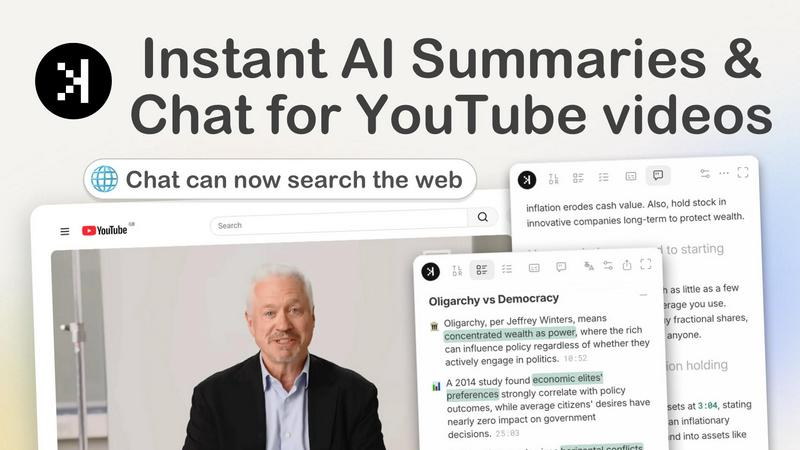
SkipBait is a Chrome extension that instantly summarizes YouTube videos and lets you chat with AI for web-grounded answers, not just transcripts.
About SkipBait
SkipBait is a Chrome extension designed to transform how you interact with YouTube videos. Instead of passively watching long-form content, you can instantly get AI-powered summaries, honest titles, and actionable insights without leaving the YouTube page. The core idea is simple: save hours of your time by getting the key takeaways from any video in seconds. Whether you are a student turning a lecture into study notes, a researcher screening multiple documentaries, or a professional keeping up with industry podcasts, SkipBait helps you move from watching to actually learning and acting. The tool provides a TLDR (too long; didn't read) summary, a topic-by-topic breakdown with timestamps, and a list of actionable recommendations tied to specific moments in the video. One standout feature is the AI chat, which not only answers questions based on the transcript but also searches the web to give you grounded, accurate answers. You can also get transcripts and summaries translated into over 20 languages, making it a versatile tool for a global audience. SkipBait is free to start with a daily quota, and it works on any Chromium-based browser like Chrome, Brave, Edge, and Arc. It is built for lifelong learners who want more than just passive consumption.
Features of SkipBait
Honest Title and TLDR
Get an honest, no-clickbait title and a one-sentence summary that tells you exactly what the video is about. This feature helps you quickly decide if a video is worth your time, saving you from misleading titles or long intros. You can glance at the TLDR and know the core message in seconds, making it perfect for scanning multiple videos in a row.
AI Breakdown with Timestamps
This feature provides a topic-by-topic breakdown of the entire video, with each point linked to an exact timestamp. You can jump directly to the most relevant sections without scrubbing through hours of content. It is especially useful for long lectures, podcasts, or tutorials where you only need specific parts. The breakdown is accurate and generated in seconds, turning a one-hour video into a scannable outline.
AI Chat with Web Search
The AI chat goes beyond simple transcript search. You can ask follow-up questions or drop outline points into the chat, and the AI will search the web to find you grounded answers. This means you get responses based on both the video content and live online sources, reducing hallucinations and giving you more reliable information. It is like having a research assistant that watches the video with you and then looks up facts in real time.
Actionable Insights with Timestamps
Every summary includes a list of recommendations you can act on, each tied to a specific timestamp and a quote from the video. This turns passive watching into active learning. For example, if a speaker suggests a productivity technique, SkipBait will extract that as an actionable to-do, complete with the exact moment they said it and a direct quote. You can then implement these insights immediately without rewatching.
Use Cases of SkipBait
Students Turning Lectures into Notes
Students can use SkipBait to instantly summarize long lecture videos into structured notes. The AI breakdown with timestamps allows them to jump to key concepts, and the transcript can be downloaded or translated. This saves hours of manual note-taking and helps them focus on understanding rather than transcribing. They can also export the summary as a PDF for study sessions.
Researchers Screening Documentaries and Videos
Researchers often need to review multiple long-form videos to find relevant information. SkipBait lets them get a TLDR and topic breakdown for each video in seconds, so they can quickly decide which ones are worth watching in full. The AI chat with web search also helps them verify facts or find additional sources without leaving the extension.
Professionals Keeping Up with Industry Podcasts
Professionals can stay updated on industry trends by summarizing podcasts and conference talks. The actionable insights feature extracts key recommendations and to-dos, which can be directly applied to their work. They can also translate summaries into their preferred language, making global content accessible. This turns hours of listening into a few minutes of scanning.
Lifelong Learners Seeking Answers Beyond the Video
For curious learners who want to dive deeper, SkipBait’s AI chat with web search is a game-changer. They can ask questions that go beyond the transcript, like "What are the latest studies on this topic?" and get web-sourced answers. This encourages active engagement and discovery, turning a single video into a springboard for broader learning.
Frequently Asked Questions
What is SkipBait?
SkipBait is a Chrome extension that generates AI summaries, transcripts, and allows you to chat with YouTube videos. The AI chat includes web search, so answers are based on both the video content and online sources, not just the transcript alone. It is designed to save you time and help you engage more deeply with video content.
Is SkipBait free to use?
Yes, the free tier includes 2 AI summary bundles daily, unlimited transcripts, and a monthly quota of chat messages and translations. This is enough for regular users, but heavy users may want to check for future premium plans. You can start using it immediately without any payment.
How do I start using SkipBait?
Install SkipBait from the Chrome Web Store, then visit any YouTube video page. The extension will automatically appear, allowing you to generate summaries, get transcripts, and chat with the video. It works on any Chromium-based browser like Chrome, Brave, Edge, and Arc.
Does SkipBait work on long YouTube videos?
Yes, as long as the video has usable transcript data. SkipBait works on long-form content like podcasts, lectures, and tutorials. Live streams or videos without transcripts may not be supported. Most standard YouTube videos with captions will work perfectly.
Pricing of SkipBait
SkipBait is currently free to use. The free tier includes 2 AI summary bundles per day, unlimited transcripts, and a monthly quota for chat messages and translations. There is no mention of paid plans or premium tiers in the provided information, so you can start using the full features without any cost.
Explore more in this category:
Best Language & Translation AI tools
Best Personal Development AI tools
Similar to SkipBait

002call
Call 190+ countries from your browser, with no SIM card, no app, and no contract. Cheap international calls start at $0.02 a minute, and your first mi

NexiaTools
NexiaTools is an all-in-one AI platform with 86+ micro-tools for writing, marketing and everyday business tasks. Free to try.

TextFromAudio
Turn any audio or video recording into editable text, free.

Hue & Shape
Find your face shape, color season and skin undertone from one selfie, measured in your browser.

Speakeroo
Free AI speaking coach. Speak out loud in your browser and get instant scored feedback on pronunciation, fluency, grammar, vocabulary and confidence.

ExpressAI by Express Translate
AI document translation with optional professional review and a signed Certificate of Accuracy.

AlterHunt
AlterHunt is a curated directory of AI alternatives where you can find the best alternatives to popular tools like Higgsfield and Cursor.

Invoiceize
Free invoice generator with live previews, PDF export and optional AI-assisted Scan & fill.