

Square Face Generator
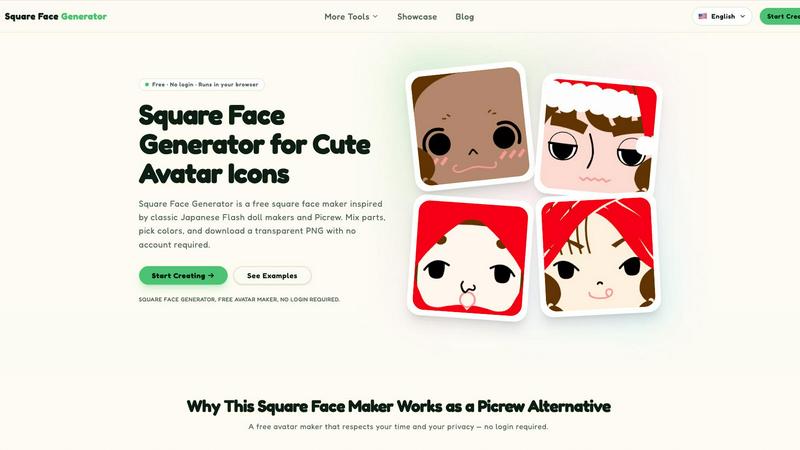
Square Face Generator is a free browser-based tool for creating cute avatar icons with mix-and-match parts and instant transparent PNG downloads.
About Square Face Generator
Square Face Generator is a free, browser-based avatar maker that specializes in creating charming square-shaped character faces. Inspired by classic Japanese Flash doll makers and the popular Picrew platform, this tool puts the power of creative expression directly into your hands without any barriers like sign-ups, logins, or payments. The core experience revolves around mixing and matching parts from 12 distinct categories, including skin tones, bangs, side hair, eyes, nose, mouth, brows, lashes, blush, glasses, hats, and outfits. With over 200 individual pieces to choose from, you can assemble millions of unique combinations to create a personalized square face avatar that truly feels like your own.
What makes Square Face Generator stand out is its commitment to privacy and simplicity. Everything renders locally in your browser, meaning none of your creations or data ever leaves your device. There are no servers processing your images, no accounts tracking your activity, and no hidden data collection. The tool is also fully responsive and touch-friendly, working seamlessly across desktop computers, tablets, and smartphones. Whether you are a casual user looking for a new social media profile picture, a game developer needing quick placeholder portraits, or a community organizer wanting unified yet personalized icons for your group, Square Face Generator delivers a polished, hassle-free experience. It combines the nostalgic charm of early 2000s avatar creators with modern web technology, all wrapped in a friendly, approachable interface that anyone can use immediately.
Features of Square Face Generator
Massive Customization Library
Dive into a treasure trove of over 200 individual parts spread across 12 comprehensive categories. From various skin tones and hairstyles to expressive eyes, noses, mouths, eyebrows, and eyelashes, every detail of your square face avatar can be tailored. You can also add accessories like glasses, hats, blush, and complete outfits, giving you the power to create everything from a casual everyday look to a fantastical character design. The sheer volume of combinations, exceeding one million, ensures that your avatar will be uniquely yours.
Live Preview and Instant Feedback
As you browse through different parts and colors, your square face avatar updates in real-time right before your eyes. There is no need to click "apply" or navigate away from your current selection to see how a change looks. This instant feedback loop makes the creative process feel fluid, playful, and highly satisfying. You can experiment freely, mixing unexpected combinations and seeing the results immediately, which encourages exploration and helps you discover your perfect look without any friction.
Full Color Customization with HEX Support
Beyond simply choosing pre-colored parts, Square Face Generator gives you granular control over the palette of your avatar. A built-in color picker allows you to fine-tune skin tones, hair colors, and outfit shades to match your exact vision. For power users and those seeking precise color matching, the tool also supports HEX color code input. This feature is perfect for creating avatars that align with brand guidelines, team colors, or specific aesthetic themes you have in mind.
One-Click Transparent PNG Export
When you have perfected your square face creation, saving it is incredibly simple and fast. With a single click, the tool exports your avatar as a transparent 256x256 pixel PNG file. This standard size is ideal for virtually any avatar slot on social media platforms, forums, game profiles, and messaging apps. The transparent background means your avatar will sit cleanly on any background color or image without an ugly white box around it, making it ready for immediate use.
Use Cases of Square Face Generator
Social Media Profile Pictures
Refresh your presence on platforms like Discord, X (formerly Twitter), Instagram, and TikTok with a custom square face avatar that stands out from the crowd. Instead of using a generic photo or a common meme, you can craft a unique digital persona that reflects your personality, interests, or mood. The 256x256 pixel export size is perfectly optimized for profile picture slots, and the transparent background ensures your new icon looks professional and clean on any theme or layout.
Game Development Placeholder Art
Indie game developers and solo creators often need quick, charming character portraits for NPCs, player avatars, or menu screens during early development. Square Face Generator provides an excellent solution for creating placeholder art that is visually appealing and consistent in style. You can rapidly generate a variety of distinct character faces, saving valuable time and resources that would otherwise be spent on more complex art creation. These can later be replaced with final assets or even used as inspiration for the final character designs.
Team and Community Branding
Build a unified visual identity for your online guild, club, class, or professional team. Because the tool uses a consistent square face style, every member can create their own unique avatar while still fitting into a cohesive group aesthetic. This is perfect for Discord servers, Slack workspaces, or community forums where you want members to feel like part of a collective without sacrificing individual expression. The no-login requirement makes it easy for everyone to participate instantly.
Creative and Educational Projects
Teachers, students, and content creators can leverage Square Face Generator for a wide range of creative projects. Use the avatars in slideshow presentations to represent different historical figures or characters in a story. Incorporate them into posters, stickers, zines, or school assignments to add a personal, illustrated touch. Bloggers and social media managers can create a consistent character mascot for their brand, building recognition and a friendly connection with their audience through a recurring, lovable square face.
Frequently Asked Questions
Is it really free?
Yes, Square Face Generator is completely free to use. There are no hidden costs, no premium parts locked behind a paywall, and no subscription fees. Every single part, color option, and the download feature is available to all users without any restrictions. You will never encounter a watermark on your exported images, and you do not need to create an account or provide any personal information to access the full functionality of the tool.
What size are the exports?
When you save your square face avatar, it is exported as a 256x256 pixel PNG image. This size is a standard and widely accepted dimension for profile pictures across most social media platforms, forums, and messaging applications. The image also includes a transparent background, which means it will blend seamlessly into any design or interface without a distracting white rectangle surrounding your avatar.
Can I use my icon commercially?
The avatars you create with Square Face Generator are yours to use as you see fit. This includes using them for commercial purposes, such as in game development, branding for a business, or as part of a product you sell. However, you cannot resell the tool itself or claim ownership of the underlying art assets. For specific legal details, it is always a good idea to review the official Terms of Service provided on the website.
Do I need to install anything?
No installation is required whatsoever. Square Face Generator runs entirely in your web browser. It is built with modern web technologies, including Ruffle for compatibility with the original Flash-based content, meaning everything processes locally on your device. There are no plugins to download, no software to install, and no files to manage. Simply open the website in your browser, and you can start creating immediately.
Does it work on mobile?
Absolutely. The tool is fully responsive and has been designed with touch-friendly controls. It works equally well on desktop computers, tablets, and smartphones. Whether you are using a mouse and keyboard or tapping and swiping on a touchscreen, the interface adapts to your device for a smooth and intuitive experience. You can create and download your square face avatar from anywhere, at any time.
Is there a limit on how many I can create?
There is no limit on the number of avatars you can create. You can mix, match, and experiment as much as you like. Since everything runs in your browser and no accounts are required, you are free to generate hundreds or even thousands of different square face combinations without any restrictions. Each creation can be saved as a separate PNG file, giving you an endless supply of unique avatars.
How is this different from Picrew?
While Square Face Generator is inspired by the Picrew platform and classic Japanese doll makers, it offers several key differences. First, it is completely free with no parts locked behind any system. Second, it requires absolutely no login or account creation, offering maximum privacy and convenience. Third, the tool is focused exclusively on a consistent square face style, providing a streamlined and cohesive creative experience. Finally, all processing happens locally in your browser, ensuring your data and creations never leave your device.
Explore more in this category:
Similar to Square Face Generator

Enhance My Photo
Online AI photo enhancer that sharpens portraits, products, scenery, pets and text images and exports JPEG/PNG/WebP without watermarks.

Kamero
AI event photo sharing for photographers. Guests take a selfie and face recognition instantly finds every photo they appear in from weddings & events.

Hotel Lobby AI
Hotel Lobby AI turns two portraits into a duet video in an orange recording booth with motion, lip-sync, and audio.

Tiny Desk AI Video Maker
Turn three photos into a vertical Tiny Desk-style concert video with original sound.

ZombieTrend AI
ZombieTrend AI turns two photos into a cinematic zombie love story video with sound, no watermark, and a free preview.

WhiteBackground.app
Make photo backgrounds pure white with private, free browser processing.

Rhinobird
AI video ads, UGC-style videos, and product visuals for cross-border sellers and e-commerce brands.

GenX
All-in-one AI workspace to generate images, videos, and audio with multiple leading AI models.