

Subclip App
Subclip is an AI video editing platform that automates transcription, captioning, and dubbing, saving creators time and enhancing global reach.
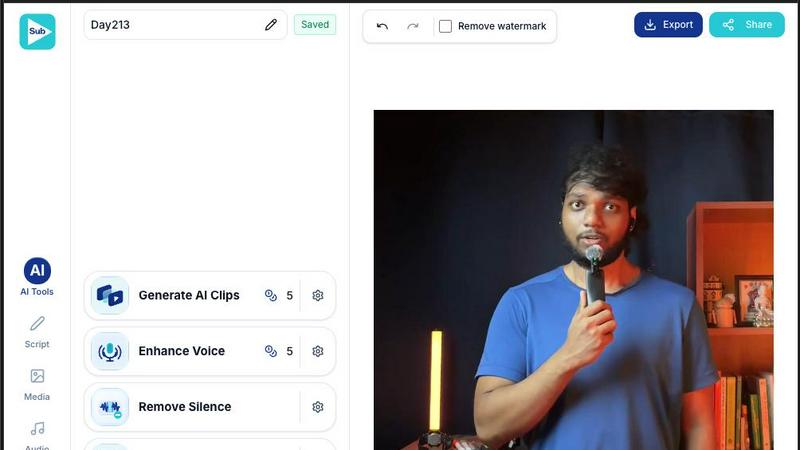
About Subclip App
Subclip is an innovative AI-powered, browser-based video editor tailored for modern content creators who demand speed without compromising on quality. It seamlessly integrates the fragmented workflow of using multiple tools—like transcription software, caption editors, dubbing platforms, and clip editors—into a single, user-friendly application that is accessible directly from your browser, eliminating the need for cumbersome downloads. Subclip is designed for a wide range of users, including content creators, podcasters, educators, coaches, vloggers, and freelancers, providing them with the tools to enhance their video production process. By automating time-consuming tasks, Subclip allows creators to focus on what they do best: crafting compelling content that resonates with their audience.
Features of Subclip App
AI-Powered Video Clipping
Subclip's AI engine automatically identifies and extracts the most engaging moments from long-form videos in mere seconds. This feature is ideal for creating YouTube highlights, TikTok clips, and social media snippets, ensuring that users can quickly produce captivating content without the manual effort.
Unlimited Transcription & Animated Captions
With Subclip, users can generate accurate transcripts of their videos and transform them into beautifully animated, customizable subtitles. This feature enhances accessibility and viewer engagement, allowing creators to cater to diverse audiences effectively.
AI Dubbing & Translation (21+ Languages)
Subclip offers high-quality voice dubbing that preserves the natural intonation and emotion of the original audio, enabling creators to localize their content for global audiences. This feature supports over 21 languages, making it easier than ever to reach new markets without the need for expensive voice actors.
Prompt-Based Motion Graphics
Create stunning animations, lower thirds, and visual effects effortlessly using simple text prompts. This feature empowers users to add a professional touch to their videos, enhancing visual storytelling without the need for extensive graphic design skills.
Use Cases of Subclip App
For Content Creators
Content creators can leverage Subclip to quickly clip long-form videos, enhancing their viewership without the usual editing grind. By producing engaging snippets, they can attract more followers and increase audience interaction across platforms.
For Podcasters
Podcasters can use Subclip to dub their recordings into multiple languages, ensuring their content reaches a wider audience. This feature allows them to maintain their voice’s authenticity while breaking language barriers, thus expanding their listener base.
For Coaches
Coaches can create multilingual training videos or courses, allowing students from different backgrounds to benefit from their expertise. Subclip’s AI dubbing capability means they can easily share their knowledge globally, making education more accessible.
For Agencies & Freelancers
Agencies and freelancers can significantly boost their output with Subclip's unlimited transcription and export capabilities. This allows them to manage multiple client projects efficiently while maintaining high-quality standards in video production.
Frequently Asked Questions
How does Subclip's AI clipping feature work?
Subclip's AI clipping feature scans your video for high-energy segments, punchlines, and key emotional shifts to automatically identify the most engaging moments, allowing you to create impactful clips with minimal effort.
Can I collaborate with my team on Subclip?
Yes, Subclip provides a collaborative workspace where you can share projects with your team, collect feedback, and work together on video edits in real-time, streamlining the production process.
Is there a limit to the number of captions I can generate?
No, Subclip offers unlimited transcription and caption generation, allowing you to create as many subtitles as you need without worrying about additional costs or limitations.
What platforms can I export my videos to?
Subclip allows for instant export to various social media platforms, including YouTube and X (formerly Twitter), with plans to support additional platforms in the future. This ensures your content can be published and shared easily across the web.
Explore more in this category:
Similar to Subclip App

TestNeo
TestNeo.ai is an AI-native engineering and release assurance platform that helps teams automate web and API testing using natural language.


Artcraft AI
AI image and video studio in your browser: generate and edit images, turn photos into videos, edit clips by sentence.

FreeVideoGenerator
Free AI video generator that turns text prompts and photos into video clips using Sora 2, Veo 3.1, Wan and more. Free starter credits.

ViewMax Studio
AI video generator that turns one prompt into shorts, UGC-style ads and faceless videos, with script, voiceover and captions.

Dola AI
Dola AI video generator online: make Seedance 2.5 videos from text or a photo in your browser. No app, no watermark, free credits.

Gas Station Dance AI
Turn your photos into a viral gas station dance video with AI

ToonBee AI
ToonBee AI turns a script or a one-line idea into a narrated cartoon video, keeping the same character in every scene. 10+ styles, 16:9 or 9:16.