

TabMate - Browser Research Assistant
TabMate is an AI browser assistant that helps you ask questions, capture notes, and run smart tasks without leaving your current tab.
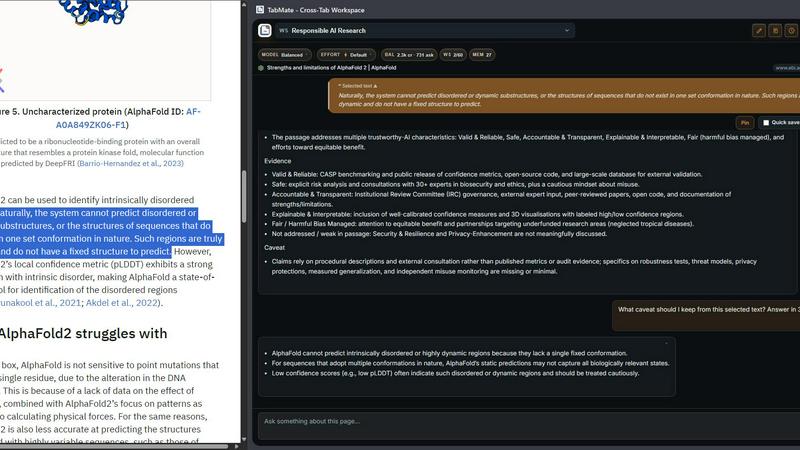
About TabMate - Browser Research Assistant
If you have ever found yourself lost in a sea of browser tabs, copying and pasting text from one site into a chat tool, then repeating the same process on the next page, you know how frustrating online research can be. You spend more time managing context than actually thinking about what you have found. TabMate is a browser extension designed to solve this exact problem. It lives in your browser as a side panel, giving you a dedicated AI-powered workspace that stays with you as you browse. Instead of jumping between tabs, notes, and separate AI chat tools, TabMate keeps everything connected in one place. You can ask questions about the page you are currently viewing, save useful excerpts and notes, and carry the right context forward as you move from one site to another. TabMate also features an agent mode that can perform multi-step tasks on your behalf, like clicking buttons and filling forms, with built-in approval gates before anything sensitive happens. This tool is built for researchers, students, analysts, writers, and anyone who spends time gathering information online. Its main value proposition is simple: stop moving context between tools and keep your research work connected, organized, and instantly recallable across sessions.
Features of TabMate - Browser Research Assistant
Ask in Context
Instead of copying text from a webpage and pasting it into a separate chat tool to ask a question, you can simply ask TabMate about the page you are currently viewing. The AI assistant understands the context of the page, including any text you have selected, so you can get answers, summaries, or explanations without ever leaving your browser. This saves time and keeps your focus on the research at hand.
Capture What Matters
When you come across a useful excerpt, an interesting fact, or a thought you want to remember, TabMate lets you save it instantly as a note or a saved excerpt. You can also save follow-up questions for later. These captures are stored inside your workspace, complete with their source, so you never lose track of why something was important or where it came from. This feature turns your browsing session into a structured research notebook.
Dynamic Workspace Memory
TabMate remembers the research you choose to keep. It does not just store your saves in a list; it intelligently suggests things worth keeping during your session, like a limitation mentioned on a page or a comparison that could become a note. Later, when you ask a new question, TabMate brings back relevant saved context automatically. This means you do not have to rebuild your research from scratch every time you open a new session.
Agent Mode for Multi-Step Tasks
For more complex workflows, TabMate includes an agent mode that can interact with webpages automatically. This agent can click links, fill out forms, and navigate through multi-step processes on your behalf. Importantly, it includes built-in approval gates that pause before performing any sensitive action, so you stay in control. This feature is perfect for repetitive tasks like submitting reviews, signing up for newsletters, or comparing products across multiple sites.
Use Cases of TabMate - Browser Research Assistant
Academic Research and Literature Review
A graduate student is researching a specific topic and needs to read through multiple papers, articles, and conference proceedings. With TabMate, they can ask questions about each paper as they read it, save key excerpts and citations, and keep notes on their own analysis. As they move to the next paper, TabMate remembers what they have saved and can bring back relevant context when they ask a comparative question. This keeps the entire literature review organized in one place.
Competitive Analysis for Business
A product manager needs to gather information about competitors, including pricing, features, and customer reviews. They browse multiple competitor websites, saving pricing notes and feature comparisons directly in TabMate. The AI assistant can answer questions like "What is the main limitation of this competitor's product?" based on the current page. Later, when writing a report, they can recall all saved context instantly, avoiding the need to revisit every site again.
Content Creation and Fact-Checking
A writer is creating an article about a complex topic and needs to verify facts from multiple sources. They use TabMate to ask questions about each source, save verified facts as notes, and keep track of conflicting information. As they move between pages, the AI assistant helps them synthesize the information by bringing up relevant saves. This ensures the final article is accurate and well-sourced without the writer having to manage a dozen different documents.
Online Course and Learning Management
A lifelong learner is taking an online course and needs to research additional materials. They watch a lecture, then open related articles and research papers in their browser. With TabMate, they can save key concepts from the lecture, ask clarifying questions about a research paper, and save follow-up questions for their study group. The workspace keeps all course-related research separate from other projects, making it easy to review before an exam.
Frequently Asked Questions
How does TabMate keep my research organized across different projects?
TabMate supports workspaces that let you separate your research by project or topic. You can create a workspace for a specific research paper, a market analysis, or a course. All saves, notes, and questions within that workspace stay isolated from others. This means you can work on multiple projects simultaneously without mixing up your context.
Is my data safe when using the agent mode for automated tasks?
Yes. TabMate is built with a strong focus on trust and safety. The agent mode includes built-in approval gates that pause before performing any sensitive action, such as submitting a form or clicking a payment button. You always have the final say before the agent proceeds. This ensures you remain in control of your browsing experience at all times.
Can I use TabMate with any website?
TabMate works as a browser extension and is designed to function on most websites. The AI assistant can analyze the content of any page you are viewing, and the agent mode can interact with standard web elements like buttons, links, and forms. However, some complex web applications or pages with heavy security restrictions may have limited functionality.
What happens to my saved notes and excerpts if I close my browser?
Your saved notes, excerpts, and workspace data are stored securely and persist across browser sessions. When you come back later, all your research is still there, organized by workspace. You do not have to start from scratch or remember what you saved. TabMate also surfaces relevant saved context automatically when you ask new questions, making your research truly cumulative.
Pricing of TabMate - Browser Research Assistant
TabMate offers a free plan that lets you add the extension to Chrome and start using the core features, including asking questions about the current page, saving notes and excerpts, and using the dynamic workspace memory. There are also paid plans available for users who need advanced features like unlimited agent mode actions, larger workspace storage, and priority support. For the most current pricing details, please visit the Plans page on the TabMate website. No credit card is required to start with the free plan.
Explore more in this category:
Best Productivity & Management AI tools
Similar to TabMate - Browser Research Assistant

Klype AI
Writes LinkedIn and social posts in your own measured voice and checks every draft for AI tells and invented claims.

VoiceVibe
Talk to your computer: dictate, rewrite, ask about your screen, launch AI agents.

imgtxtapp.laviolab.com
imgtxtapp.laviolab.com is a Telegram-based image-to-text converter that turns photos, screenshots, scanned documents into editable text

Booksmaker.ai
Books Maker AI is the AI-powered platform that turns your idea into a professional book.

Toolara Music
Describe a song in plain text and get a complete track — vocals or instrumental, custom lyrics, up to 120 seconds, MP3 download

AFFLIGO
AFFLIGO is a free online toolkit for everyday file tasks. Easily edit PDFs, compress images, convert file formats, and get things done.

LinkIntel
MCP server giving your AI assistant your X post results and X’s ranking weights, with sources.

SafePDF
Free online PDF tools to merge, split, compress, convert, sign, and edit PDFs privately in your browser. No signup required.