

Transcrisper
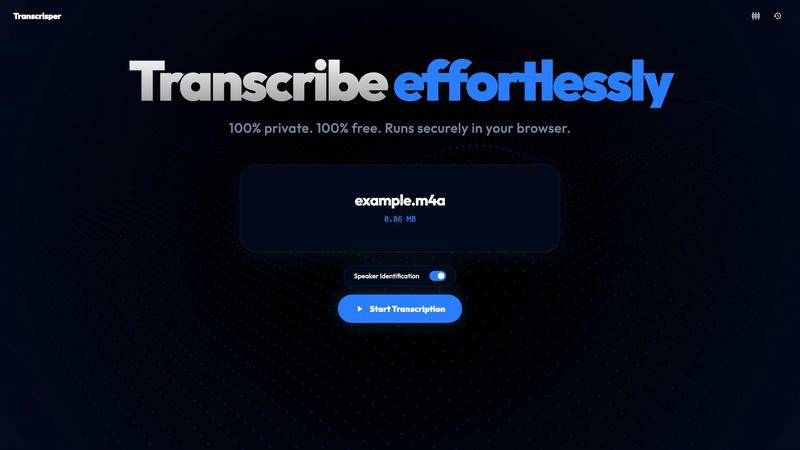
Transcrisper is a free, secure tool that transcribes audio and video files directly in your browser, ensuring complete privacy and accuracy.
About Transcrisper
Transcrisper is an innovative transcription tool that prioritizes your privacy while delivering high-speed, accurate transcriptions right within your browser. Unlike traditional transcription services that often require monthly fees and store your data on cloud servers, Transcrisper processes all audio files locally. This means your sensitive interviews, meetings, and memos are never uploaded to third-party servers, ensuring complete confidentiality. The tool is designed for anyone who needs a reliable transcription solution without the hassle of software installation or account setup. With features like automatic speaker identification and support for various audio formats, Transcrisper is ideal for journalists, healthcare professionals, and privacy-conscious users who demand precision and security.
Features of Transcrisper
100% Private Processing
Transcrisper guarantees your data's privacy by processing all audio files directly in your browser. There are no server uploads, ensuring that sensitive information remains secure and confidential.
Automatic Speaker Identification
The tool utilizes an advanced diarization engine that can distinguish between different speakers in your audio. This feature is invaluable for interviews, panel discussions, and any audio with overlapping speech, providing clarity and context to your transcriptions.
High-Speed Transcription
Transcrisper leverages state-of-the-art AI models that run efficiently in your browser, allowing for rapid transcription of audio files without sacrificing accuracy. This means you can get results quickly, making it perfect for tight deadlines.
Broad Format Support
Transcrisper supports a wide range of audio file formats, including MP4, M4A, MOV, MKV, WEBM, WAV, OGG, FLAC, and MP3. This flexibility ensures that you can transcribe virtually any audio file without compatibility issues.
Use Cases of Transcrisper
Journalistic Interviews
Journalists can use Transcrisper to transcribe interviews quickly and accurately, maintaining the integrity of sensitive conversations without compromising privacy.
Medical Transcriptions
Healthcare professionals can benefit from Transcrisper by transcribing patient interviews or consultations securely, ensuring sensitive patient data remains confidential and compliant with regulations.
Academic Research
Researchers can transcribe focus groups or discussions, allowing for easier analysis of qualitative data. The automatic speaker identification helps in distinguishing between multiple participants effortlessly.
Business Meetings
Transcrisper is an excellent tool for professionals who need to transcribe meetings, brainstorming sessions, or discussions. The ability to keep all data local ensures that proprietary information stays secure.
Frequently Asked Questions
How does Transcrisper ensure my data is secure?
Transcrisper processes all audio files entirely within your browser, meaning your data never leaves your device. This eliminates the risk associated with uploading sensitive information to cloud servers.
What audio formats does Transcrisper support?
Transcrisper supports a wide array of audio formats, including MP4, M4A, MOV, MKV, WEBM, WAV, OGG, FLAC, and MP3, making it versatile for various transcription needs.
Is there any software installation required?
No, Transcrisper runs directly in your browser without requiring any software installation or account setup. Just drop your media file, and you're ready to transcribe.
Can Transcrisper handle overlapping speech?
Yes, Transcrisper uses an advanced diarization engine that can analyze voice biometrics to effectively group audio segments by speaker, even handling overlapping speech with ease.
Explore more in this category:
Similar to Transcrisper

@fuck.it - email with attitude
Private email. Pure. Secure. Exclusive. No ads, no tracking, no data selling. GDPR compliant, EU-hosted.

xfiles
Free PDF, image and audio tools that process your files locally in your browser. No account or added watermarks.

this+that
An AI agent that reads every email and chat message your team gets, turns requests into tasks, and does what they ask.

Toolbit.ai
Describe your task and Toolbit finds the right AI tool. Compare tools side by side, see top rankings, and follow daily AI news and guides.


RunMyWealth
Smart, private financial calculators for mortgage, FIRE, and debt. 100% free, runs locally in your browser, no signup required.

Nutrition Fact Label
Free FDA-compliant nutrition facts label generator with recipe-to-label nutrition, allergen checks and 152 label formats for 114 countries.