

Upsampler
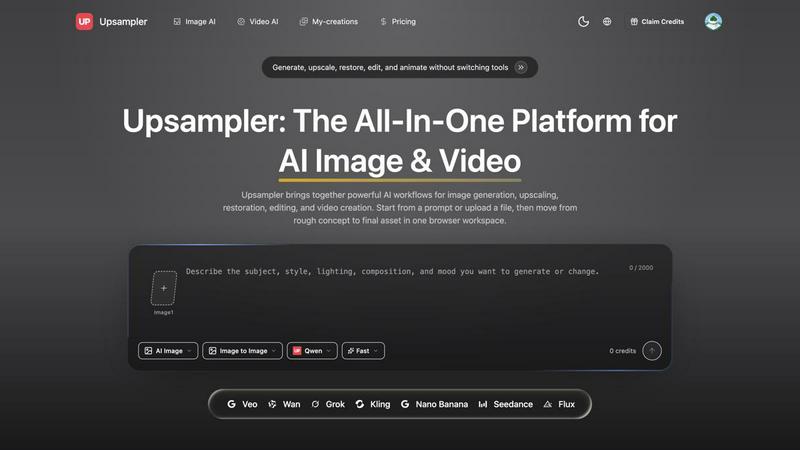
Upsampler is a free all-in-one platform where you can generate, upscale, restore, edit, and animate both images and videos without switching tools.
About Upsampler
Upsampler is a free, all-in-one browser-based platform that combines AI image generation and AI video generation into one seamless creative workspace. Designed for creators, marketers, and product teams, Upsampler lets you generate stunning visuals from text prompts, upscale and restore low-resolution images, remove backgrounds, and animate still frames into short videos without ever switching tools. Whether you need a polished product photo, a social media clip, or a campaign-ready asset, Upsampler provides a practical, cost-free solution. The platform brings together powerful AI models like Qwen, Veo, Wan, Grok, Kling, Flux, and more, giving you flexibility for every project. You can start from a simple text prompt or upload your own reference image, then move from rough concept to final deliverable in just a few clicks. Upsampler also includes essential editing features like background removal, video trimming, and compression, making it a truly complete toolkit. It is built for speed and simplicity, helping teams produce publish-ready outputs without needing multiple subscriptions or technical expertise. With its friendly interface and zero-cost entry, Upsampler empowers anyone to create professional-grade images and videos directly in their browser.
Features of Upsampler
Free AI Image Generator
Turn text prompts into polished, high-quality visuals instantly using multiple AI models. You can generate ads, thumbnails, portraits, product scenes, and more from scratch. The platform supports different styles and speeds, letting you choose between fast generation or higher detail. You can also use image-to-image workflows to refine existing visuals with prompt-driven control, making it easy to replace backgrounds, adjust styling, or improve composition without rebuilding the image.
Free AI Video Generator
Create short cinematic clips from text prompts or reference images for ads, teasers, demos, and social content. Upsampler’s video generator supports multiple AI engines, giving you creative flexibility. You can animate product shots, character art, portraits, and keyframes while preserving the original composition. The tool is perfect for turning still concepts into motion assets that capture attention on social feeds, landing pages, or video campaigns.
AI Image Upscaler to 4K
Enhance soft, compressed, or low-resolution images before they go into campaigns, listings, or video workflows. The upscaler sharpens detail, reduces artifacts, and prepares older or cropped visuals for modern channels. This feature is ideal for restoring clarity in source assets that are almost right but not usable yet, ensuring your final outputs look crisp and professional across all platforms.
Background Removal and Cleanup
Remove distractions, isolate subjects, and prepare cleaner assets for ecommerce, thumbnails, and ads. The cleanup tool helps you fix distracting artifacts, improve consistency, and recover important details from imperfect source images. Combined with prompt-driven editing, you can easily replace backgrounds or refine composition without starting over, saving time and effort during asset production.
Use Cases of Upsampler
Generate On-Brand Image Concepts
Create ads, thumbnails, portraits, covers, and product scenes from text prompts or reference images. Marketers and designers can quickly explore visual directions without waiting for photoshoots or manual design. The platform’s multiple AI models allow you to experiment with different styles and compositions, ensuring your final concept aligns with brand guidelines. This use case is perfect for brainstorming sessions, campaign planning, or rapid prototyping of visual assets.
Upscale Low-Resolution Source Assets
Prepare older, cropped, or compressed visuals for modern channels before they move into production. If you have a small product photo, a vintage illustration, or a compressed social media image, Upsampler’s upscaler can enhance it to 4K quality. This is especially useful for ecommerce listings, print materials, or video projects where detail matters. You can recover lost sharpness and reduce pixelation without needing expensive software or design skills.
Restore and Clean Important Details
Recover clarity, improve consistency, and fix distracting artifacts when the source image is almost right but not usable yet. For example, if a product shot has a messy background or a portrait has unwanted reflections, the cleanup tools let you isolate the subject and remove imperfections. This use case is valuable for product teams preparing final assets for launch, or for creators polishing personal projects before sharing online.
Turn Strong Stills into Motion Assets
Animate product shots, character art, portraits, and keyframes into short videos for launches and storytelling. Start with a still image from your library or one generated in Upsampler, then use the image-to-video workflow to add subtle motion. This is ideal for social media ads, product teasers, or visual stories that need movement to grab attention. The animation preserves the original composition, so your brand’s visual identity stays consistent.
Frequently Asked Questions
Is Upsampler really free to use?
Yes, Upsampler is completely free to use for both AI image generation and AI video generation. You can generate, upscale, restore, edit, and animate without paying anything. The platform offers free credits to get started, and you can claim additional credits as needed. There are no hidden fees or subscription requirements for basic use, making it accessible for creators, marketers, and product teams of all sizes.
What AI models does Upsampler support?
Upsampler supports a wide range of popular AI models including Qwen, Veo, Wan, Grok, Kling, Flux, Seedance, and Nano Banana. This variety gives you flexibility to choose the best model for your specific project, whether you need fast generation, high detail, or a particular artistic style. You can switch between models easily within the same workspace to compare results and find the perfect output.
Can I use my own images with Upsampler?
Absolutely. Upsampler lets you start from either a text prompt or an uploaded image. You can use your own photos, product shots, portraits, or illustrations as reference images for image-to-image editing, upscaling, restoration, or animation. This makes it easy to maintain brand consistency and work with existing assets while leveraging AI for enhancement and creative expansion.
What kind of videos can I create with Upsampler?
You can create short cinematic clips for ads, teasers, demos, social content, and visual stories. The video generator works from text prompts or reference images, and you can animate product shots, character art, portraits, and keyframes. The output is designed for social media, product pages, campaign review, or team handoff. You can also trim and compress your videos directly in the browser before exporting.
Explore more in this category:
Similar to Upsampler


ImageGPT
ImageGPT is an all-in-one AI creative platform for generating, editing and transforming images and videos using AI.


Adobe Firefly Background Remover
Strip backgrounds from photos with one click.


Rankbox
Get cited by ChatGPT and ranked on Google, on autopilot.

AI Album Cover Maker
Create release-ready album covers from a prompt or photo. Generate, refine, and export art for singles, EPs, mixtapes, and playlists.

shardstitch
ShardStitch helps recover and hand off AI coding work, with a visual website editor and SEO Guardrails MCP in development.