

Very Good Calendar Sync
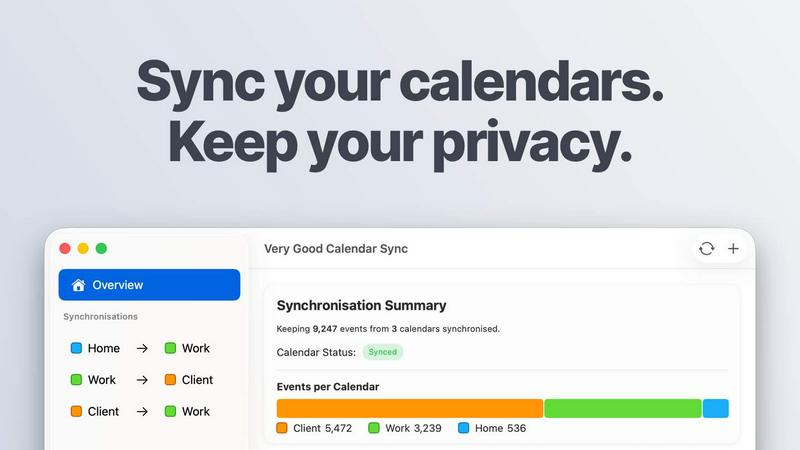
Very Good Calendar Sync quietly keeps work and personal calendars aligned on your Mac without linking accounts or exposing your data.
About Very Good Calendar Sync
Very Good Calendar Sync is a Mac-only application designed to solve one of the most frustrating modern problems: keeping multiple calendars perfectly aligned without sacrificing your privacy or sanity. If you juggle a work calendar, a personal calendar, and client calendars, you know the pain of double-bookings, manual cross-checking, and missed appointments. This app eliminates all of that by running quietly on your Mac, automatically synchronizing events between any calendars available in macOS Calendar.app. The core promise is simple: set it up once, and forget about it. The app monitors your calendars in the background and syncs changes instantly, so a new meeting on your work calendar appears on your personal calendar automatically. What makes Very Good Calendar Sync truly special is its commitment to privacy. Your calendar data never leaves your Mac. There are no servers to upload to, no third-party access, and no cloud storage involved. The app uses your Mac's native calendar access, so your Google, Microsoft, and Apple credentials stay safe under macOS' Internet Accounts. It is perfect for consultants managing client calendars, employees balancing work and personal schedules, freelancers juggling multiple projects, or anyone tired of calendar chaos. The app offers flexible filtering options, allowing you to choose specific weekdays, set daily hours, and decide exactly what event details to share. Your first sync is free, and the app is built by someone who got tired of double-bookings and third-party apps wanting access to their life.
Features of Very Good Calendar Sync
Clone or Redact Events
Share your availability without sharing your life. When synchronizing events, you have full control over what details are shared. You can clone events with full details, including the title, description, and location, so your other calendar shows the complete picture. Alternatively, you can redact events to show only that you are busy, keeping the title, description, and location completely private. This is perfect for protecting sensitive client meetings or personal appointments while still maintaining accurate availability.
Stays Out of the Way
Very Good Calendar Sync is designed to be invisible. It runs quietly in your Mac's menu bar, and after you set up your syncs once, you can truly forget about it. The app synchronizes automatically whenever your calendars change, so you never have to remember to manually update anything. There are no pop-ups, no reminders, and no complex interfaces to navigate daily. It simply works in the background, keeping your calendars aligned without interrupting your workflow.
Filter by Day and Time
You have granular control over exactly what gets synchronized. For each sync, you can choose to synchronize only weekdays, only weekends, or pick specific days of the week. You can also set a daily time range, for example only syncing events between 9 AM and 6 PM. This means your personal calendar won't be cluttered with late-night work events, and your work calendar won't show weekend social plans. Each synchronization gets its own rules, giving you complete flexibility.
No Accounts to Link and No Middleman
Your privacy is paramount. The app does not require you to create an account or link your Google, Microsoft, or Apple credentials on a third-party website. All your credentials stay safe under macOS' built-in Internet Accounts system. Furthermore, the app runs entirely on your Mac with no servers of its own. There is no data collection, no analytics on your calendar, and no transmission of your data externally. It is just your Mac talking directly to your calendars.
Use Cases of Very Good Calendar Sync
Consultants and Freelancers Managing Client Calendars
As a consultant or freelancer, you likely have multiple clients, each with their own calendar. Manually checking each one to find a free slot is inefficient and error-prone. Very Good Calendar Sync allows you to keep every client calendar in sync with your master schedule. A new meeting scheduled by one client automatically appears on your personal calendar, preventing double-bookings. You can also redact event details for client meetings, showing only your busy time without revealing sensitive project information.
Employees Balancing Work and Personal Schedules
Many employees have a work calendar managed by their company and a personal calendar for family and social events. Without synchronization, your team might schedule a meeting during your dentist appointment, or you might accidentally commit to a dinner party when you have a late work call. Very Good Calendar Sync seamlessly bridges these two worlds. Your personal appointments appear as busy time on your work calendar, and your work events show up on your personal calendar, ensuring you never get double-booked.
Agencies and Cross-Functional Teams
Agencies often have internal calendars for team collaboration and client-facing calendars for project management. Keeping these separate but aligned is a major challenge. Very Good Calendar Sync allows everyone on the team to see the same, real-time availability. Internal team meetings show up as busy on client calendars, and client deadlines are visible internally. This eliminates confusion, reduces scheduling friction, and ensures that everyone is working from the same set of facts.
Anyone with Multiple Calendars from Different Providers
If you use Google Calendar for personal events, Microsoft Outlook for work, and Apple iCloud for family sharing, you are familiar with the chaos of managing three separate schedules. Very Good Calendar Sync works with any calendar that shows up in macOS Calendar.app, including Google, Microsoft, and Apple iCloud. You can set up multiple synchronizations between any of these calendars, applying different filter rules to each one. This creates a unified view of your life without requiring you to abandon any of your preferred calendar services.
Frequently Asked Questions
Do you store any of my calendar data?
No, absolutely not. Very Good Calendar Sync runs entirely on your Mac. It has no servers of its own, and it does not collect, store, or transmit any of your calendar data. The app uses your Mac's native calendar access to read and write events directly. Your data never leaves your device, and there is no cloud storage involved. This is a core design principle of the application.
Which calendar providers are supported?
Very Good Calendar Sync supports any calendar that is available in macOS Calendar.app. This includes Google Calendar, Microsoft Outlook and Exchange, Apple iCloud, and any CalDAV account. If you can see it in your Mac's Calendar app, you can sync it with Very Good Calendar Sync. There is no extra setup or third-party access required.
Does it sync when my Mac is off or asleep?
No, the app can only synchronize your calendars when your Mac is powered on and awake. When your Mac is off or asleep, the app cannot run. However, as soon as you wake your Mac or turn it on, the app will automatically detect any changes that occurred while it was off and synchronize them. This ensures your calendars are always up to date as soon as you start working.
Is this app available for Windows or iOS?
Currently, Very Good Calendar Sync is a Mac-only application. It is built directly into macOS and works exclusively with the macOS Calendar.app. There are no versions available for Windows or iOS at this time. The app is designed to be a simple, powerful, and private solution for Mac users who need to manage multiple calendars.
Pricing of Very Good Calendar Sync
Very Good Calendar Sync offers a free tier and three paid plans, all of which include unlimited synchronizations, all calendar providers, and email support. The license is per user and covers all of your Macs.
The first synchronization between two calendars is completely free with no payment required. This allows you to try the app and see how it works before committing.
For users who need more than one sync, the paid plans are:
Monthly: GBP 1.99 per month. This is a flexible month-to-month subscription that you can cancel anytime.
Annual: GBP 19.99 per year. This is the best value plan, saving you over 15% compared to the monthly plan.
Lifetime: GBP 39.99 as a one-time payment. With this plan, you pay once and the app is yours forever, including all future updates.
Explore more in this category:
Similar to Very Good Calendar Sync

ColdCrow
AI cold email writer: turn one line about a prospect into personalized outreach with a deliverability score in seconds. Free trials, no credit card.

Ask Versa AI
AI verdicts for any two Amazon products, in seconds. Live specs plus real buyer reviews, scored 0-100, one clear winner. Free, no account.

Panzoe
Panzoe is an all-in-one AI platform for personal productivity, business automation, AI assistants, content creation, and custom AI solutions.

TryThatTool
Discover AI tools worth trying. Compare options, explore practical reviews, and build your own AI stack based on your goals and budget.

ROIpad
Stop losing enterprise deals to inferior products with better copy. Discover the exact messaging gaps your competitors left wide open.

JustTools
JustTools offers a growing collection of free online tools that run directly in your browser, with no sign-up and no uploads.


Novastart
Novastart brings apps and files onto an infinite canvas where people and AI agents can work together.