

VideoSnap
Convert and compress videos and images quickly, privately, and for free with VideoSnap, your all-in-one online media converter.
About VideoSnap
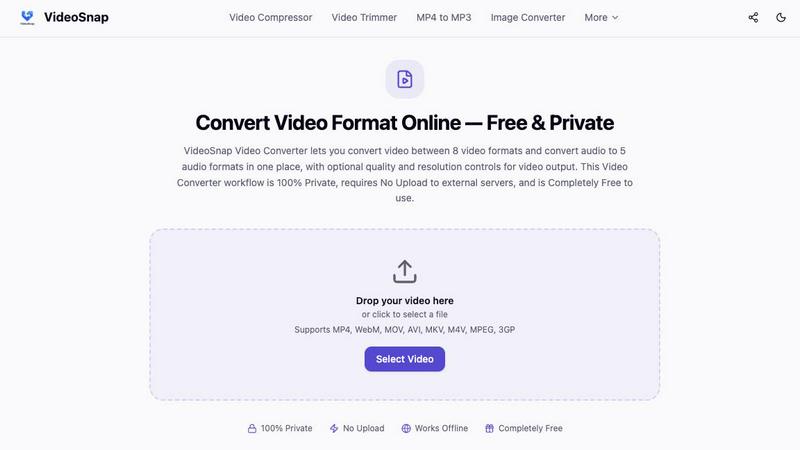
VideoSnap is a powerful online tool designed for effortless video and audio file processing. It prioritizes privacy and convenience by ensuring that all operations occur locally in your browser, which means no files are uploaded to external servers. This makes VideoSnap ideal for anyone who values data security while needing to compress, convert, trim, or edit multimedia content quickly and easily. Whether you are a content creator looking to streamline your workflow, an educator preparing learning materials, or simply someone who frequently handles videos for social media, VideoSnap offers a clean and user-friendly experience. Its no-cost structure allows users to access essential features without hitting paywalls or encountering hidden fees, making it a versatile choice for both beginners and experienced users alike.
Features of VideoSnap
100% Private
VideoSnap guarantees that your files remain entirely private. Unlike typical online tools that transfer your data to remote servers, VideoSnap operates within your browser's sandboxed environment. This ensures that your media stays under your complete control, giving you peace of mind while processing sensitive content.
No Upload Required
With VideoSnap, you can load files directly into your browser's memory for immediate processing. This eliminates the need for waiting on upload progress bars, reducing bandwidth consumption and making the entire experience significantly faster. You can start working on your files without any delays, even if you are using a slower internet connection.
Works Offline
After your initial visit, VideoSnap caches essential assets in your browser, allowing you to continue processing videos and images even with a weak or nonexistent internet connection. This feature is especially useful for users who may be in areas with limited access to stable internet, ensuring productivity is never interrupted.
Completely Free
VideoSnap is entirely free to use, with no subscription plans or hidden fees. You can compress, convert, trim, and edit as many files as you want without incurring any charges or facing limitations. Say goodbye to watermarks and account registrations; VideoSnap is genuinely accessible for everyone.
Use Cases of VideoSnap
Social Media Content Creation
VideoSnap is perfect for social media managers and influencers who need to quickly compress videos or convert formats for various platforms. Its straightforward interface allows for rapid editing, making it easy to produce engaging content without sacrificing quality.
Educational Material Preparation
Teachers and educators can utilize VideoSnap to create learning resources by extracting audio from videos or trimming content to fit specific lesson plans. This flexibility enables them to tailor media for their students effectively, enhancing the learning experience.
Personal Video Projects
From vacation highlights to family gatherings, VideoSnap makes it easy for individuals to edit personal videos. Users can resize, crop, or convert formats, ensuring their cherished memories are preserved and shared in the right way.
Video Marketing
Marketers can benefit from VideoSnap by quickly creating demos or promotional clips. The ability to convert and compress videos without compromising quality allows for efficient campaign launches, helping businesses to reach their audience more effectively.
Frequently Asked Questions
How many output formats are available?
VideoSnap supports a variety of formats for both video and audio. You can convert videos into MP4, WebM, MOV, AVI, MKV, M4V, MPEG, and 3GP, while audio can be converted to MP3, AAC, WAV, FLAC, or OGG.
When do quality and resolution settings apply?
Quality and resolution settings can be adjusted during the video conversion process. Users can select from Original, High, Medium, or Low quality, allowing for tailored output according to their specific needs and file size considerations.
Can I extract audio directly here?
Yes, VideoSnap allows users to extract audio from video files easily. This feature is particularly useful for creating sound clips for various applications, such as podcasts or social media posts.
Which format is best for compatibility?
MP4 is generally the most compatible video format across different platforms and devices. If you're unsure which format to choose, MP4 is often a safe bet for ensuring your content plays smoothly everywhere.
Explore more in this category:
Similar to VideoSnap

Reword Image
Change the text already printed inside a photo, screenshot or poster, without the original design file.

Artcraft AI
AI image and video studio in your browser: generate and edit images, turn photos into videos, edit clips by sentence.

FreeVideoGenerator
Free AI video generator that turns text prompts and photos into video clips using Sora 2, Veo 3.1, Wan and more. Free starter credits.

ViewMax Studio
AI video generator that turns one prompt into shorts, UGC-style ads and faceless videos, with script, voiceover and captions.

Dola AI
Dola AI video generator online: make Seedance 2.5 videos from text or a photo in your browser. No app, no watermark, free credits.

Gas Station Dance AI
Turn your photos into a viral gas station dance video with AI

ToonBee AI
ToonBee AI turns a script or a one-line idea into a narrated cartoon video, keeping the same character in every scene. 10+ styles, 16:9 or 9:16.

sakuttoAI
A free suite of online tools for everyday tasks like PDF compression, image conversion, text diff and CSV to Excel.