
5chat vs ToolPortal
Side-by-side comparison to help you choose the right AI tool.

5chat is a lightning-fast live chat that helps startups connect with customers effortlessly.
Last updated: March 1, 2026

ToolPortal
ToolPortal is your go-to online directory with over 300 free tools for developers, designers, and content creators to streamline their tasks.
Last updated: April 4, 2026
Visual Comparison
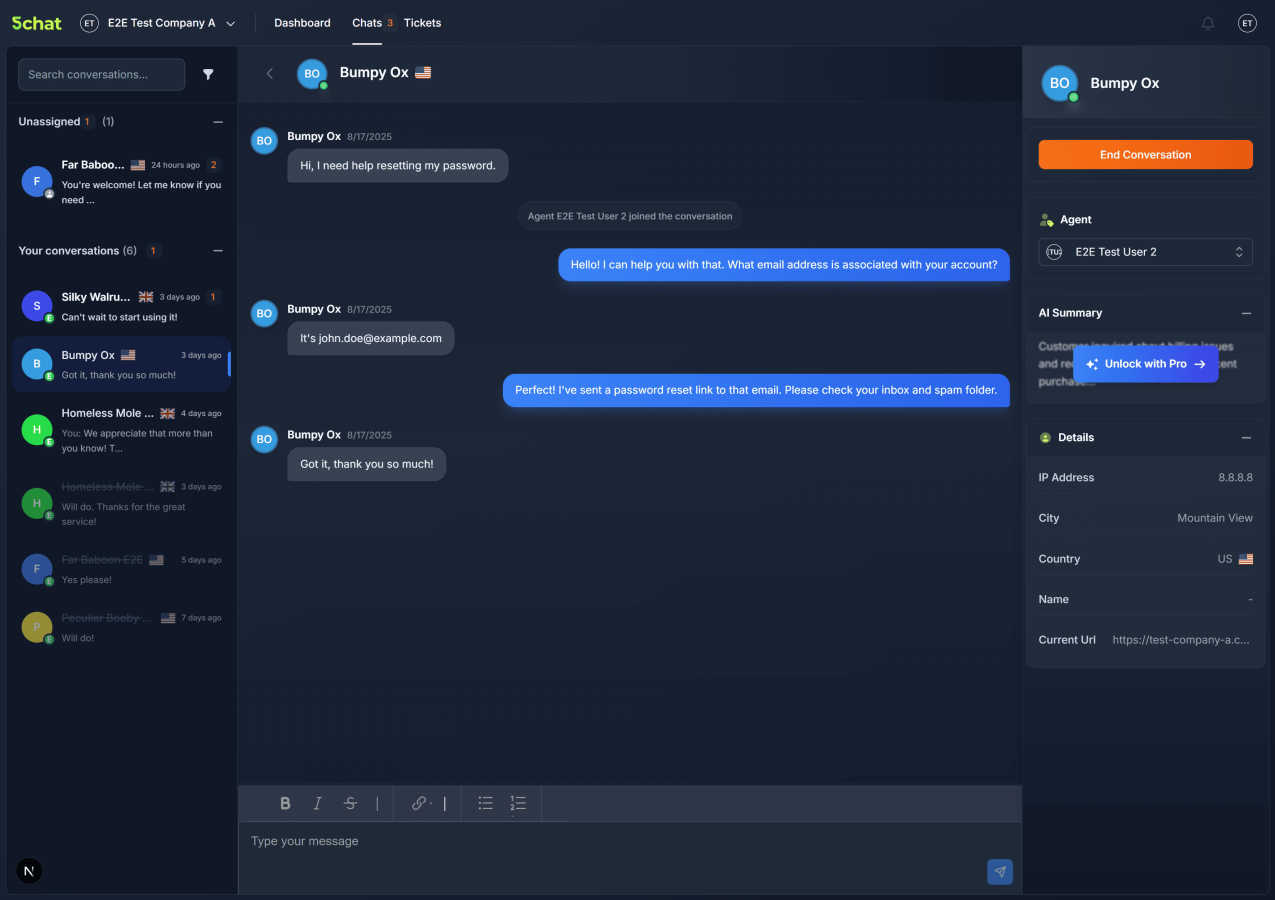
5chat
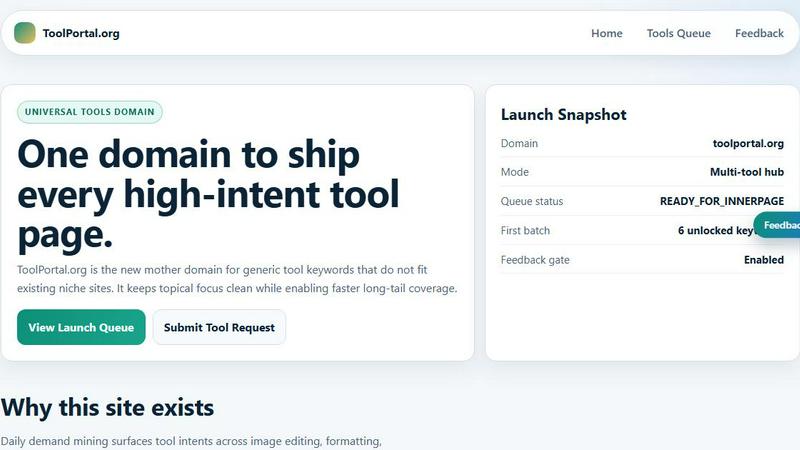
ToolPortal
Feature Comparison
5chat
Blazing-Fast Performance
Engineered with a relentless focus on speed, 5chat boasts a load time of under 50 milliseconds and a tiny JavaScript footprint of less than 15kb. This optimized performance protects your website's Core Web Vitals scores, ensuring your site remains fast and your SEO isn't penalized by a heavy third-party script. It delivers the live chat functionality you need without the performance overhead that typically comes with it, keeping your user experience smooth and conversion-friendly.
Intuitive, Messaging-Style UI
5chat features a fresh, modern interface designed to feel as natural as texting a friend. By mimicking familiar messaging apps, it reduces the learning curve for both your support agents and your customers. Agents can become productive immediately with minimal training, spending their time solving problems instead of learning a complicated system. This approach makes customer interactions more casual, friendly, and effective.
AI-Powered Conversation Intelligence
Let artificial intelligence handle the administrative heavy lifting. 5chat's AI automatically analyzes conversations in real-time, applying relevant tags to organize and categorize customer inquiries effortlessly. Simultaneously, it generates intelligent conversation summaries that capture the key points and updates them as the chat progresses. This gives agents instant context and saves valuable time on note-taking and post-chat analysis.
Seamless Integration & Customization
Integrating 5chat into your website is remarkably simple. You can use a one-line code snippet for instant activation or choose from plugins for popular platforms like WordPress and Shopify. Beyond easy setup, you can fully customize the chat widget's colors, text, and agent profiles to match your brand perfectly—all without needing a developer. For advanced needs, a robust API allows for deep customization to fit unique business workflows.
ToolPortal
Comprehensive Tool Index
ToolPortal features a dense index of 261 live tools organized into specific categories, including generators, checkers, converters, formatters, and image editing tools. This organization allows users to quickly navigate to the tools they need without unnecessary friction.
Dual Search Modes
Users can choose between two search methods: a direct keyword search for when they know the exact tool name or a task description mode that suggests tools based on the stated job. This flexibility caters to both experienced users and those who may be unsure of what they need.
Daily Refresh Cycle
ToolPortal is committed to continuous improvement, with new pages and UI updates being rolled out daily. This ensures that users always have access to the latest tools and features, enhancing the overall experience and keeping the content fresh and relevant.
Instant Access Without Login
One of the standout features of ToolPortal is that it requires no login or account creation. Users can open any tool page and run it immediately, eliminating barriers to access and allowing for a seamless workflow.
Use Cases
5chat
High-Growth E-commerce Stores
For online retailers, site speed is directly tied to cart abandonment and sales. 5chat allows e-commerce stores to offer real-time support for sizing questions, order tracking, and last-minute purchases without slowing down their product pages. The fast load time preserves the shopping experience, while features like visitor insights help agents provide personalized, efficient service that boosts conversion rates and customer loyalty.
Performance-Conscious SaaS Companies
SaaS businesses rely on their application's speed and reliability. Integrating a slow chat widget can degrade the user experience for all customers. 5chat provides a lightweight support channel for onboarding, technical questions, and feedback that doesn't compromise the app's performance. The AI-generated summaries are perfect for handing off conversations between teams or quickly catching up on a customer's history.
Startups and Small Teams
Startups need to move fast and make every interaction count with limited resources. 5chat's intuitive UI means new team members can start handling support chats immediately with no formal training. The simple setup gets them talking to customers in minutes, not days. The affordable, efficient tool helps small teams provide a level of responsive, personal support that competes with much larger companies.
Agencies Managing Multiple Client Sites
Web development or marketing agencies managing multiple client websites need a reliable, consistent tool that won't harm the site performance they work hard to optimize. 5chat's one-line installation and white-label customization options make it easy to deploy and brand uniquely for each client. The unified dashboard allows agents to manage conversations from all client sites in one place efficiently.
ToolPortal
Social Media Content Creation
Content creators can utilize the text styling tools available in ToolPortal, such as glitch or gothic text generators, to produce eye-catching social media posts. This allows for enhanced engagement and unique branding.
Quick Image Editing
Marketers and designers can use the image tools to crop photos, remove backgrounds, and prepare assets for various platforms in a matter of minutes. This efficiency is crucial for meeting tight deadlines in the fast-paced digital landscape.
Validation and Quality Checks
Developers can rely on the validation tools for tasks such as checking DMARC records or running speed tests to ensure their projects meet quality standards before publishing. This helps maintain a high level of professionalism.
Format Conversion
Students and professionals alike can benefit from the conversion tools offered by ToolPortal, which allow for quick and easy transformation of units, time, and text formats. This is particularly useful for those working on reports or data analysis.
Overview
About 5chat
5chat is a revolutionary live chat tool designed for businesses that refuse to compromise between customer engagement and website performance. At its core, 5chat solves a critical problem: traditional chat widgets are often slow, bloated scripts that drag down your site speed, hurting your Core Web Vitals, SEO, and ultimately, your conversion rates. Built from the ground up for speed-obsessed companies, 5chat loads in under 50 milliseconds—that's ten times faster than most alternatives—with a total bundle size of less than 15kb. This lightning-fast performance ensures your site stays quick and responsive, providing instant connection for your visitors. It’s the perfect solution for e-commerce stores, SaaS platforms, and startups where every millisecond of load time can impact revenue. Beyond raw speed, 5chat offers an intuitive, messaging-style interface that makes support feel natural for both customers and your team. With powerful AI features working behind the scenes to auto-tag conversations and generate real-time summaries, it streamlines your workflow. Whether you're at your desk or on the go, 5chat helps you connect with customers faster and easier than ever, turning support into a seamless conversation.
About ToolPortal
ToolPortal is a robust online directory offering over 300 free, browser-based tools designed to cater to a wide range of needs. Whether you're looking to convert text formats, validate JSON code, edit images, or perform SEO checks, ToolPortal has something for everyone. It serves as a one-stop-shop for developers, marketers, writers, and anyone who needs quick access to practical online utilities without the hassle of installation or sign-up. The intuitive interface allows users to search for tools by keyword or describe their task in plain language, making it easy to find the right tool in seconds. With a focus on user experience, ToolPortal ensures that all tools are live and ready to use immediately, streamlining workflows and enhancing productivity.
Frequently Asked Questions
5chat FAQ
How does 5chat impact my website's loading speed?
5chat is specifically engineered to have a minimal impact. With a load time of under 50ms and a total script size of less than 15kb, it is one of the lightest live chat solutions available. It uses optimized delivery mechanisms to ensure it loads asynchronously, protecting your Core Web Vitals (like Largest Contentful Paint) and preventing any negative effect on your site's SEO or user experience.
Can I customize the look of the chat widget to match my brand?
Absolutely! 5chat offers easy-to-use customization options that require no coding knowledge. You can change the primary colors, button text, agent profile pictures, and more directly from your dashboard to ensure the chat widget blends seamlessly with your website's design and maintains a consistent brand identity for your customers.
What kind of AI features does 5chat include?
5chat includes intelligent AI that works passively in the background. Its two main features are Smart Conversation Tagging, which automatically categorizes chats with relevant labels (like "billing" or "feature request"), and Intelligent Conversation Summaries, which generates a concise recap of the chat's key points in real time. This helps agents stay organized and resolve issues faster.
Is 5chat suitable for a team that is often on the move?
Yes, it's built for mobility. 5chat is fully responsive and accessible from any device with an internet connection. Your support team can manage and respond to customer conversations just as easily from a smartphone or tablet as they can from a desktop computer, ensuring you never miss an important inquiry, no matter where you are.
ToolPortal FAQ
What types of tools does ToolPortal offer?
ToolPortal offers a wide variety of tools across categories such as generators, checkers, converters, formatters, and image editing utilities. This diversity ensures that users can find tools for nearly any online task.
Do I need to create an account to use ToolPortal?
No, ToolPortal does not require any account creation or login. Users can access and run tools directly in their browser without any barriers, making it quick and easy to get started.
How often are new tools added to ToolPortal?
ToolPortal features a daily refresh cycle, meaning new tools and updates are continually being integrated into the platform. This commitment to freshness ensures users have access to the latest tools available.
Can I search for tools without knowing their names?
Absolutely! ToolPortal allows users to describe their tasks in plain language, and it will suggest the best-fit tools based on that description. This user-friendly feature helps those who may not be familiar with specific tool names.
Alternatives
5chat Alternatives
5chat is a fast, lightweight live chat tool in the productivity and management category. It's built for businesses that prioritize website speed and customer engagement, offering AI-powered features to connect with visitors effortlessly. Users often explore alternatives for various reasons. Maybe a business has outgrown its current plan and needs more advanced features, or perhaps they require a different pricing structure that better fits their budget. Others might be looking for specific integrations with their existing tech stack or a platform that caters to a unique use case their current tool doesn't address. When searching for a different solution, it's wise to consider a few key factors. Focus on how the tool impacts your website's loading speed and overall performance. Evaluate the depth of features, like automation and reporting, against your team's actual needs. Finally, consider the ease of setup and whether the platform can scale smoothly as your business grows.
ToolPortal Alternatives
ToolPortal is a robust online tools directory designed specifically for developers, designers, SEO professionals, and content creators. With over 300 free browser-based tools, it offers a wealth of resources across various categories, including productivity, web development, and SEO. Users often seek alternatives to ToolPortal for several reasons, such as varying feature sets, user interface preferences, or specific platform needs that might not be met by ToolPortal. When looking for an alternative, consider factors like the types of tools offered, ease of navigation, user experience, and whether the platform requires any installation or sign-up. It's also essential to assess the reliability and support provided, as well as how frequently the tools are updated to meet current industry standards.