
Adswize vs StatPecker
Side-by-side comparison to help you choose the right AI tool.

Adswize
Adswize is your AI assistant that analyzes Meta Ads and gives you clear daily actions to optimize them.
Last updated: March 4, 2026

StatPecker gives you fast, private AI insights and stunning visuals from your data.
Last updated: March 1, 2026
Visual Comparison
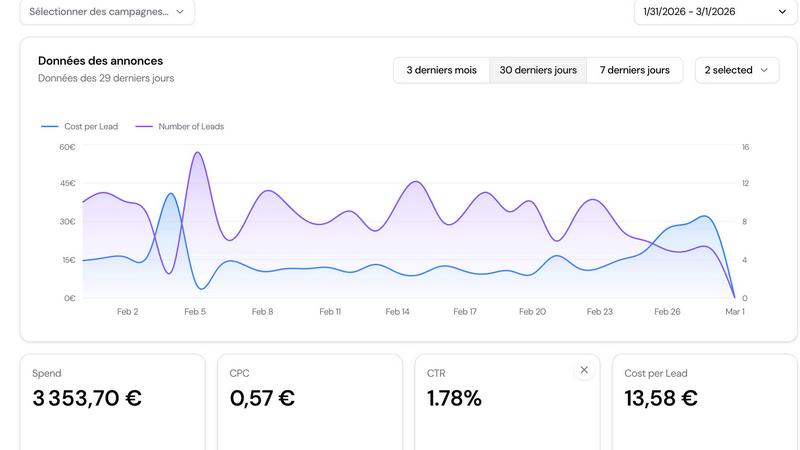
Adswize
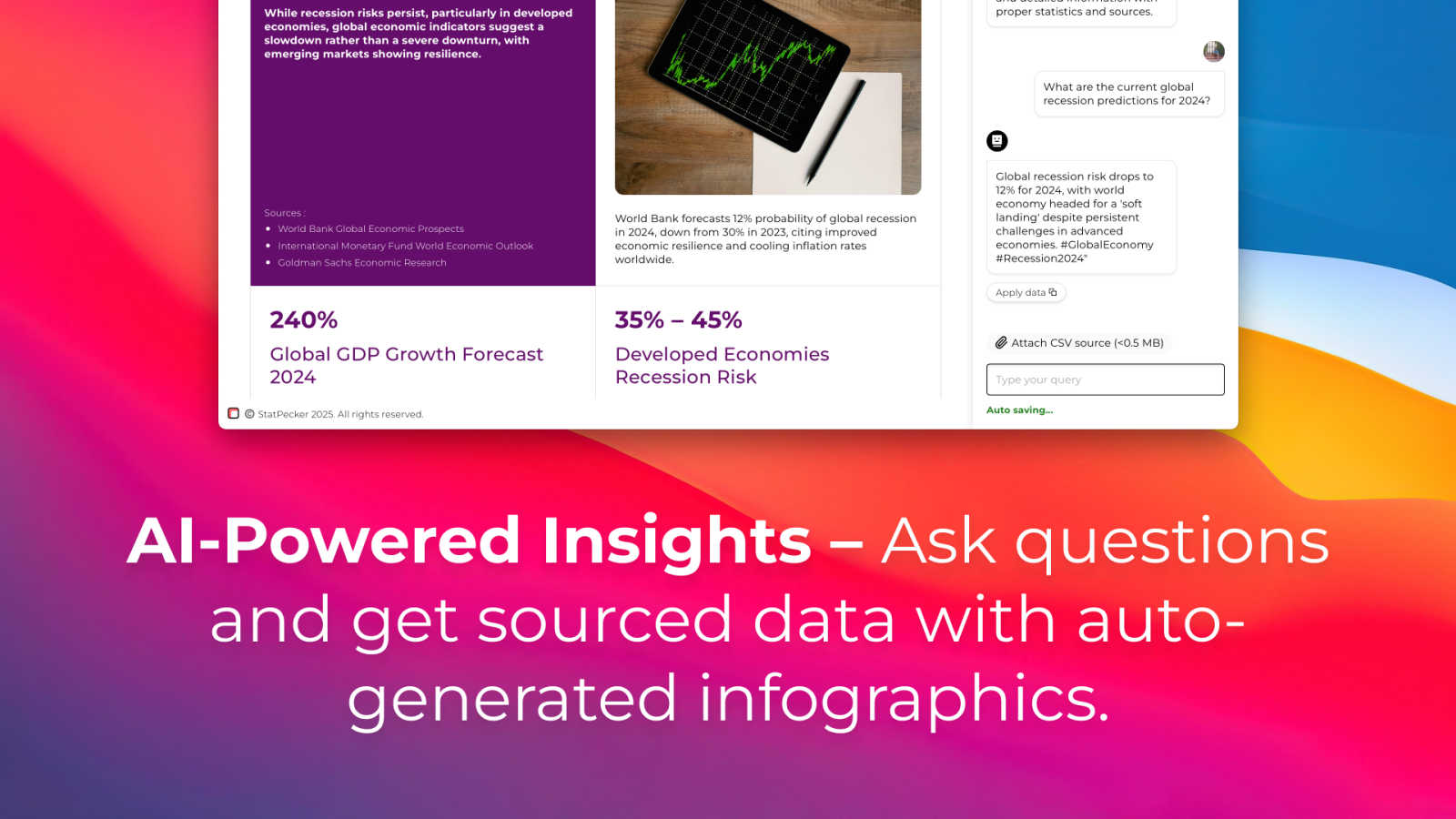
StatPecker
Feature Comparison
Adswize
Daily AI Optimization Recommendations
Wake up to a clear, prioritized list of actions. Adswize analyzes your account overnight and tells you exactly what to do—like pausing an underperforming ad set with a rising CPA, scaling the budget for a high-ROAS lookalike audience, or refreshing a creative with a dropping CTR. This turns hours of analysis into a simple, actionable checklist you can complete in minutes.
Clear, Insight-Driven Dashboard
Say goodbye to overwhelming spreadsheets and confusing graphs. The Adswize dashboard is designed for clarity, showing you what truly matters at a glance. You can instantly see your top performers, identify budget drains, and track your daily progress on optimization tasks, all without needing to analyze raw data yourself.
Deep AI Insights on Any Ad
Go beyond surface-level metrics. With Adswize, you can drill down into any ad, campaign, or ad set to get AI-powered explanations for performance changes. Ask "why did my ROAS drop last Tuesday?" and get an instant, data-backed answer that highlights trends, audience shifts, or creative fatigue, giving you the context needed to make smart decisions.
Conversational AI Assistant
Stop guessing and start asking. The built-in AI assistant allows you to ask natural questions about your account, such as "Which audience converts best?" or "What's my most cost-effective creative?" It provides instant, personalized insights pulled directly from your live campaign data, acting as your on-demand Meta Ads expert.
StatPecker
Ask Your Query
Simply type a question in plain English, and StatPecker's AI will find the answer from validated sources and present it as a ready-to-use visual. There's no need to learn complex query languages or data tools. Want to know the global smartphone market share or the GDP growth of a country? Just ask, and get a clean chart or infographic instantly, perfect for dropping into your content.
Upload & Analyze CSVs
With the Local SQL Agent feature, you can upload your private CSV files (up to 50MB) and explore them with natural language questions. The best part? Your data never leaves your computer. The entire analysis runs locally on your device, ensuring complete privacy. It prepares your data, generates SQL queries behind the scenes, and delivers key insights as beautiful, shareable visuals.
Publish & Embed
Once you've created a visual, you can make it interactive and seamlessly embed it into your website, blog, or article with a simple snippet of code. This feature allows your audience to engage directly with the data, making your content more dynamic and informative. It’s designed for easy integration, so your stunning visuals work anywhere you publish.
Download & Use Anywhere
Need your infographic for a presentation, report, or social media? StatPecker lets you export your creations as high-quality image files. This gives you the flexibility to use your data visuals across any platform or medium—PowerPoint decks, PDF reports, print materials, or team newsletters—ensuring your insights look professional everywhere.
Use Cases
Adswize
For Busy Agency Owners & Media Buyers
Agency teams managing multiple client accounts are stretched thin. Adswize automates the initial daily analysis for every account, providing a consolidated view of performance and clear next steps. This drastically reduces the time spent on manual reporting and campaign reviews, allowing teams to focus on strategy and client communication instead of data crunching.
For E-commerce Brands Scaling Operations
E-commerce marketers need to constantly optimize for profitability and scale winners quickly. Adswize identifies high-performing audiences and creatives ripe for increased budget, while simultaneously flagging underperforming elements that are wasting spend. This enables brands to systematically reallocate resources to what's driving sales, fueling efficient growth.
For In-House Marketing Teams
Solo marketers or small in-house teams often lack dedicated ad specialists. Adswize acts as that expert team member, providing guidance and preventing costly mistakes. It helps them confidently manage budgets, understand performance nuances, and make optimization decisions that would typically require advanced experience, all from an intuitive platform.
For Identifying Creative & Audience Fatigue
It's challenging to know when an ad has run its course or when an audience is saturated. Adswize monitors performance trends and alerts you to dropping engagement metrics like CTR or rising costs like CPA. This proactive insight tells you exactly when it's time to refresh a creative or pivot your audience targeting, preventing slow declines in campaign performance.
StatPecker
For Content Creators & Bloggers
Writers and bloggers can use StatPecker to quickly find and visualize supporting data for their articles. Instead of describing statistics with text, they can embed interactive charts that illustrate their points, making posts more authoritative and engaging for readers, which helps boost time-on-page and shareability.
For Business Analysts & Marketers
Analysts and marketing teams can use the CSV upload feature to analyze sales data, campaign performance, or customer surveys privately. They can generate instant visuals for weekly reports or presentations, identifying trends like top-performing regions or product categories without manual chart building, speeding up decision-making.
For Educators & Researchers
Teachers and academics can simplify complex datasets or historical trends for students by converting them into easy-to-understand infographics. Researchers can also use it to visualize their findings for papers or lectures, making abstract data concrete and memorable for their audience.
For Journalists & Reporters
Journalists on tight deadlines can use the "Ask Your Query" feature to rapidly gather and visualize current statistics for their stories, from election polls to economic indicators. This allows them to create credible, data-rich narratives that enhance their reporting with clear, publish-ready graphics.
Overview
About Adswize
Adswize is your AI-powered assistant for Meta Ads, designed to cut through the noise and deliver clear, actionable insights. It's built for advertisers, media buyers, agencies, and brands who are tired of spending hours manually sifting through complex dashboards, trying to decipher what the data actually means for their campaigns. The core problem Adswize solves is the overwhelming mental load of daily optimization—the constant guessing about which ad to pause, where to shift budget, or which audience to test next.
By connecting directly to your Meta ad accounts, Adswize automatically analyzes your campaign performance over the last 7, 14, or 30 days. Instead of presenting you with raw numbers, it provides structured, daily summaries that highlight exactly what's working, what's underperforming, and where your budget is being wasted. The platform then delivers specific optimization recommendations across your campaigns, ad sets, and creatives. In short, Adswize transforms complex advertising data into straightforward decisions, saving you time, reducing wasted spend, and empowering you to scale your successful campaigns with confidence. It's like having an expert media buyer reviewing your account every single morning.
About StatPecker
StatPecker is your friendly AI-powered sidekick for transforming boring numbers into beautiful, insightful stories. At its heart, it's a smart data visualization tool that takes raw data—whether from online sources or your own CSV files—and turns it into engaging infographics, charts, and reports in seconds. It's built for anyone who needs to communicate data clearly and compellingly, without needing a degree in design or data science. Think of content creators looking to spice up their blog posts, marketers needing to showcase campaign results, educators simplifying complex topics for students, or business analysts who want to share insights quickly with their team. The core value of StatPecker is its simplicity and power: you ask a question or upload your data, and it handles the heavy lifting of analysis and design, saving you hours of manual work in tools like spreadsheets or graphic editors. It’s about making data storytelling accessible, fast, and impactful for everyone.
Frequently Asked Questions
Adswize FAQ
How does Adswize connect to my Meta Ads account?
Adswize uses Meta's secure, official API to connect to your ad accounts. You simply log in with your Meta credentials (the same ones you use for Ads Manager) and grant the necessary permissions. This read-only connection allows Adswize to analyze your campaign data without being able to make any changes, ensuring your accounts remain secure.
What kind of recommendations does the AI provide?
The AI provides specific, actionable recommendations based on your campaign data. Common recommendations include pausing ad sets or ads with poor performance metrics (like high CPA), increasing budget for well-performing campaigns, testing new audience variations, and refreshing creatives that show signs of fatigue. Each suggestion comes with a clear reason, such as "CPA +52%," so you understand the "why."
Is my data safe with Adswize?
Yes. Adswize takes data security seriously. The connection to Meta is secure and encrypted. Adswize has read-only access, meaning it can analyze your data but cannot edit campaigns or spend money. Your data is used solely to generate your insights and is not sold to third parties. You can review their privacy policy for full details on data handling.
Can I try Adswize for free?
Absolutely! Adswize offers a free trial that allows you to connect your account and see the platform in action. During the trial, you can experience the daily AI analysis, receive sample recommendations, and explore the dashboard to see how it can transform your workflow. No credit card is required to start the trial.
StatPecker FAQ
Is my data safe when I upload a CSV file?
Absolutely. When you use the Local SQL Agent feature, your data privacy is the top priority. Your CSV file is processed entirely on your own device. Nothing is sent to StatPecker's servers, meaning your sensitive business or personal data stays completely private and secure on your computer during analysis.
What kind of questions can I ask the AI?
You can ask a wide range of data-driven questions! The AI pulls from validated public sources to answer queries about business, economics, demographics, technology trends, and more. Examples include "What is the renewable energy capacity in Europe?" or "Show me the top 5 countries by internet penetration." Think of it as a research assistant for facts and figures.
Do I need to know how to code or use SQL?
Not at all. StatPecker is designed for ease of use. You interact with it using simple, natural language. Whether you're asking a question or exploring your CSV file, you just type what you want to know (e.g., "Which product had the highest sales last quarter?"), and the tool handles all the complex query generation and coding in the background for you.
Can I try StatPecker for free?
Yes! StatPecker offers a generous Free Tier that allows you to explore its core capabilities at no cost. This includes creating unlimited projects, making a number of AI queries, and uploading several CSV files. It's a great way to see how the tool can fit into your workflow before considering any paid plan.
Alternatives
Adswize Alternatives
Adswize is an AI-powered SaaS tool in the marketing analytics category, specifically designed to help advertisers on Meta. It automates the process of syncing ad data and analyzing campaign performance, delivering clear insights and recommendations to save time and improve results. Users often explore alternatives for various reasons. This could be due to budget constraints, a need for features beyond Meta advertising, or a preference for a different user interface or reporting style. It's a normal part of finding the perfect tool that aligns with your specific workflow and business goals. When evaluating other options, consider your core needs. Look for tools that offer the right balance of automation, depth of analysis, and platform coverage. Key factors include the clarity of insights provided, the actionability of recommendations, and how well the tool integrates into your existing processes without adding complexity.
StatPecker Alternatives
StatPecker is a smart, AI-powered tool in the business intelligence and marketing space that helps you quickly turn data into beautiful, engaging infographics. It’s designed for anyone who needs to tell a clearer story with their numbers, from marketers to educators. People often explore other options for a variety of reasons. Maybe they need a different pricing model, require a specific feature StatPecker doesn’t offer, or must integrate with a particular set of tools they already use. It’s a normal part of finding the perfect fit for your unique workflow and budget. When evaluating other tools, consider what matters most to you. Think about the types of data visualizations you need, how easy the tool is to use, where you need to publish your final graphics, and of course, your budget. The goal is to find a solution that makes your data work for you, not the other way around.