
Ai Home Design vs Picture to Drawing
Side-by-side comparison to help you choose the right AI tool.

Ai Home Design
Transform your space effortlessly with AI Home Design, the quick and easy tool for stunning room redesigns.
Last updated: February 27, 2026

Picture to Drawing
Easily transform your photos into stunning drawings or sketches with our free AI art tool in just seconds.
Last updated: March 1, 2026
Visual Comparison
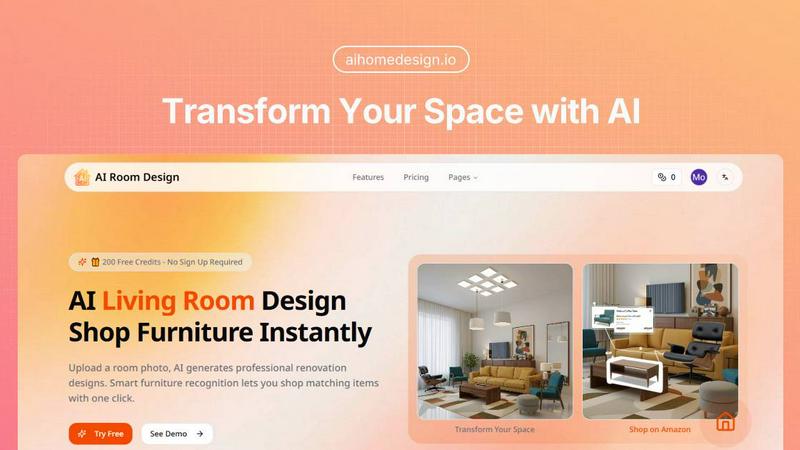
Ai Home Design
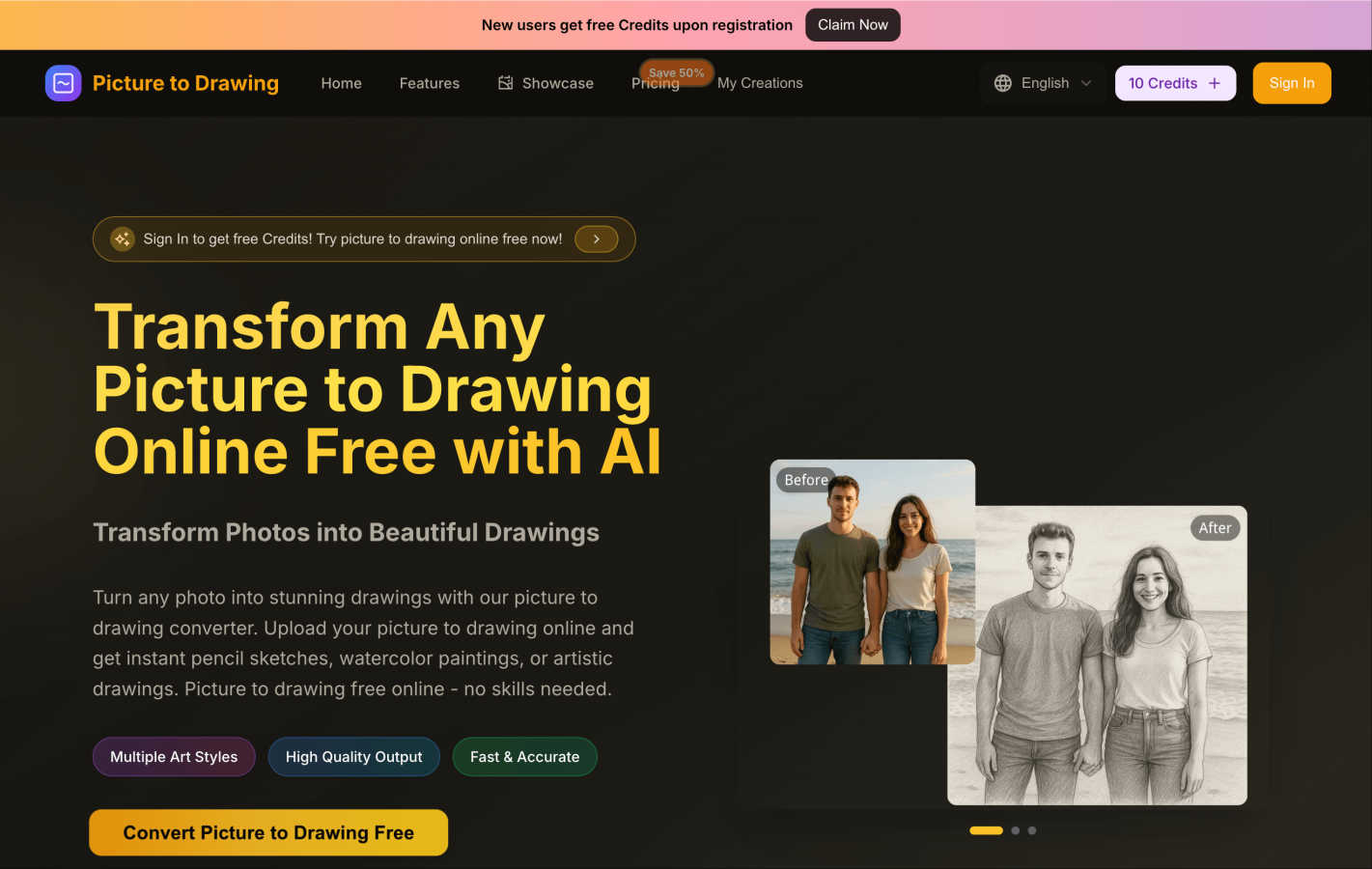
Picture to Drawing
Feature Comparison
Ai Home Design
AI Room Redesign
The heart of Ai Home Design is its AI room redesign feature. Users can simply upload a room photo, and the AI instantly generates professional renovation designs, ensuring that the existing structure is preserved while giving it a fresh, stylish look. This feature is perfect for anyone who wants to visualize changes before committing to them.
AI 3D Panoramic Space Tour
Experience your redesigned room like never before with the AI 3D panoramic space tour. This feature creates immersive 360-degree views of your new design, allowing you to explore every corner virtually. It feels as though you are stepping into your newly designed space, providing a realistic preview of your transformation.
AI Home Design Video Tours
Take your design experience to the next level with AI-generated video tours. These 8-second cinematic walkthroughs bring your static designs to life, allowing you to envision how your space will look and feel. This feature adds a dynamic aspect to your home design journey, making it even more engaging.
Smart Furniture Recognition
Ai Home Design includes an intelligent furniture recognition system that analyzes your uploaded room photo. It identifies each piece of furniture, extracting details about their style, color, and materials. This makes it easier than ever to find matching products, ensuring that your final design is cohesive and stylish.
Picture to Drawing
Multiple Art Styles
Picture to Drawing offers a diverse range of artistic styles, allowing users to choose from pencil sketches, watercolor paintings, ink art, and more. This variety ensures that every user can find a style that resonates with their vision and artistic intent.
High Quality Output
The tool guarantees high-quality output, transforming your photos into professional-grade artwork. Each generated drawing is crafted with meticulous attention to detail, ensuring that the essence of the original image is preserved while giving it an artistic flair.
Fast & Accurate
Speed is one of the standout features of Picture to Drawing. The AI technology processes your images rapidly, delivering stunning artwork in seconds. This efficiency makes it ideal for users who want quick results without sacrificing quality.
User-Friendly Interface
The platform's interface is designed with simplicity in mind, making it accessible for users of all skill levels. The drag-and-drop functionality and straightforward navigation ensure that anyone can easily upload images, select styles, and download their creations without hassle.
Use Cases
Ai Home Design
Redesigning Your Living Room
Imagine wanting to refresh your living room but not knowing where to start. With Ai Home Design, you can upload a photo of your current setup, choose a style, and within seconds, receive a complete redesign suggestion. This makes it easy to visualize new layouts and decor.
Planning a Bedroom Makeover
If you are considering giving your bedroom a makeover, Ai Home Design can help. Upload a picture of your bedroom, select your preferred design style, and watch as the AI generates a beautiful new concept for your space. It’s like having a personal designer at your fingertips.
Preparing for a Home Sale
Sellers can use Ai Home Design to enhance their home’s appeal before listing it. By uploading images of their rooms, they can explore potential redesigns that attract buyers. The tool helps in visualizing improvements that can make a significant difference in selling price.
Real Estate Staging
Realtors can leverage Ai Home Design to stage properties virtually. By uploading photos of the spaces, they can create appealing design concepts that showcase the property at its best. This can lead to quicker sales and higher offers from potential buyers.
Picture to Drawing
Personal Memories
Picture to Drawing is perfect for turning cherished personal photos into unique art pieces. Whether it’s a family portrait or a snapshot from a memorable vacation, users can create beautiful drawings that capture the essence of their experiences.
Gifts and Keepsakes
Looking for a thoughtful gift? Transforming a loved one's photo into a stunning piece of art makes for a memorable present. These custom drawings can serve as keepsakes for special occasions like birthdays, anniversaries, or holidays.
Social Media Content
Artists and influencers can use Picture to Drawing to enhance their social media presence. By converting everyday photos into eye-catching artwork, users can create engaging content that stands out in crowded feeds.
Creative Projects
For those involved in creative projects, such as graphic design, marketing, or education, Picture to Drawing offers a quick way to generate artistic resources. Whether you need illustrations for presentations or creative assets for campaigns, this tool simplifies the process.
Overview
About Ai Home Design
Ai Home Design is an innovative AI-powered platform designed to transform your interior spaces effortlessly. It allows users to upload photos of their rooms and receive professional design suggestions in seconds. This tool is perfect for homeowners, renters, or anyone looking to refresh their living spaces without the hefty price tag of hiring an interior designer. With a variety of design styles to choose from, including Scandinavian, Industrial, and Bohemian, Ai Home Design caters to diverse tastes. The platform's main value proposition lies in its ability to provide quick, stunning design solutions while integrating furniture shopping directly from Amazon. Plus, new users enjoy 30 free credits upon sign-up, making it easy to get started on your home transformation journey.
About Picture to Drawing
Picture to Drawing is a groundbreaking AI-powered online tool that transforms your everyday photos into stunning artwork, all for free. This innovative platform is designed for anyone who wants to express their creativity without needing extensive artistic skills or expensive software. Whether you are a complete beginner or a seasoned artist, Picture to Drawing offers a seamless way to convert your images into beautiful sketches, paintings, or drawings with just a few clicks. The core value proposition is to democratize art creation, enabling users to transform their personal memories into unique pieces of art effortlessly. Just upload your chosen image, select one of the various artistic styles, and watch as the advanced AI technology generates high-quality, downloadable artwork in seconds. Additionally, new users receive free credits upon registration, allowing them to explore the platform without any financial commitment.
Frequently Asked Questions
Ai Home Design FAQ
How does Ai Home Design work?
Ai Home Design uses advanced AI algorithms to analyze uploaded room photos. Users select a design style, and the AI generates a professional redesign in seconds, complete with furniture recommendations.
What file formats can I upload?
You can upload room photos in JPEG, PNG, or WebP formats, with a maximum size of 10MB. This flexibility allows you to use images from various sources.
Can I shop for furniture directly through the platform?
Yes! Once your design is generated, Ai Home Design provides links to Amazon products that match the identified furniture in your design, making shopping convenient and straightforward.
Are there any costs associated with using Ai Home Design?
While you receive 30 free credits upon signing up, additional credits can be purchased for ongoing use. Various subscription plans are available that cater to different needs, allowing you to choose the one that fits your design ambitions.
Picture to Drawing FAQ
Is Picture to Drawing completely free to use?
Yes, Picture to Drawing is free to use. New users receive free credits upon registration, allowing them to convert their photos into drawings without any cost.
What file formats does Picture to Drawing support?
The platform supports various file formats, including JPG, PNG, WEBP, and HEIC. This versatility ensures that users can upload their images without worrying about compatibility issues.
How long does it take to convert a picture to drawing?
The conversion process is extremely fast, typically taking just seconds to transform your uploaded photo into a stunning piece of artwork.
Do I need any artistic skills to use Picture to Drawing?
No, you do not need any artistic skills to use Picture to Drawing. The tool is designed for everyone, and its one-click transformation process makes it easy for anyone to create beautiful artwork.
Alternatives
Ai Home Design Alternatives
Ai Home Design is a free AI-powered tool designed to assist users with interior design and room redesign. By allowing users to upload room photos, it generates professional design suggestions in seconds, making it a valuable resource in the design tools category. Many users seek alternatives to Ai Home Design due to varying needs such as pricing, specific features, or compatibility with different platforms and devices. When looking for an alternative, it's essential to consider factors like user-friendliness, the range of design styles offered, and any additional features that may enhance the design experience, such as virtual tours or shopping integration. Evaluating these aspects will help you find a tool that best fits your unique design needs.
Picture to Drawing Alternatives
Picture to Drawing is an innovative online tool that allows users to transform their photos into beautiful hand-drawn artworks using advanced AI technology. It falls under the category of design tools, specifically for art creation, making it accessible for anyone from casual users to professional artists. Users often seek alternatives to Picture to Drawing for various reasons, including pricing, specific features that may better suit their needs, or compatibility with different platforms. When searching for an alternative, consider factors such as the range of artistic styles offered, the quality of the output, ease of use, and whether the service meets your specific artistic vision. By choosing the right alternative, you can enhance your creative process, find unique artistic styles, or even discover additional features that suit your preferences better. It's essential to evaluate tools based on their conversion speed, the quality of the final artwork, and any costs involved, ensuring that you find the best fit for your artistic endeavors.