
Any2Text vs MP3ToMIDI
Side-by-side comparison to help you choose the right AI tool.
Any2Text
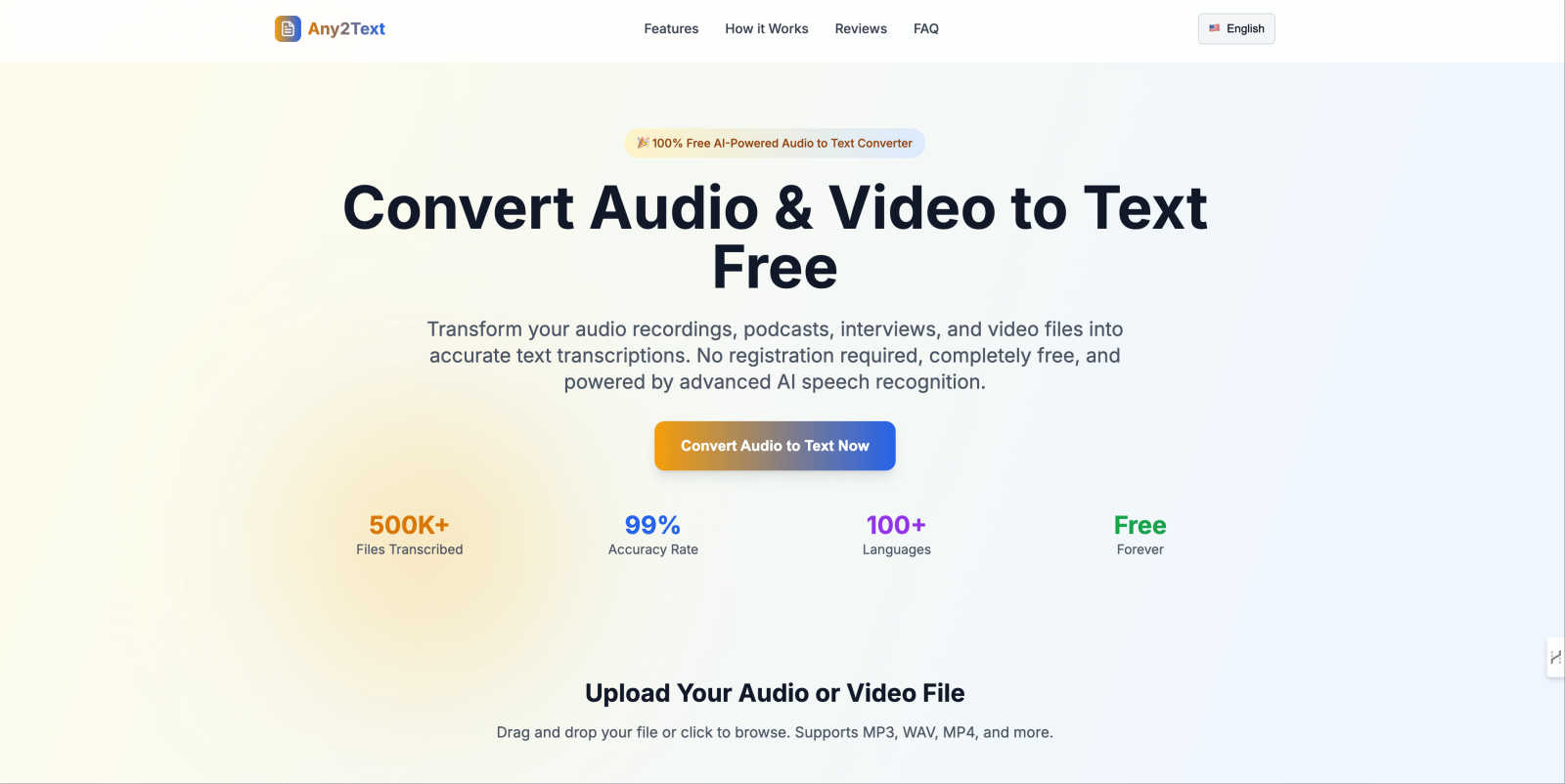
Any2Text is a free AI tool that instantly converts audio and video files into accurate text transcriptions.
Last updated: March 1, 2026

MP3ToMIDI
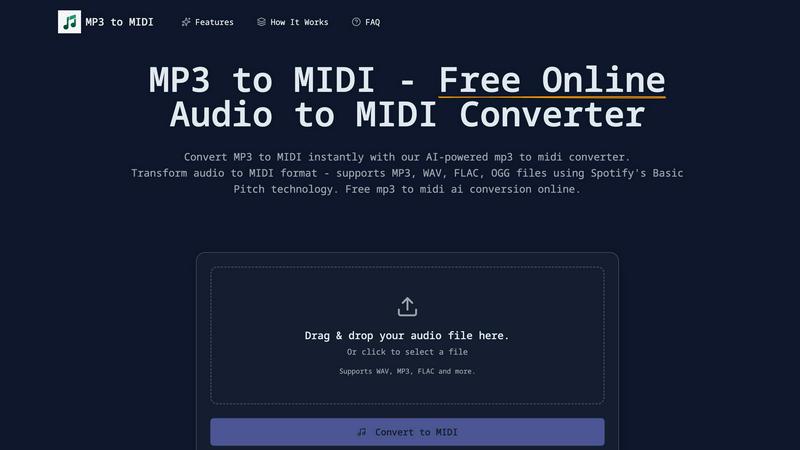
Effortlessly convert MP3, WAV, FLAC, and OGG audio files to MIDI with our free AI-powered converter in seconds.
Last updated: February 26, 2026
Visual Comparison
Any2Text
MP3ToMIDI
Feature Comparison
Any2Text
Lightning Fast AI Transcription
Any2Text employs sophisticated AI speech recognition technology to convert audio to text in minutes. This is especially beneficial for those who need quick turnarounds, such as podcasters and journalists, allowing users to get their transcripts without unnecessary delays.
100% Free Audio to Text Service
Users can enjoy unlimited audio and video file conversions without any hidden costs, subscription fees, or registration requirements. This makes Any2Text an accessible tool for anyone needing transcription services, regardless of budget.
Multi-Language Support
With support for over 100 languages, Any2Text can transcribe audio in English, Spanish, French, German, Chinese, and many more. This feature is ideal for users working in multilingual environments or those who need to convert audio from various language sources.
Mobile-Friendly Interface
Any2Text is designed with a responsive layout that works seamlessly on smartphones and tablets. This allows users to convert audio to text on-the-go, making it convenient for busy individuals who need transcription services wherever they are.
MP3ToMIDI
AI-Powered Technology
MP3ToMIDI utilizes advanced AI technology from Spotify's Basic Pitch, ensuring high accuracy in converting audio to MIDI. This feature allows for precise note detection, tempo recognition, and instrument separation, making it a powerful tool for music creation.
Multi-Format Audio Support
The converter supports various audio file formats, including MP3, WAV, FLAC, and OGG. This multi-format compatibility enables users to upload any audio file and convert it into MIDI instantly, offering flexibility for different audio projects.
Instant MIDI Download
Once the audio file is processed, users can download their MIDI files immediately. This quick turnaround allows musicians and producers to import MIDI into their favorite DAWs—such as Ableton, FL Studio, or Logic Pro—and start editing right away.
Accurate Note Detection
MP3ToMIDI boasts industry-leading accuracy in detecting musical notes, chords, and melodies. This feature ensures that every detail of the original recording is captured, providing users with high-quality MIDI files that reflect the nuances of their audio.
Use Cases
Any2Text
Transcribing Podcasts
Podcasters can utilize Any2Text to quickly transcribe their episodes, making it easier to create show notes or blog posts that accompany their audio content. This is a time-saving solution that enhances their content's accessibility.
Lecture Notes for Students
Students can record their lectures and use Any2Text to convert these recordings into written notes. This streamlined process allows them to focus on understanding the material during class rather than scrambling to take notes.
Interview Transcriptions for Journalists
Journalists can benefit from Any2Text by transcribing interviews efficiently. With high accuracy, they can ensure that quotes and important details are captured correctly, saving them time and effort in the editing process.
Documenting Business Meetings
Business professionals can use Any2Text to transcribe meetings, creating accurate records of discussions and decisions made. This aids in maintaining clear communication and accountability within teams.
MP3ToMIDI
Music Production
Producers can use MP3ToMIDI to convert audio samples into MIDI, allowing for easy manipulation and integration into their projects. This feature streamlines the production process and enhances creativity by enabling remixing and sampling.
Music Education
Teachers can leverage the converter to create MIDI files from recordings, providing students with editable sheet music. This approach allows learners to practice and understand music better by working with familiar songs they enjoy.
Composing Original Music
Composers can quickly transform their audio ideas into MIDI format, facilitating arrangement and orchestration. By using MP3ToMIDI, they can focus on creativity without the tedious task of manual transcription.
Sound Design
Sound designers can extract MIDI data from audio files to create new sounds and textures. This capability enables them to innovate and experiment with sound, leading to unique musical compositions and soundscapes.
Overview
About Any2Text
Any2Text is a user-friendly, completely free online platform designed to convert spoken words into written text effortlessly. Utilizing advanced AI speech recognition technology, Any2Text transforms audio and video files into searchable, editable, and shareable text transcripts. It caters to a diverse range of users, including content creators, journalists, students, and business professionals. Whether you are looking to transcribe a podcast episode, an interview, lecture notes, or meeting recordings, Any2Text has you covered. The main value proposition of Any2Text lies in its simplicity and effectiveness: providing professional-grade transcription that is fast, accurate, and respects user privacy without requiring payment or registration. By making voice data instantly accessible, Any2Text empowers users to focus on what truly matters: creating, learning, and effective communication.
About MP3ToMIDI
MP3ToMIDI is a free, online AI-powered converter that transforms audio files into MIDI tracks effortlessly. Designed for musicians, producers, composers, and students, this user-friendly tool supports a variety of audio formats, including MP3, WAV, FLAC, and OGG. By leveraging advanced AI technology from Spotify's Basic Pitch library, MP3ToMIDI accurately analyzes melodies, harmonies, and rhythms within your audio files, producing high-quality MIDI files in mere seconds. The platform requires no software installation, making music transcription accessible for everyone. Simply upload your audio file, let the AI process it, and download your ready-to-edit MIDI file, compatible with any Digital Audio Workstation (DAW). Fast, intuitive, and completely free, MP3ToMIDI opens up a world of creative possibilities for anyone looking to convert audio into editable music formats.
Frequently Asked Questions
Any2Text FAQ
What audio and video formats does Any2Text support?
Any2Text supports a wide range of audio and video formats, including MP3, WAV, M4A, AAC, MP4, AVI, and MOV. This versatility allows users to upload almost any file type for transcription.
Is Any2Text really free to use?
Yes, Any2Text is completely free to use. There are no hidden fees, subscription costs, or registration requirements, enabling users to convert audio and video files without any financial barriers.
How accurate is the AI transcription?
Any2Text boasts an impressive accuracy rate of 99%. This high level of precision ensures that users receive reliable transcriptions, making it suitable for professional and academic purposes.
What's the maximum file size I can upload?
Any2Text allows users to upload files up to a maximum size of 200MB. This ensures that users can convert lengthy audio or video recordings without encountering size limitations.
MP3ToMIDI FAQ
How does MP3ToMIDI work?
MP3ToMIDI analyzes your audio file using AI technology from Spotify's Basic Pitch. It detects notes, rhythms, and instruments, converting them into a MIDI file that can be downloaded and edited.
What audio formats does MP3ToMIDI support?
MP3ToMIDI supports multiple audio formats, including MP3, WAV, FLAC, and OGG. This feature allows users to upload a wide range of audio files for conversion.
Is MP3ToMIDI free to use?
Yes, MP3ToMIDI is completely free to use. There are no hidden fees, watermarks, or limitations on the number of conversions you can perform.
Can I use the MIDI files in any DAW?
Absolutely! The MIDI files generated by MP3ToMIDI are compatible with all major Digital Audio Workstations, including Ableton Live, FL Studio, Logic Pro, and GarageBand, making it easy to incorporate into your music projects.
Alternatives
Any2Text Alternatives
Any2Text is a free online tool that specializes in converting audio and video files into accurate text transcripts, making it a valuable resource in the realm of transcription services. Users often seek alternatives to Any2Text due to various reasons, including the need for additional features, different pricing structures, or specific platform compatibility. Some may also be looking for enhanced capabilities like advanced editing options or integrations with other software. When choosing an alternative, it's essential to consider factors such as accuracy, processing speed, language support, and user-friendliness. Additionally, privacy policies and data security are crucial, especially when handling sensitive information. Ultimately, the right alternative should align with your specific needs and enhance your transcription experience.
MP3ToMIDI Alternatives
MP3ToMIDI is a free online converter that leverages AI technology to transform audio files like MP3, WAV, FLAC, and OGG into editable MIDI tracks. This tool is particularly popular among musicians, producers, and students who want to easily transcribe music without the need for complex software installations. Users often seek alternatives to MP3ToMIDI for various reasons, including the need for different features, specific platform compatibility, or potential pricing structures. When choosing an alternative, it's essential to consider aspects such as the accuracy of audio processing, the range of supported audio formats, the ease of use, and any additional functionalities that may enhance your music production workflow.