
Banana Editor vs RemoveTexts
Side-by-side comparison to help you choose the right AI tool.

Banana Editor
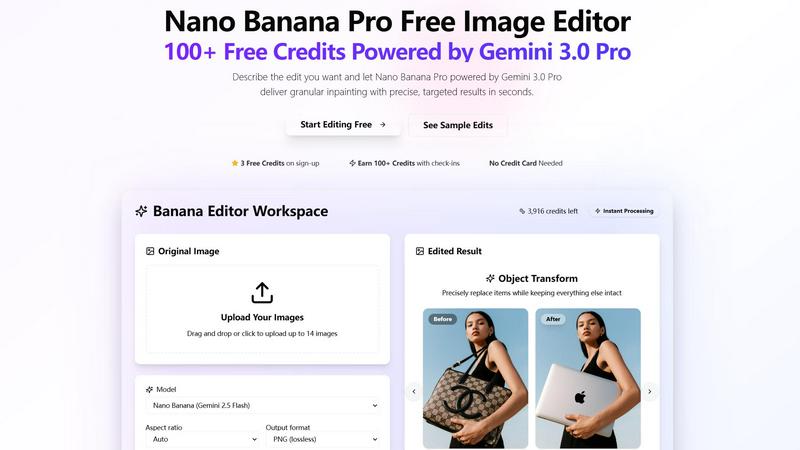
Banana Editor transforms your photos with simple text prompts for precise edits like background removal and relighting.
Last updated: March 1, 2026

RemoveTexts
RemoveTexts is a free AI tool that instantly removes text from any image with just a brush stroke.
Last updated: March 11, 2026
Visual Comparison
Banana Editor
RemoveTexts

Feature Comparison
Banana Editor
Prompt-Driven Editing with Nano Banana Pro
Simply describe the edit you want in plain English, and the powerful Nano Banana Pro (Gemini 3.0 Pro) model brings it to life. This feature removes the steep learning curve of traditional photo editing, allowing you to execute complex instructions like background replacements, object additions, or lighting changes just by typing a sentence. It delivers granular inpainting, meaning it can target specific areas of an image with surgical precision while leaving everything else untouched.
Precise Object Transformation
This feature is perfect for detailed product or fashion edits. You can instruct the AI to precisely replace or modify specific items within a scene. For example, you can swap a handbag for a laptop on a model's shoulder or change a bottle's label. The AI intelligently understands the context, ensuring the new object blends seamlessly with the original lighting, perspective, and shadows, keeping the rest of the composition perfectly intact.
Flexible Output & Workspace Controls
Banana Editor gives you full control over your final image's specifications. Before applying your edit, you can select the desired aspect ratio (from square 1:1 to vertical 9:16), output format (PNG, JPEG, WebP), and resolution (up to 4K). This ensures your edited image is perfectly optimized for its intended use, whether it's a social media post, a product catalog page, or a wide-format banner ad, all from within one intuitive workspace.
Inspiration Gallery & Prompt Remixing
Jumpstart your creativity with a community-driven gallery of sample edits. Browse through categorized examples like "E-commerce Product Photos" or "Cinematic Posters" to see what's possible. Each example comes with the exact prompt used, which you can copy and remix for your own images. This feature is an excellent way to learn effective prompting techniques and instantly apply proven creative concepts to your projects.
RemoveTexts
Paint to Remove
For ultimate precision, the Paint to Remove feature gives you complete control. Simply use the digital brush to paint directly over the specific text, watermark, or small object you want gone. The AI then focuses only on those painted areas, erasing them while perfectly rebuilding the background underneath. This is perfect for when you only need to remove a caption from a corner or a watermark from a specific spot, leaving the rest of your image perfectly intact.
Auto Remove All Text
When you need a completely clean slate, the Auto Remove All Text feature is your one-click wonder. Just upload your image and let the AI do all the work. It automatically scans and detects every text element in the photo—be it subtitles, logos, date stamps, or overlays—and removes them all simultaneously. In seconds, you get a pristine image free of any textual distractions, saving you immense time and effort compared to manual removal.
Edit & Replace Text
Go beyond simple removal with the innovative Edit & Replace Text feature. This powerful tool doesn't just erase text; it allows you to change what it says. Want to update a price on a menu or correct a word on a meme? Paint over the text you want to change, type your new words, and the AI will generate replacement text that matches the original font style, color, and size as closely as possible, blending it naturally into the image.
Remove Objects
RemoveTexts is versatile enough to handle more than just text. The Remove Objects feature lets you erase any unwanted element from your photos. Whether it's an unexpected photobomber, a distracting logo, a stray piece of litter, or an unsightly power line, you can brush over it and watch as the AI fills in the space with a believable background, leaving your composition clean and focused.
Use Cases
Banana Editor
Content & Social Media Creation
Ideal for influencers and social media managers, Banana Editor streamlines content creation. You can lock a subject's identity across a series of posts, instantly swap backgrounds to match seasonal themes, or add branded props to images without organizing a reshoot. The granular editing ensures every post looks cohesive and professionally tailored, saving hours of manual editing time for stories, reels, and carousels.
E-commerce & Product Photography
Transform your online catalog efficiently. Update product photos in batches by swapping scenes or backgrounds for a fresh look. Instantly generate new product colorways, update packaging labels for a campaign, or create perfectly cropped images for different platform requirements. This allows e-commerce teams to keep their visuals current and engaging without the cost and time of new photoshoots for every minor change.
Interiors & Real Estate Staging
Visualize redesigns and property staging with ease. Rearrange virtual furniture in a room, change wall colors or flooring materials realistically, or adjust the lighting from a bright day to a cozy evening ambiance. This use case is invaluable for interior designers, real estate agents, and homeowners looking to experiment with different styles and present compelling visualizations to clients.
Film & Marketing Previsualization
Perfect for creative teams in advertising and film, Banana Editor acts as a powerful pre-visualization tool. Directors and marketers can quickly generate alternate costumes, experiment with set dressings, or create mock-ups of key visual scenes for storyboards and mood boards. This accelerates the creative decision-making process and helps align teams on a visual direction before moving to costly production stages.
RemoveTexts
Cleaning Product Photos for E-Commerce
Online sellers can use RemoveTexts to quickly clean up product images by erasing watermarks from supplier photos, removing promotional text overlays, or deleting price tags from mockups. This results in professional, brand-consistent visuals that are ready for their website or marketplace listings, helping products look their best and boosting sales potential.
Preparing Professional Screenshots and Presentations
Professionals and students often need to share clean screenshots for reports, tutorials, or presentations. RemoveTexts makes it easy to erase irrelevant browser tabs, system notifications, personal data, or UI watermarks from screenshots, ensuring the focus remains solely on the intended content for a polished and professional look.
Creating Clean Social Media and Marketing Graphics
Content creators and marketers can repurpose images by removing dated captions, outdated logos, or distracting text elements from stock photos or old graphics. This allows for the creation of fresh, on-brand visuals for social media posts, blog headers, and advertising materials without starting from scratch or needing complex design software.
Redacting Sensitive Information
Individuals handling documents, forms, or correspondence that contain private details like addresses, phone numbers, or names can use RemoveTexts for quick redaction. Simply paint over the sensitive text to permanently erase it from the image, providing a simple layer of privacy protection for shared documents.
Overview
About Banana Editor
Banana Editor is a revolutionary AI-powered image editing platform that transforms how you edit photos. At its core, it uses the advanced Gemini 3.0 Pro (Nano Banana Pro) technology to understand your creative vision through simple text prompts. Instead of navigating complex software tools, you just upload an image and describe the change you want—like "replace the background with a sunset" or "swap the model's shirt for a blue jacket"—and Banana Editor executes it with impressive precision. It's built for anyone who needs high-quality visual edits quickly and efficiently, from social media creators and e-commerce managers to marketing teams and interior designers. The main value proposition is its "granular inpainting" capability, which allows for targeted edits that keep all other parts of the image perfectly intact, ensuring professional, stable results. Best of all, you can start for free with credits earned simply by signing up and checking in, with no credit card required, making professional-grade editing accessible to everyone.
About RemoveTexts
RemoveTexts is your go-to, hassle-free solution for cleaning up images in seconds. It's an AI-powered online tool designed to remove unwanted text, watermarks, date stamps, and even objects from your photos with incredible ease. Forget about complex software like Photoshop that requires steep learning curves and hours of manual editing. With RemoveTexts, you simply upload your image, and with one click or a quick brush stroke, the AI works its magic. It intelligently detects text, erases it completely, and then performs a minor miracle: it seamlessly reconstructs the background so no one can tell anything was ever there. This tool is perfect for a wide range of users, from social media creators and marketers who need clean product shots and promotional graphics, to professionals and students who want to redact information or tidy up screenshots for presentations. Trusted by over 100,000 users worldwide, RemoveTexts delivers professional, traceless results in under 30 seconds, making advanced image editing accessible to absolutely everyone, regardless of their design skills.
Frequently Asked Questions
Banana Editor FAQ
How do I get started and is it really free?
Yes, you can start editing for free immediately! Simply sign up for an account and you'll receive free credits to begin using Banana Editor. No credit card is required upfront. You can also earn more credits through daily check-ins on the platform, providing a sustainable way to access the tool's core features without an initial financial commitment.
What is "granular inpainting"?
Granular inpainting is the advanced AI technology that allows Banana Editor to make extremely precise edits to specific parts of your image. Instead of regenerating the entire picture, the AI identifies and alters only the area you describe in your prompt, keeping all other details—like the subject's face, the surrounding environment, and the original lighting—completely stable and unchanged. This results in clean, realistic before-and-after comparisons.
What kind of edits can I make with a text prompt?
You can make a wide variety of edits by describing them. Common examples include replacing or removing backgrounds, swapping clothing or accessories on a person, changing object colors, modifying lighting conditions (e.g., to "golden hour"), adding new elements like props, extending image canvases for different formats, and updating text on labels or signs. The more descriptive your prompt, the better the result.
Can I use the edited images for commercial purposes?
Yes, you own the images you create using Banana Editor. The platform is designed to support professional workflows for content creators, marketers, and e-commerce businesses. The images you generate or edit are yours to use in commercial projects, social media, advertising, product listings, and other business applications. Always ensure any original images you upload have the appropriate rights for modification.
RemoveTexts FAQ
Is RemoveTexts really free to use?
Yes, RemoveTexts offers a free online tool that allows you to upload images and remove text without any cost. You can access core features like painting over text to remove it and download your cleaned image. For advanced features like auto-removing all text or using high-resolution 4K output, you may need to explore their premium plans.
What image formats does RemoveTexts support?
RemoveTexts supports all the most common image formats, including JPG, PNG, and WebP. This covers the vast majority of images you'll encounter from cameras, screenshots, and the web. Just ensure your file is under the size limit (typically 10MB) for a smooth upload and processing experience.
How does the AI remove text without leaving a trace?
The tool uses advanced deep learning inpainting technology, similar to systems developed by leading tech companies. The AI doesn't just delete pixels; it analyzes the patterns, colors, and textures of the pixels surrounding the text. It then intelligently generates new background content that matches this context, filling in the erased area so seamlessly that it becomes indistinguishable from the original image.
Can I use RemoveTexts on my phone?
Absolutely! Since RemoveTexts is a web-based online tool, it works directly in your mobile phone's browser (like Chrome or Safari). There's no app to download. You can upload images from your phone's gallery, use the brush tool on your touchscreen to paint over text, and download the clean result straight to your device, making it incredibly convenient for on-the-go editing.
Alternatives
Banana Editor Alternatives
Banana Editor is a modern, AI-powered photo editing tool in the design and image category. It stands out for its prompt-driven approach, allowing users to describe edits in plain language to remove backgrounds, swap outfits, and relight scenes with impressive control. People often explore other options for various reasons. They might need a tool with a different pricing model, specific advanced features not offered, or one that integrates directly into their existing platform or workflow. The search for the right fit is common. When evaluating alternatives, consider what matters most for your projects. Key factors include the core editing capabilities, the learning curve and user interface, the cost structure and value, and how well the tool handles the specific types of image manipulation you do regularly.
RemoveTexts Alternatives
RemoveTexts is a popular AI-powered image editing tool that specializes in quickly and intelligently removing text from any picture. It falls into the category of automated, user-friendly photo editors designed to simplify tasks that once required complex software like Photoshop. It's a great solution for anyone needing to clean up screenshots, erase watermarks, or delete unwanted subtitles and date stamps. Users often explore alternatives for a variety of reasons. Some might be looking for a different pricing model or a free tier with more generous limits. Others may need specific features like batch processing, integration with other platforms, or tools that go beyond just text removal. The platform itself can also be a factor, as some prefer desktop software over web-based tools or need a dedicated mobile app. When choosing an alternative, consider what matters most for your workflow. Key factors include the accuracy and quality of the AI's editing, the speed of processing, the range of supported file formats and output resolutions, and overall ease of use. It's also wise to check the privacy policy to understand how your uploaded images are handled.