
Banana Editor vs Seedance AI
Side-by-side comparison to help you choose the right AI tool.

Banana Editor
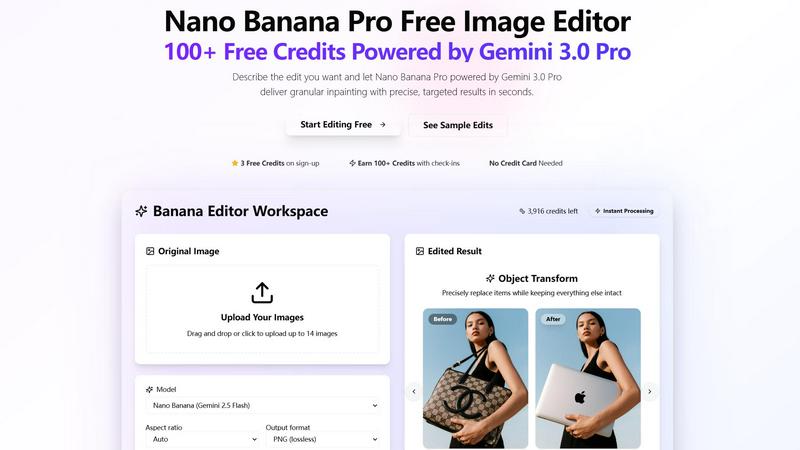
Banana Editor transforms your photos with simple text prompts for precise edits like background removal and relighting.
Last updated: March 1, 2026

Seedance AI
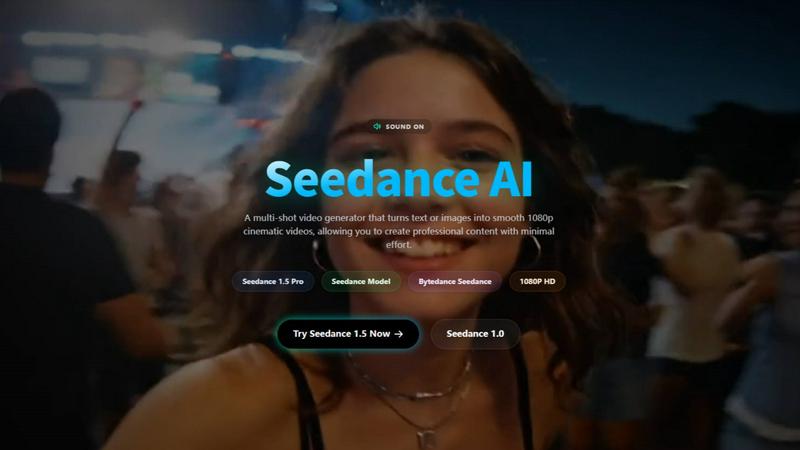
Seedance 2.0 transforms your text, images, and audio into cinematic AI videos with precise creative control.
Last updated: April 13, 2026
Visual Comparison
Banana Editor
Seedance AI
Feature Comparison
Banana Editor
Prompt-Driven Editing with Nano Banana Pro
Simply describe the edit you want in plain English, and the powerful Nano Banana Pro (Gemini 3.0 Pro) model brings it to life. This feature removes the steep learning curve of traditional photo editing, allowing you to execute complex instructions like background replacements, object additions, or lighting changes just by typing a sentence. It delivers granular inpainting, meaning it can target specific areas of an image with surgical precision while leaving everything else untouched.
Precise Object Transformation
This feature is perfect for detailed product or fashion edits. You can instruct the AI to precisely replace or modify specific items within a scene. For example, you can swap a handbag for a laptop on a model's shoulder or change a bottle's label. The AI intelligently understands the context, ensuring the new object blends seamlessly with the original lighting, perspective, and shadows, keeping the rest of the composition perfectly intact.
Flexible Output & Workspace Controls
Banana Editor gives you full control over your final image's specifications. Before applying your edit, you can select the desired aspect ratio (from square 1:1 to vertical 9:16), output format (PNG, JPEG, WebP), and resolution (up to 4K). This ensures your edited image is perfectly optimized for its intended use, whether it's a social media post, a product catalog page, or a wide-format banner ad, all from within one intuitive workspace.
Inspiration Gallery & Prompt Remixing
Jumpstart your creativity with a community-driven gallery of sample edits. Browse through categorized examples like "E-commerce Product Photos" or "Cinematic Posters" to see what's possible. Each example comes with the exact prompt used, which you can copy and remix for your own images. This feature is an excellent way to learn effective prompting techniques and instantly apply proven creative concepts to your projects.
Seedance AI
Multi-Modal Input Workflow
Seedance AI, especially with its 2.0 engine, lets you build videos from multiple sources at once. You're not limited to just text. Start with an image for the visual style, add a short video clip to define the specific camera motion you want, layer in an audio track to sync the action to a beat, and then fine-tune everything with a descriptive text prompt. This fusion of inputs gives you unparalleled creative control over the final output.
Reference-Based Motion & Style Control
This powerful feature allows you to upload existing images or video clips to directly control the composition, motion, and aesthetic of your new AI-generated video. Want your scene to pan slowly like a reference film clip or adopt the color grade of a specific photo? Simply upload it as a reference. This makes achieving specific cinematic looks and complex motions much more reliable than text prompts alone.
Consistent Character Generation
One of the biggest challenges in AI video is maintaining a character's identity across different scenes. Seedance AI tackles this head-on, allowing you to generate characters that retain their clothing, facial features, and other visual details throughout a video sequence. This is a game-changer for narrative storytelling, branded content, and any project where character continuity is essential.
Native Audio-Visual Sync & Video Continuation
Seedance AI can synchronize the motion and editing rhythm of your video to an uploaded audio track, creating a natural, music-video-like flow. Furthermore, its video continuation feature lets you seamlessly extend an existing video clip, whether it's AI-generated or your own footage, while preserving the narrative flow and visual consistency, perfect for lengthening scenes or creating sequels.
Use Cases
Banana Editor
Content & Social Media Creation
Ideal for influencers and social media managers, Banana Editor streamlines content creation. You can lock a subject's identity across a series of posts, instantly swap backgrounds to match seasonal themes, or add branded props to images without organizing a reshoot. The granular editing ensures every post looks cohesive and professionally tailored, saving hours of manual editing time for stories, reels, and carousels.
E-commerce & Product Photography
Transform your online catalog efficiently. Update product photos in batches by swapping scenes or backgrounds for a fresh look. Instantly generate new product colorways, update packaging labels for a campaign, or create perfectly cropped images for different platform requirements. This allows e-commerce teams to keep their visuals current and engaging without the cost and time of new photoshoots for every minor change.
Interiors & Real Estate Staging
Visualize redesigns and property staging with ease. Rearrange virtual furniture in a room, change wall colors or flooring materials realistically, or adjust the lighting from a bright day to a cozy evening ambiance. This use case is invaluable for interior designers, real estate agents, and homeowners looking to experiment with different styles and present compelling visualizations to clients.
Film & Marketing Previsualization
Perfect for creative teams in advertising and film, Banana Editor acts as a powerful pre-visualization tool. Directors and marketers can quickly generate alternate costumes, experiment with set dressings, or create mock-ups of key visual scenes for storyboards and mood boards. This accelerates the creative decision-making process and helps align teams on a visual direction before moving to costly production stages.
Seedance AI
Marketing & Promotional Video Production
Quickly generate eye-catching product videos, ad concepts, and promotional content for social media or websites. Showcase a product from multiple angles, demonstrate features with dynamic motion, or create a series of branded clips with consistent characters and styles—all without a full-scale film production.
Creative Storytelling & Short Films
Bring your storyboards and scripts to life. Create narrative video sequences with consistent characters, controlled camera movements (like dramatic pans or close-ups), and extended scenes. It's an excellent tool for indie filmmakers, writers, and animators to visualize stories before committing to expensive production.
Engaging Social Media Content
Produce a high volume of trendy, platform-optimized short-form videos for TikTok, YouTube Shorts, and Instagram Reels. Use the 9:16 aspect ratio preset, sync clips to popular audio, and quickly remix visual ideas to stay ahead of trends and engage your audience with fresh, professional-looking content daily.
Animation & Concept Pre-Visualization
Animators and directors can use Seedance AI to rapidly prototype scenes, test character movements, and visualize complex shots before beginning the labor-intensive traditional or 3D animation process. It's a cost-effective way to experiment with styles, pacing, and compositions during the pre-production phase.
Overview
About Banana Editor
Banana Editor is a revolutionary AI-powered image editing platform that transforms how you edit photos. At its core, it uses the advanced Gemini 3.0 Pro (Nano Banana Pro) technology to understand your creative vision through simple text prompts. Instead of navigating complex software tools, you just upload an image and describe the change you want—like "replace the background with a sunset" or "swap the model's shirt for a blue jacket"—and Banana Editor executes it with impressive precision. It's built for anyone who needs high-quality visual edits quickly and efficiently, from social media creators and e-commerce managers to marketing teams and interior designers. The main value proposition is its "granular inpainting" capability, which allows for targeted edits that keep all other parts of the image perfectly intact, ensuring professional, stable results. Best of all, you can start for free with credits earned simply by signing up and checking in, with no credit card required, making professional-grade editing accessible to everyone.
About Seedance AI
Seedance AI is your all-in-one creative studio for bringing ideas to life as stunning, cinematic videos. At its core is the powerful Seedance 2.0 model, a multi-modal AI video generator that goes far beyond simple text prompts. It allows you to create videos using a combination of text descriptions, images, video clips for motion reference, and even audio for rhythm and timing—all within a single, intuitive workflow. This platform is designed for creators, marketers, and storytellers who want precision and control, moving away from random AI outputs to directed, professional-grade content. Whether you're crafting a short film, a social media ad, or a product showcase, Seedance AI empowers you to guide the scene, camera movement, and artistic style with remarkable consistency. It's the ideal tool for anyone looking to produce engaging video content quickly, without sacrificing creative vision or requiring extensive technical expertise.
Frequently Asked Questions
Banana Editor FAQ
How do I get started and is it really free?
Yes, you can start editing for free immediately! Simply sign up for an account and you'll receive free credits to begin using Banana Editor. No credit card is required upfront. You can also earn more credits through daily check-ins on the platform, providing a sustainable way to access the tool's core features without an initial financial commitment.
What is "granular inpainting"?
Granular inpainting is the advanced AI technology that allows Banana Editor to make extremely precise edits to specific parts of your image. Instead of regenerating the entire picture, the AI identifies and alters only the area you describe in your prompt, keeping all other details—like the subject's face, the surrounding environment, and the original lighting—completely stable and unchanged. This results in clean, realistic before-and-after comparisons.
What kind of edits can I make with a text prompt?
You can make a wide variety of edits by describing them. Common examples include replacing or removing backgrounds, swapping clothing or accessories on a person, changing object colors, modifying lighting conditions (e.g., to "golden hour"), adding new elements like props, extending image canvases for different formats, and updating text on labels or signs. The more descriptive your prompt, the better the result.
Can I use the edited images for commercial purposes?
Yes, you own the images you create using Banana Editor. The platform is designed to support professional workflows for content creators, marketers, and e-commerce businesses. The images you generate or edit are yours to use in commercial projects, social media, advertising, product listings, and other business applications. Always ensure any original images you upload have the appropriate rights for modification.
Seedance AI FAQ
What kind of files can I upload as a reference?
You can upload images (like JPG, PNG), video clips, and audio files to guide your video generation. These references can define the visual style, specific camera motions, or the rhythmic timing of your final AI-generated video, giving you multiple levers of creative control.
How can I improve the quality and consistency of my AI videos?
For best results, use clear, high-quality reference images with isolated subjects. When writing text prompts, be specific about motion, style, and sequence. For smoother videos, ensure the start and end frames of your desired motion are visually consistent. Also, leverage the platform's aspect ratio guides (e.g., 16:9 for YouTube, 9:16 for social media).
Can I use the videos I create for commercial purposes?
Yes, you own the rights to the videos you generate using Seedance AI. This means you can freely use them in commercial projects, such as advertisements, social media campaigns, client work, and other professional applications, giving you full creative and commercial freedom.
Do I need powerful hardware or prior video editing experience?
Not at all. Seedance AI is a cloud-based platform, so all the heavy processing happens on their servers. You can create videos from any standard computer or even via their mobile app. The interface is designed to be user-friendly, making advanced AI video creation accessible to beginners and pros alike.
Alternatives
Banana Editor Alternatives
Banana Editor is a modern, AI-powered photo editing tool in the design and image category. It stands out for its prompt-driven approach, allowing users to describe edits in plain language to remove backgrounds, swap outfits, and relight scenes with impressive control. People often explore other options for various reasons. They might need a tool with a different pricing model, specific advanced features not offered, or one that integrates directly into their existing platform or workflow. The search for the right fit is common. When evaluating alternatives, consider what matters most for your projects. Key factors include the core editing capabilities, the learning curve and user interface, the cost structure and value, and how well the tool handles the specific types of image manipulation you do regularly.
Seedance AI Alternatives
Seedance AI is a powerful platform in the AI video generation space, known for its multi-modal cinematic capabilities. It allows creators to produce marketing videos, social content, and narratives using text, images, and precise reference controls to guide scenes and motion. Users often explore other options for various reasons. This could be due to budget constraints, a need for different feature sets like simpler editing tools or specific output formats, or simply a preference for a different user interface and workflow. Finding the right tool is a personal journey. When evaluating alternatives, consider your primary goals. Look at the core video generation methods, the level of creative control offered, output quality and consistency, and how well the platform integrates into your existing creative or marketing workflow. The best choice aligns closely with your specific project needs and skill level.