
Fix Pixelated Photos vs ThumbnailMaker
Side-by-side comparison to help you choose the right AI tool.

Fix Pixelated Photos
Enhance and restore pixelated photos effortlessly with AI for sharper, clearer images in seconds, all in your browser.
Last updated: February 26, 2026

ThumbnailMaker
Easily create eye-catching thumbnails with AI for your videos, boosting clicks and engagement in just seconds, no design skills required.
Last updated: April 4, 2026
Visual Comparison
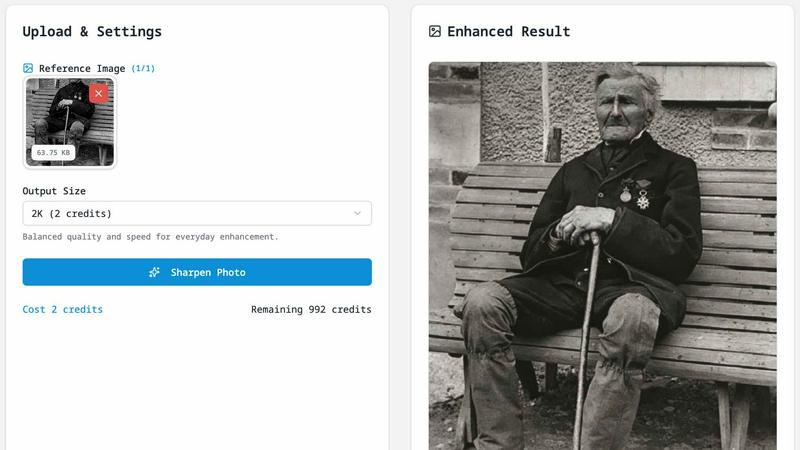
Fix Pixelated Photos
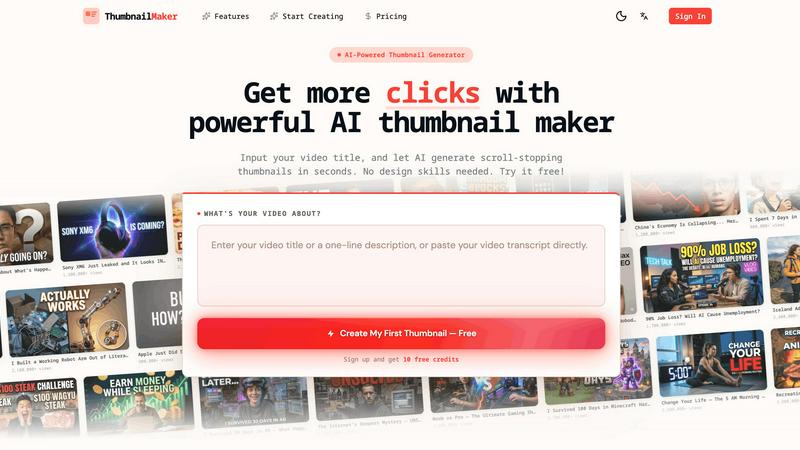
ThumbnailMaker
Feature Comparison
Fix Pixelated Photos
One-Click Unpixelate
This feature is designed to reduce blocky artifacts and recover smoother edges from compressed or low-resolution images. With just a single click, you can see your images transform, making it an ideal solution for anyone who needs quick fixes without diving deep into manual editing.
AI Upscaling
The AI upscaling capability increases the image resolution while preserving essential structures and details. This allows your photos to become more usable for sharing online or for print, ensuring that they maintain their quality even at larger sizes.
Smart Sharpening
Improve the clarity of key areas in your photos, such as faces, text, and product shots, without the need for extensive manual adjustments. Smart sharpening enhances detail in a way that looks natural, making it a perfect choice for high-quality image presentations.
Batch-Friendly Workflow
For users needing to enhance multiple images, the batch-friendly workflow allows you to apply the same enhancement process efficiently across several files at once. This saves time and effort, making it ideal for photographers and businesses handling large volumes of images.
ThumbnailMaker
AI-Powered Thumbnail Generator
Our AI thumbnail generator is the heart of ThumbnailMaker. By simply entering your video title, the AI analyzes your content and proposes engaging thumbnail designs within seconds. This feature eliminates the need for design expertise, making it accessible for everyone.
Style Clone & Transfer
With the style clone and transfer feature, you can import thumbnails from successful YouTube videos by pasting their URLs. The tool then extracts the design style, allowing you to either replicate it closely or remix it for a fresh take, ensuring your thumbnails resonate with proven visual strategies.
Fix & Refine Options
ThumbnailMaker allows you to tweak and refine your thumbnails after generating them. If something doesn't look right, simply specify the changes you want, and the AI will regenerate the thumbnail in seconds. This iterative process means you can achieve the perfect look without starting from scratch.
Face Consistency & Brand Identity
When you upload your photo, ThumbnailMaker ensures that your face remains consistent across all generated thumbnails. This feature helps build a recognizable brand identity, making your content instantly identifiable to your audience.
Use Cases
Fix Pixelated Photos
Restoring Old Photographs
If you have old family photos that have faded or lost details over time, Fix Pixelated Photos can help restore their clarity. This is perfect for preserving memories and sharing them with loved ones in a visually appealing manner.
Enhancing Product Images for E-commerce
For e-commerce businesses, high-quality product images are essential. Use this tool to upscale and sharpen product shots, ensuring they look professional and attractive to potential buyers.
Improving Portraits for Social Media
Whether you are a professional photographer or just someone who enjoys taking pictures, enhancing portraits for social media can make a significant difference. Fix Pixelated Photos helps you improve skin details and sharpness, ensuring your images stand out.
Fixing Screenshots for Presentations
Screenshots often suffer from pixelation, especially when taken from low-quality sources. This tool can quickly enhance screenshots, making them clearer and more presentable for reports or presentations.
ThumbnailMaker
YouTuber Launching a New Series
If you're a YouTuber starting a new series, you can use ThumbnailMaker to create distinctive thumbnails that reflect your brand and the content's theme. The AI helps generate multiple options, making it easier to choose one that stands out.
Social Media Content Creator
As a social media influencer, having visually appealing thumbnails for your videos is crucial. ThumbnailMaker allows you to create thumbnails quickly, enhancing your content's visibility across platforms like Instagram and TikTok.
Educator or Online Course Creator
If you are creating educational content or online courses, thumbnails that clearly communicate the subject matter are essential. ThumbnailMaker helps you design informative and appealing thumbnails that attract potential students to your videos.
Brand Promoter or Affiliate Marketer
For brand promoters or affiliate marketers, effective thumbnails can significantly increase click-through rates. With ThumbnailMaker, you can create enticing thumbnails that highlight products or services, driving more traffic to your promotional content.
Overview
About Fix Pixelated Photos
Fix Pixelated Photos is a powerful, browser-based AI image enhancement platform designed to tackle the common issues of pixelated and low-resolution images. Whether you are a professional photographer, a content creator, or simply someone looking to improve personal photos, this tool is tailored for you. Its main value proposition lies in its ability to unpixelate, sharpen, and upscale images with just a few clicks, making it easy for anyone to enhance their visuals without the need for complex software.
The platform operates entirely online, meaning no downloads or installations are required, and it works seamlessly on both desktop and mobile devices. By leveraging advanced AI technology, Fix Pixelated Photos allows users to restore detail, clarity, and vibrancy to their images quickly and efficiently. With features like one-click unpixelation and smart sharpening, you can achieve professional-quality results in moments, enhancing everything from portraits and product shots to old photographs and screenshots.
About ThumbnailMaker
ThumbnailMaker is an innovative AI-powered tool designed to help content creators generate stunning thumbnails in mere seconds. Whether you're a YouTuber, Twitch streamer, or any digital content creator, eye-catching thumbnails are essential for capturing viewers' attention and boosting click-through rates. This tool simplifies the process, enabling users with no design skills to create professional-looking thumbnails effortlessly. By inputting a video title, ThumbnailMaker's AI quickly analyzes the content and generates multiple thumbnail options tailored to maximize viewer engagement. With features that allow for customization, style transfer, and real-time adjustments, ThumbnailMaker empowers creators to enhance their visual branding and grow their audience effectively.
Frequently Asked Questions
Fix Pixelated Photos FAQ
What does this tool do?
Fix Pixelated Photos is an AI-powered platform that enhances the quality of low-resolution images by unpixelating, sharpening, and upscaling them quickly and efficiently.
What image types are supported?
The platform supports a wide range of image formats, including JPEG, PNG, and GIF, making it versatile for various types of images that users might need to enhance.
Do I need editing experience?
No editing experience is required to use Fix Pixelated Photos. Its user-friendly interface allows anyone, regardless of skill level, to enhance their images easily.
How do you handle uploaded images?
Uploaded images are processed solely for enhancement purposes and are not published or shared. Your privacy is important, and all files are deleted after processing to ensure security.
ThumbnailMaker FAQ
How does ThumbnailMaker generate thumbnails?
ThumbnailMaker uses advanced AI algorithms to analyze the video title and content, generating multiple thumbnail designs that are optimized for visual impact and engagement.
Can I upload my own images for thumbnails?
Yes, ThumbnailMaker allows you to upload your own photos to personalize your thumbnails. This helps in maintaining a consistent brand identity by incorporating your likeness into the designs.
Is there a limit to how many thumbnails I can create?
Initially, users receive 10 free credits upon signing up. Each thumbnail generation consumes a credit, but you can purchase additional credits if needed to create more thumbnails.
What if I'm not satisfied with the generated thumbnails?
ThumbnailMaker offers a fix and refine feature that lets you make adjustments to generated thumbnails. You can specify what you want changed, and the AI will regenerate the thumbnail based on your feedback, ensuring you get the desired look.
Alternatives
Fix Pixelated Photos Alternatives
Fix Pixelated Photos is an innovative browser-based platform that utilizes AI technology to enhance images by unpixelating, sharpening, and upscaling low-quality photos. This tool falls under the category of image and photo enhancement, making it an invaluable resource for both individuals and teams looking to improve their visual content with ease and efficiency. Users often seek alternatives to Fix Pixelated Photos for various reasons, including pricing, specific features, or compatibility with different platforms. When choosing an alternative, it's essential to consider factors such as the technology used, ease of use, quality of output, and any additional features that may enhance the image enhancement experience. Identifying what matters most to you can help streamline your search for the perfect solution.
ThumbnailMaker Alternatives
ThumbnailMaker is a free thumbnail creator and generator designed to help users create eye-catching thumbnails in seconds. Falling under the categories of Image & Photo and Image Generation, it harnesses the power of AI to assist users, regardless of their design skills, in boosting click-through rates (CTR) and growing their channels effectively. Many users seek alternatives to ThumbnailMaker for various reasons, including pricing concerns, the need for additional features, or compatibility with different platforms. When choosing an alternative, it's essential to consider factors like ease of use, available design templates, customization options, and overall effectiveness in enhancing visual appeal. Finding an alternative that meets your specific needs can significantly impact your content's performance and engagement.