
Fluidium vs Veo 4 AI
Side-by-side comparison to help you choose the right AI tool.

Fluidium lets you create beautiful, flowing digital art with just your touch.

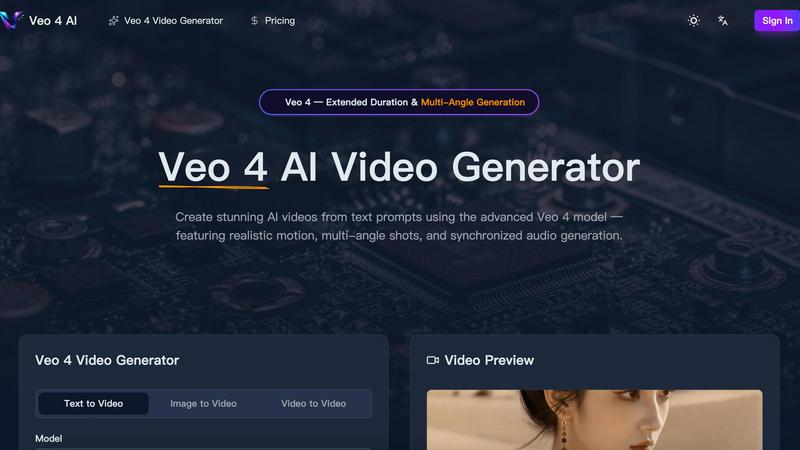
Veo 4 AI instantly creates stunning, realistic videos from your text prompts with synchronized audio and multi-angle shots.
Last updated: March 11, 2026
Visual Comparison
Fluidium

Veo 4 AI
Feature Comparison
Fluidium
Real-Time Interactive Fluids
Fluidium's heart is its incredibly responsive physics engine. Every tap, drag, or swipe sends ripples of color through the digital liquid, blending and reacting with stunning realism. The simulation runs in real-time, meaning there is zero lag between your gesture and the on-screen effect. This immediate feedback loop makes the experience feel tactile and magical, as if you're truly manipulating a viscous, colorful substance directly on your device's screen.
130+ Stunning Visual Presets
Jump right into creativity with a vast library of over 130 beautifully crafted presets. These are pre-configured combinations of color palettes, brush styles, and background effects that range from serene watercolors to energetic neon explosions. This feature is perfect for when you want instant gratification or need a spark of inspiration. Simply browse the collection, tap a preset, and immediately begin interacting with a completely new and unique fluid environment.
Custom Palette & Brush Studio
For those who want full creative control, Fluidium offers deep customization tools. You can design your own color palettes from scratch, choosing exact hues for the fluid, background, and accents. Furthermore, you can tailor your brushes, adjusting parameters like size, flow, and behavior to create your signature painting style. This transforms the app from a simple toy into a powerful digital art tool for creating personalized, shareable masterpieces.
Auto-Play & Recording Modes
Fluidium isn't just for active creation; it's also for relaxation and sharing. The Auto-Play mode lets you sit back and watch as the app generates its own ever-evolving fluid art, perfect for meditation or as a dynamic screen display. When you create something you love, use the built-in recording feature to capture high-quality videos of your sessions. You can then easily share these mesmerizing clips directly to social media, with friends, or save them to your camera roll.
Veo 4 AI
Photorealistic Text-to-Video Generation
Describe any scene in plain English, and watch as Veo 4 AI generates a high-fidelity video that matches your vision. It excels at creating realistic lighting, accurate physics for elements like water and fabric, and natural human movement, turning your prompts into believable, cinematic footage.
Multi-Angle Camera Generation
This powerful feature allows you to generate the same scene from multiple perspectives—like front, side, overhead, and behind—all in a single request. It provides complete creative coverage, making it perfect for creating dynamic sequences without having to generate each shot separately.
Synchronized Audio & Lip-Sync
Veo 4 AI doesn't just create silent movies. It generates dialogue, sound effects, and ambient audio that are perfectly synchronized with the on-screen action. This includes accurate lip-sync for characters across multiple languages, creating a cohesive and professional audiovisual experience from one prompt.
Extended Duration & Cinematic Control
Generate longer video clips with consistent quality, giving you more usable footage for storytelling. Furthermore, you have precise control over the cinematography, allowing you to specify lens types, camera motion, and tracking shots for a truly directorial level of creative input.
Use Cases
Fluidium
Digital Art & Creative Exploration
Artists and hobbyists can use Fluidium as a digital sketchpad for exploring color, form, and motion. The unpredictable nature of the fluid simulation can lead to unexpected and inspiring patterns that can be recorded and used as a basis for other artwork, backgrounds for digital projects, or simply as standalone abstract pieces. It's a fantastic tool for breaking creative blocks and experimenting with visual concepts in a low-pressure, fun environment.
Stress Relief & Mindfulness
The calming, flowing motion of the liquids makes Fluidium an excellent tool for mindfulness and stress relief. Engaging with the gentle, responsive visuals can provide a focused, meditative activity to help quiet the mind. You can use it for short mental breaks during a busy day, or set it to Auto-Play mode to create a serene, animated backdrop that promotes relaxation and reduces anxiety.
Educational Tool for Physics & Color
Teachers and curious minds can use Fluidium to demonstrate principles of fluid dynamics, viscosity, and color theory in an engaging, hands-on way. Watching how colors blend (like digital primary colors mixing into secondaries), how forces propagate through a medium, and how different "brush" settings affect the simulation provides an intuitive understanding of complex concepts that is both educational and entertaining.
Dynamic Visual Display & Entertainment
Turn your iPad or iPhone into a captivating piece of living art for your home or office. When set in Auto-Play mode and placed on a stand, Fluidium acts as a beautiful, ever-changing digital painting or screensaver. It's also a wonderful source of entertainment and a conversation starter when friends are over, allowing everyone to play and create together on a shared screen.
Veo 4 AI
Content Creation for Social Media & Marketing
Quickly produce eye-catching promotional videos, product demos, or branded content for platforms like TikTok, Instagram, and YouTube. Generate diverse scenes and angles to keep your audience engaged without the need for live-action shoots.
Pre-Visualization and Storyboarding for Filmmakers
Directors and screenwriters can use Veo 4 AI to visualize complex scenes before filming. Generate different camera angles and character actions to plan shots, test concepts, and create dynamic animatics or storyboards efficiently.
Educational and Explainer Video Production
Educators and trainers can bring complex concepts to life. Generate videos showing scientific processes, historical reenactments, or animated diagrams from a simple text description, making learning materials more engaging and accessible.
Prototyping for Game and Animation Studios
Game developers and animators can rapidly prototype character movements, environmental effects, or short narrative sequences. This accelerates the creative process, allowing teams to experiment with styles and motions before committing to final, resource-intensive production.
Overview
About Fluidium
Fluidium is a breathtaking interactive art application that transforms your iOS device into a dynamic canvas of flowing color. At its core, it's a real-time fluid simulation that responds instantly to your touch, allowing you to paint with vibrant, swirling liquids. Created by the award-winning developer behind the popular app Uzu, Fluidium is designed for anyone seeking a blend of creative expression, digital relaxation, and visual spectacle. Its main value proposition is delivering a powerful, professional-grade simulation that feels magical and responsive, right at your fingertips. Whether you're an artist looking for inspiration, someone wanting to de-stress with mesmerizing visuals, or just a fan of beautiful technology, Fluidium turns your screen into a living, breathing work of art. You don't need any artistic training to create stunning patterns; simply touch, drag, and watch as complex and endlessly unique visuals unfold in real-time.
About Veo 4 AI
Veo 4 AI is a groundbreaking text-to-video generator that transforms your imagination into stunning, photorealistic video content. Built on Google's most advanced model, it's designed for filmmakers, content creators, marketers, and anyone who wants to produce high-quality video without a film crew or expensive equipment. Simply describe your scene in natural language, and Veo 4 AI brings it to life with incredible detail, realistic motion, and cinematic flair. Its core value lies in democratizing professional video production, offering features like multi-angle shots and synchronized audio generation that were once exclusive to big studios. Whether you're crafting a short film, a social media ad, or an educational clip, Veo 4 AI provides the creative control and quality you need to tell compelling visual stories effortlessly.
Frequently Asked Questions
Fluidium FAQ
What devices is Fluidium compatible with?
Fluidium is built exclusively for iOS devices (iPhone and iPad) using Apple's Metal graphics technology. This ensures it delivers smooth, real-time performance and dazzling visual effects on any supported device, from older models to the latest iPads and iPhones. It is not currently available for Android or desktop computers.
Do I need an internet connection to use Fluidium?
No, you do not. Once Fluidium is downloaded from the App Store, all of its features--including the 130+ presets, custom tools, and recording functions--work completely offline. This makes it a perfect creative and relaxation tool for use anywhere, whether you're on a plane, commuting, or just away from Wi-Fi.
Can I share or export the art I create?
Absolutely! Fluidium includes a robust recording feature that allows you to capture high-quality video of your fluid art sessions. You can save these videos directly to your device's camera roll. From there, you can easily share them on social media platforms, send them to friends via messaging apps, or import them into other video editing software for further use.
Is Fluidium a free app or does it require a purchase?
Fluidium is a premium application that requires a one-time purchase to download from the iOS App Store. The purchase gives you full, unrestricted access to all current and future features, including all presets, customization tools, and recording capabilities, with no subscriptions or additional in-app purchases required.
Veo 4 AI FAQ
What makes Veo 4 better than previous versions?
Veo 4 represents a significant leap forward with stronger character consistency across shots, more realistic and synchronized audio generation, enhanced understanding of complex prompts, and greater control over cinematic elements like camera motion. It produces higher quality, more coherent, and professional-looking videos.
Can I use an image to create a video with Veo 4 AI?
Absolutely! The Image-to-Video feature allows you to upload any still picture. Veo 4 AI will then animate it, adding natural motion, depth, and cinematic camera movement to bring your static image to life in a dynamic video format.
How long can the videos generated by Veo 4 be?
Veo 4 supports extended duration video generation, allowing for longer clips than previous models while maintaining consistent quality. The exact maximum length may vary, but it is designed to provide more footage per generation for better storytelling.
Do I need video editing skills to use Veo 4 AI?
Not at all! Veo 4 AI is built to be user-friendly. You can create stunning videos directly from text prompts. However, for creators who want more control, it offers advanced settings for aspect ratio, resolution, and audio to fine-tune your results without complex software.