
Graph Maker vs Opal44
Side-by-side comparison to help you choose the right AI tool.

Graph Maker
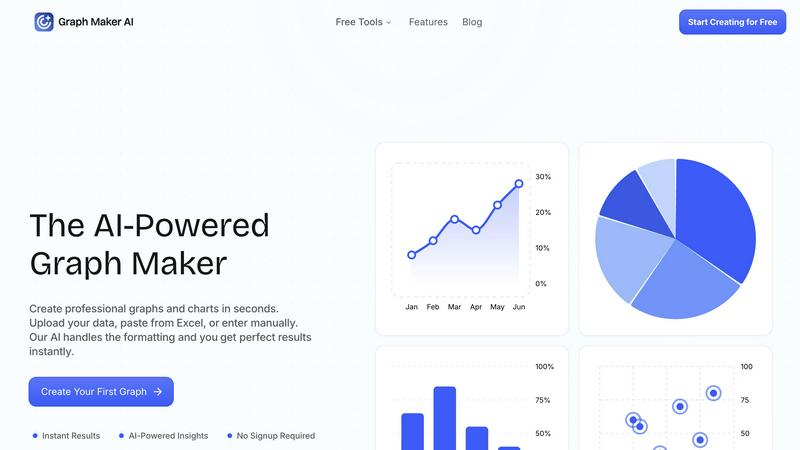
Effortlessly create and customize stunning graphs and charts from your data in seconds with our AI-powered Graph Maker.
Last updated: February 26, 2026

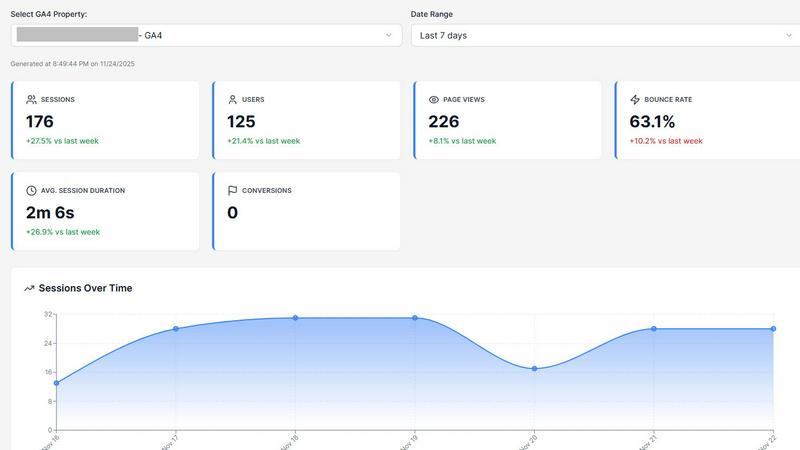
Opal44 explains your website traffic in plain English using AI, so you can make smarter decisions.
Last updated: March 4, 2026
Visual Comparison
Graph Maker
Opal44
Feature Comparison
Graph Maker
Instant Graph Generation
With Graph Maker, simply paste your data and click "Generate." The AI-powered tool creates your graph in seconds, eliminating the need for time-consuming setup or configuration. This feature allows users to visualize data instantly without the hassle.
Fully Editable Graphs
Customize every aspect of your graphs, from themes and colors to labels and legends. This feature ensures that your visualizations can be tailored to meet specific presentation needs or personal preferences, making it easy to achieve the perfect look for your data.
Automatic AI Insights
Graph Maker doesn’t just create graphs; it also generates clear insights from your data. The AI analyzes trends, proportions, distributions, and correlations, helping you tell a meaningful story with your charts rather than just presenting numbers.
Multiple Graph Types
Choose from a variety of graph types, including line graphs, pie charts, bar graphs, and scatter plots. Each option is powered by AI, making it effortless to select the visualization that best fits your data and your goals.
Opal44
Plain English Insights
This is the heart of Opal44. The AI analyzes your connected GA4 data and explains trends, spikes, drops, and user behavior in simple, everyday language you can actually understand. Instead of seeing "Sessions: 5,432," you'll get an insight like, "Your traffic from social media increased by 20% this week, driven mainly by your latest LinkedIn post." It removes the guesswork and technical barrier, making analytics accessible to everyone on your team.
Conversation-Style Reports
Forget dry, static PDFs. Opal44 delivers updates and reports that read like a natural conversation. Imagine getting a summary that says, "Hey, I noticed your blog traffic dipped on Tuesday. It looks like the drop came from organic search, possibly because a key page lost some ranking. Here's a link to that page and a tip on how to improve its content." This approach makes digesting information faster and more engaging.
Smart, Data-Driven Tips
Opal44 doesn't just tell you what happened; it suggests what to do next. Based on your specific data, the AI provides tailored recommendations to help you improve. For example, it might say, "Your product page has a high bounce rate. Consider adding a video demo or more customer testimonials to keep visitors engaged," giving you a clear, actionable next step backed by your own numbers.
Real-Time Alerts
Stay informed instantly about critical changes in your website traffic. Opal44 monitors your GA4 data and sends you alerts for significant events, like an unexpected traffic spike, a sudden drop in conversions, or unusual user activity. This allows you to react quickly to opportunities or address potential issues before they impact your business, all without needing to constantly check your analytics dashboard.
Use Cases
Graph Maker
Students and Educators
Students can leverage Graph Maker for homework, science projects, and presentations, while educators can create engaging graphs for lessons and classroom materials. The tool's simplicity allows users to focus on learning rather than struggling with complex software.
Marketers and Content Creators
Marketing teams utilize Graph Maker to visualize campaign data, create social media graphics, and generate client reports. By turning spreadsheets into shareable visuals quickly, they enhance their storytelling and communication efforts.
Business Analysts and Data Professionals
Data professionals can streamline their workflow by using Graph Maker to replace tedious Excel tasks. The tool allows for quick visualizations, enabling analysts to focus on extracting insights rather than formatting data.
Researchers and Scientists
Researchers can use Graph Maker to visualize their findings in a professional manner. Whether presenting statistical analysis or displaying experimental data, the tool makes it easy to create compelling graphs that enhance the impact of their research.
Opal44
For Small Business Owners
Small business owners wear many hats and rarely have time to decipher analytics. Opal44 helps them understand which marketing efforts are actually bringing in customers, which pages are most popular, and where visitors might be leaving their site. This allows them to make informed decisions about where to spend their limited time and budget, like focusing on a social platform that's driving real sales.
For Marketing Teams
Marketing teams can use Opal44 to streamline reporting and strategy meetings. Instead of preparing complex data slides, they can share clear, conversational insights about campaign performance, content engagement, and audience demographics. This clarity helps align the entire team, justify marketing spend with concrete data, and quickly pivot strategies based on what the AI reveals is working or not.
For Digital Agencies
Agencies can leverage Opal44 to provide exceptional value to their clients. They can generate easy-to-understand reports that clients will actually read and appreciate, demonstrating clear ROI. The plain English explanations and smart tips also empower agencies to offer strategic advice without needing a dedicated data analyst, improving client satisfaction and retention.
For Content Creators & Bloggers
Content creators can use Opal44 to understand what resonates with their audience. They can ask questions like, "Which of my blog posts performed best last month?" and get a simple breakdown of traffic sources, read time, and engagement. The AI's tips can guide them on what topics to write about next or how to optimize existing content for better reach and impact.
Overview
About Graph Maker
Graph Maker is an innovative AI-powered tool that revolutionizes the way you create professional graphs and charts. Designed for users of all backgrounds—from students and educators to marketers and business analysts—Graph Maker simplifies the data visualization process. You can easily upload your data, paste it from Excel, or input it manually, and the tool's advanced AI takes care of the formatting and design aspects, delivering perfect results in seconds. The primary value proposition of Graph Maker is its ability to save you time and effort; with no signup required, you can start creating visually appealing graphs immediately. Whether you need to illustrate trends, compare data, or present insights, Graph Maker provides an accessible solution that turns your raw data into clear, engaging visuals in no time.
About Opal44
Opal44 is your friendly, AI-powered guide to understanding your website's performance. It connects directly to your Google Analytics 4 (GA4) account and translates complex data into simple, actionable insights using plain English. If you've ever felt overwhelmed by confusing dashboards, technical jargon, and endless rows of numbers, Opal44 is the solution. It's designed for business owners, marketers, content creators, and agency professionals who need to make data-driven decisions but don't have the time or expertise to become analytics experts. The core value proposition is clarity: you ask simple questions about your traffic, conversions, or user behavior, and Opal44 provides clear answers and smart recommendations. With a focus on security and ease of use, it offers a code-free setup in minutes, real-time alerts for significant changes, and conversational reports that feel like chatting with a knowledgeable colleague. Opal44 empowers you to stop guessing and start understanding exactly what's happening on your site, so you can focus on growing your business.
Frequently Asked Questions
Graph Maker FAQ
How does Graph Maker handle data formatting?
Graph Maker's AI automatically cleans and formats your data upon input. This means you can spend less time on data preparation and more time on analyzing and understanding your results.
Do I need to create an account to use Graph Maker?
No, there is no signup required to use Graph Maker. You can start creating your graphs immediately, making it a hassle-free experience for all users.
Can I customize the graphs I create?
Absolutely! Graph Maker allows you to customize various elements of your graphs, including themes, labels, and legends, ensuring that your visualizations meet your specific needs.
What types of graphs can I create with Graph Maker?
Graph Maker offers a wide range of graph types, including line graphs, pie charts, bar graphs, and scatter plots. You can choose the type that best represents your data and insights.
Opal44 FAQ
How does Opal44 connect to my data?
Opal44 connects securely and directly to your Google Analytics 4 (GA4) account using a secure, read-only connection. This means we can view your data to generate insights, but we cannot alter any data within your GA4 property. The setup is code-free and typically takes just a couple of minutes through a simple authentication process with Google.
What are "credits" in your pricing?
Credits are the unit used for AI actions within Opal44. Each time you ask a question, generate a report, or receive an automated insight, it consumes a small number of credits. Our pricing plans include a monthly allowance of credits (e.g., 5,000 in the Starter plan). This system ensures you pay for the level of usage that matches your needs.
Is my GA4 data safe with Opal44?
Absolutely. Your data security and privacy are our top priorities. We use a secure, read-only connection to your GA4 account. We never sell, share, or use your data for training unrelated AI models. Your information stays yours, and you maintain full control. You can disconnect your GA4 account from Opal44 at any time.
Can I try Opal44 for free?
Yes! We offer a 7-day free trial that includes 50 AI credits to explore the platform. This allows you to connect your GA4 account, ask questions, and see the plain-English insights for yourself. No credit card is required to start the trial, so you can test it risk-free and decide if it's the right tool for you.
Alternatives
Graph Maker Alternatives
Graph Maker is an innovative AI-powered tool that enables users to create professional graphs and charts in just seconds. It falls under the categories of AI Assistants, Analytics & Data, Business Intelligence, and Data Visualization. Users often seek alternatives to Graph Maker due to various reasons such as pricing, specific feature requirements, or compatibility with different platforms. Selecting the right alternative involves considering aspects like user-friendliness, customization options, data handling capabilities, and overall performance to ensure that it meets your unique graphing needs. When exploring alternatives, it's essential to evaluate how well the tool integrates with your existing workflows and whether it can handle the types of data you typically work with. Additionally, consider the level of support and resources available for users, as well as any trial periods that allow you to test the software before committing. This way, you can find a solution that best fits your requirements and enhances your data visualization experience.
Opal44 Alternatives
Opal44 is a business intelligence tool that uses AI to simplify your Google Analytics 4 data. It translates complex website metrics into clear, actionable insights you can get just by asking questions in plain English, removing the usual jargon and steep learning curve. People often explore alternatives to tools like Opal44 for various reasons. You might be looking for a different price point, need specific integrations with other platforms in your tech stack, or require more advanced, hands-on reporting features beyond conversational AI. It's a normal part of finding the perfect fit for your business needs and budget. When evaluating other options, consider what matters most to you. Key factors include the overall cost and pricing model, the specific features and depth of analysis offered, how easily it connects to your existing tools, and the quality of the support and user experience. Focusing on these areas will help you find a solution that truly works for your workflow.