
OGimagen vs OnUml
Side-by-side comparison to help you choose the right AI tool.

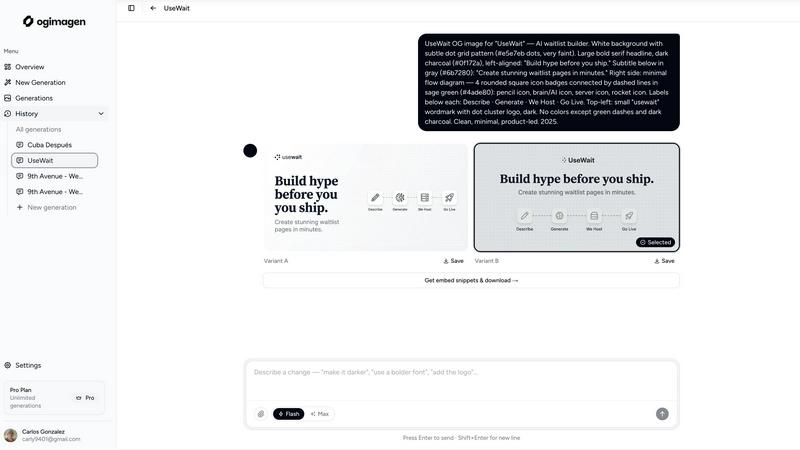
OGimagen instantly creates beautiful, platform-perfect social images and meta tags from your content.
Last updated: March 11, 2026

OnUml
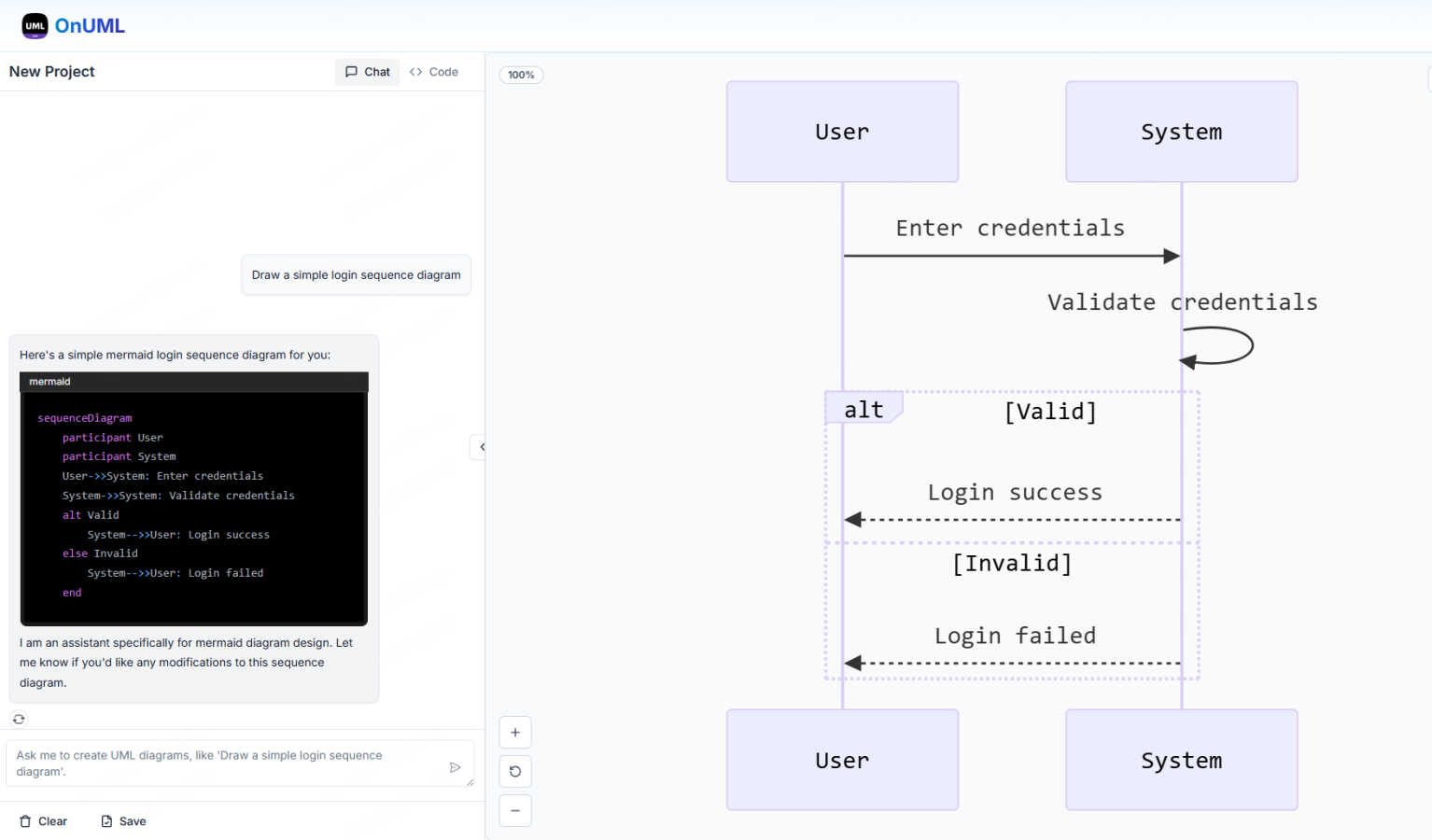
OnUML instantly creates professional UML diagrams from your natural language descriptions or Mermaid code with AI.
Last updated: March 1, 2026
Visual Comparison
OGimagen
OnUml
Feature Comparison
OGimagen
AI-Powered Generation
Simply enter your title and description, and OGimagen's AI will instantly create two beautiful, unique image variants for you to choose from. The AI handles the design, typography, and layout, ensuring a polished and professional result every time. You can further customize the output with your brand color and select from different style presets to match your project's aesthetic, all without any design skills required.
Multi-Platform Optimization
OGimagen doesn't just create one image; it automatically generates and optimizes three different formats from a single generation to meet each platform's specific requirements. You get a 1200x630px image for Facebook and other OG platforms, a 1200x600px Twitter Card, and a 1200x627px LinkedIn Card. This ensures your preview looks pixel-perfect everywhere your link is shared, saving you from manually resizing and reformatting.
Framework-Specific Meta Tags
After generating your images, OGimagen provides ready-to-paste code snippets for your specific web framework. Free users get the standard HTML meta tags, while Pro users unlock snippets for modern frameworks like Next.js (App and Pages Router), Astro, SvelteKit, and Remix. This feature eliminates the guesswork and manual coding, letting you ship your new social cards in seconds.
MCP (Model Context Protocol) Integration
For Pro users, OGimagen integrates directly into your coding workflow through MCP. You can connect it to tools like Claude Code, Cursor, or Windsurf and generate images, list past generations, and grab embed snippets without ever leaving your code editor. This seamless integration is a game-changer for developers who want to maintain their flow and efficiency.
OnUml
AI Smart Chat
The AI Smart Chat feature allows users to describe their requirements in natural language, making it easy to generate professional UML diagrams instantly. This eliminates the need for technical jargon, enabling anyone to create diagrams regardless of their expertise level.
Smart Suggestions
OnUml offers smart suggestions through an intuitive interface, providing design recommendations that enhance the UML creation process. This feature helps users make informed decisions about diagram structures and elements, improving overall diagram quality.
Multi-diagram Support
With multi-diagram support, OnUml enables users to generate various types of UML diagrams, including flowcharts, sequence diagrams, and class diagrams. The intelligent type recommendations ensure that users create the right diagram for their needs without confusion.
Real-time Rendering
The real-time rendering feature provides a WYSIWYG editing experience where diagrams update instantly as users type or chat. This allows for a dynamic and interactive diagram creation process, making it easy to visualize changes on the fly.
Use Cases
OGimagen
Blog Post Promotion
Every time you publish a new blog post, you need an eye-catching social preview. With OGimagen, you can generate a unique, branded image for each article in seconds. Simply input the post's title and a short excerpt, and you have a professional card ready to boost shares and clicks when you or your readers share the link on social media.
SaaS Product Launches
When launching a new feature or product, first impressions on social platforms are critical. OGimagen allows SaaS teams to quickly create consistent, high-quality Open Graph images that reflect their brand. This ensures that every announcement link shared on LinkedIn, Twitter, or in community channels like Discord looks polished and trustworthy.
Developer Workflow Integration
Developers building websites can integrate OGimagen's MCP feature directly into their editor. While coding a new page or component, they can generate the required OG image on the fly and immediately insert the correct meta tags into their Next.js or Astro project. This streamlines the development process and ensures no page goes live without proper social previews.
Marketing Campaigns
For marketing teams running campaigns with multiple landing pages or content pieces, creating individual social images can be a bottleneck. OGimagen scales this process effortlessly. Team members can generate a batch of on-brand images for all campaign assets quickly, ensuring visual consistency and saving valuable design resources.
OnUml
Software Development
Developers can use OnUml to create UML diagrams that illustrate system architecture, workflows, and processes, facilitating better communication and understanding among team members. This is particularly useful in agile environments where quick iterations are essential.
Technical Documentation
Technical writers can leverage OnUml to produce accurate and visually appealing UML diagrams for user manuals, API documentation, and other technical content. The ease of use and real-time updates streamline the documentation process significantly.
Educational Purposes
Teachers and students can utilize OnUml for educational purposes, creating diagrams that help explain complex concepts in software engineering and systems design. The platform's accessibility makes it ideal for learners at all levels.
System Design Workshops
In workshops focused on system design, participants can use OnUml to collaboratively create and refine UML diagrams in real time. The AI-powered features facilitate discussions and help to quickly visualize ideas, enhancing the collaborative experience.
Overview
About OGimagen
OGimagen is your AI-powered assistant for creating stunning Open Graph images in seconds. It's designed for developers, content creators, and marketers who want their shared links to look professional and engaging without the hassle of manual design work. The tool takes your content—like a title and description—and uses artificial intelligence to generate beautiful, production-ready social card images that are perfectly optimized for platforms like Facebook, Twitter (X), and LinkedIn. Beyond just creating images, OGimagen provides the exact meta tag snippets you need to embed them into your website, whether you're using Next.js, Astro, SvelteKit, or plain HTML. This end-to-end solution ensures your links stand out in feeds, helping to dramatically improve click-through rates with minimal effort. You can even try it instantly without signing up, making it the fastest way to level up your link previews.
About OnUml
OnUml is a free, browser-based diagramming tool that empowers users to create professional UML diagrams and flowcharts effortlessly. It caters to developers, technical writers, software architects, and anyone looking to visualize complex processes or system designs. Utilizing the robust capabilities of Mermaid.js, a popular text-to-diagram library, OnUml enhances the diagram creation experience with an intelligent AI assistant. Users can either write Mermaid code directly in a user-friendly editor or describe their diagram ideas in plain English, with the AI instantly generating the appropriate code. This unique combination of AI and an intuitive interface eliminates the steep learning curve typical of diagramming tools, allowing for a seamless workflow. With real-time WYSIWYG (What You See Is What You Get) previews, users can create, edit, and perfect their diagrams without the need for installations or complicated software, making OnUml a simple and fast solution for all your diagramming needs.
Frequently Asked Questions
OGimagen FAQ
How does AI generation work?
OGimagen's AI analyzes the text content you provide, such as your title and description, to understand the context and key elements. It then applies design principles, typography, and layout rules to create a visually appealing image that highlights your content. You can guide the style with presets and brand colors, but the AI handles the creative composition, ensuring a unique and professional result every time.
What's the difference between Starter, Growth, and Pro?
Starter and Growth are one-time purchase packs for 10 and 25 generations, respectively, with CDN hosting for 45 or 90 days. The Pro plan is a monthly subscription that includes 50 generations per month, permanent CDN hosting, and exclusive access to the MCP integration for editor workflow tools. Pro is designed for ongoing, high-volume use with priority processing.
What is MCP integration?
MCP (Model Context Protocol) integration allows OGimagen to connect directly with compatible code editors and AI assistants like Claude Code, Cursor, and Windsurf. Once connected, you can generate images, access your generation history, and copy embed code snippets through commands within your editor, without switching to a web browser. This is a Pro plan feature.
Which frameworks are supported for meta tag snippets?
OGimagen provides snippets for a wide range of frameworks. All users get plain HTML. Pro users additionally get framework-specific snippets for Next.js (both App Router and Pages Router), Astro, SvelteKit, and Remix. This ensures you have the correct, optimized code structure for your project's architecture.
OnUml FAQ
Will my chat content be used for AI training?
No, your chat content is not used for AI training. OnUml prioritizes user privacy and confidentiality, ensuring that your data remains secure and is not utilized for training purposes.
Are there any usage limits?
Currently, OnUml is free to use with no registration required, allowing users to create UML diagrams without any significant usage limits. This makes it accessible for everyone, whether for personal or professional projects.
What types of UML diagrams are supported?
OnUml supports a wide range of UML diagrams, including flowcharts, sequence diagrams, class diagrams, state diagrams, and more. The platform's flexibility enables users to create the diagrams they need for various applications.
How can I save my diagrams?
Users can save their diagrams by exporting them in various formats such as PNG and SVG. This feature allows for easy sharing and integration into other documents or presentations, making it convenient for different use cases.
Alternatives
OGimagen Alternatives
OGimagen is an AI-powered tool in the developer tools category, designed to create beautiful Open Graph images quickly. It helps developers and content creators generate production-ready social cards that make shared links look professional and engaging, ultimately boosting click-through rates on social media. People often explore alternatives for various reasons. This could be due to budget constraints, needing a different set of features, or requiring integration with a specific platform or workflow. Some may seek more design control, while others prioritize simplicity or a different pricing model. When evaluating other options, consider your core needs. Look at the balance between ease of use and customization, the quality and speed of the AI image generation, compatibility with your tech stack, and of course, the overall value for the price. The right tool should fit seamlessly into your process and help you create stunning previews without extra hassle.
OnUml Alternatives
OnUml is an innovative, browser-based diagramming tool that allows users to create UML diagrams and flowcharts effortlessly. By leveraging the power of AI and Mermaid.js, it simplifies the diagramming process, making it accessible for developers, technical writers, and software architects alike. Its unique features, such as AI Smart Chat and live diagram rendering, cater to users looking for a smooth and intuitive design experience. Users often seek alternatives to OnUml for various reasons, including pricing, feature sets, or specific platform compatibility needs. When exploring alternatives, it’s essential to consider the ease of use, the range of diagramming options available, and whether the tool can handle your specific requirements effectively. Finding a solution that balances functionality with user-friendly design will ensure a more productive diagramming experience.