
OnUml vs OpenAI Tools Hub
Side-by-side comparison to help you choose the right AI tool.

OnUml
OnUML instantly creates professional UML diagrams from your natural language descriptions or Mermaid code with AI.
Last updated: March 1, 2026

OpenAI Tools Hub
Discover expert AI tool reviews, comparisons, and 33+ free developer tools without signup, all designed to enhance your workflow.
Last updated: March 11, 2026
Visual Comparison
OnUml
OpenAI Tools Hub

Feature Comparison
OnUml
AI Smart Chat
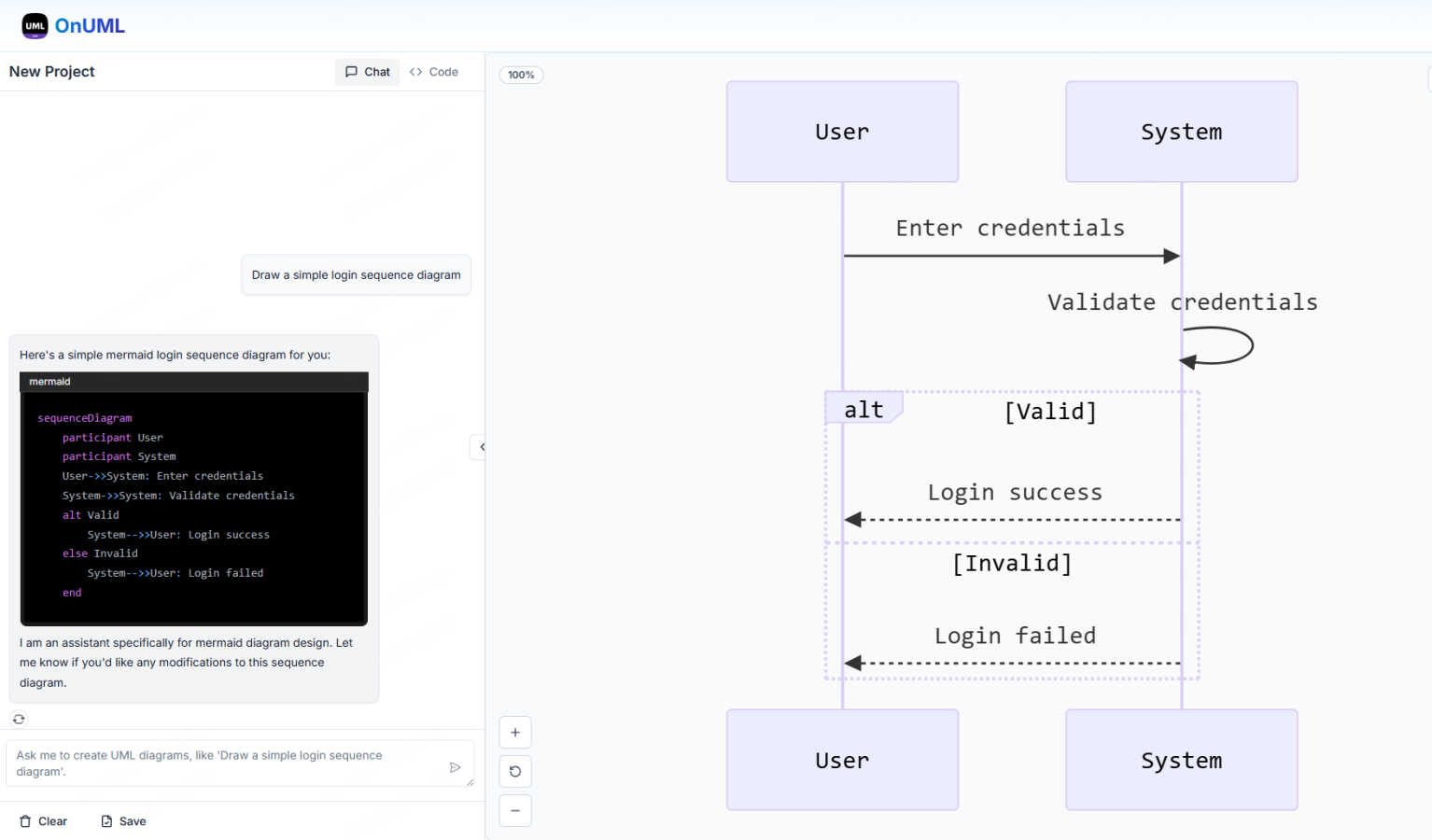
The AI Smart Chat feature allows users to describe their requirements in natural language, making it easy to generate professional UML diagrams instantly. This eliminates the need for technical jargon, enabling anyone to create diagrams regardless of their expertise level.
Smart Suggestions
OnUml offers smart suggestions through an intuitive interface, providing design recommendations that enhance the UML creation process. This feature helps users make informed decisions about diagram structures and elements, improving overall diagram quality.
Multi-diagram Support
With multi-diagram support, OnUml enables users to generate various types of UML diagrams, including flowcharts, sequence diagrams, and class diagrams. The intelligent type recommendations ensure that users create the right diagram for their needs without confusion.
Real-time Rendering
The real-time rendering feature provides a WYSIWYG editing experience where diagrams update instantly as users type or chat. This allows for a dynamic and interactive diagram creation process, making it easy to visualize changes on the fly.
OpenAI Tools Hub
Expert Reviews
OpenAI Tools Hub features in-depth expert reviews of various AI tools, providing reliable ratings based on comprehensive testing. Each review includes detailed insights into performance, usability, and pricing. This transparency allows users to select tools that best fit their needs without falling for biased marketing claims.
Head-to-Head Comparisons
The platform offers side-by-side comparisons of competing tools, allowing users to evaluate features, pricing, and overall value at a glance. This makes it easier to identify which AI solution is the best fit for specific applications, whether it be for writing, coding, or other creative tasks.
AI Skills Map
The AI Skills Map is a unique feature that provides a directory of over 349 community-built skills specifically for Claude Code. Users can browse, install, and share skills, enhancing their development experience and expanding their capabilities in AI tool usage.
Free Developer Tools
OpenAI Tools Hub provides more than 33 free developer tools, including utilities like an AI ROI calculator, JSON to YAML converter, and a regex tester. These tools are available without any sign-up or account requirements, making them easy to access and use for various development tasks.
Use Cases
OnUml
Software Development
Developers can use OnUml to create UML diagrams that illustrate system architecture, workflows, and processes, facilitating better communication and understanding among team members. This is particularly useful in agile environments where quick iterations are essential.
Technical Documentation
Technical writers can leverage OnUml to produce accurate and visually appealing UML diagrams for user manuals, API documentation, and other technical content. The ease of use and real-time updates streamline the documentation process significantly.
Educational Purposes
Teachers and students can utilize OnUml for educational purposes, creating diagrams that help explain complex concepts in software engineering and systems design. The platform's accessibility makes it ideal for learners at all levels.
System Design Workshops
In workshops focused on system design, participants can use OnUml to collaboratively create and refine UML diagrams in real time. The AI-powered features facilitate discussions and help to quickly visualize ideas, enhancing the collaborative experience.
OpenAI Tools Hub
For Developers
Developers can leverage OpenAI Tools Hub to find the best AI coding assistants, compare different tools, and access free utilities that enhance their workflow. With hands-on reviews and comparisons, they can make informed choices that improve their coding efficiency and productivity.
For Marketers
Marketers can benefit from the honest reviews and comparisons of AI tools focused on content generation, SEO, and customer engagement. By understanding the strengths and weaknesses of various platforms, they can select the right tools that align with their marketing strategies.
For Creatives
Creatives looking for AI tools for writing, image generation, or video production can explore the expert-reviewed resources on OpenAI Tools Hub. The platform's comprehensive insights help them choose tools that enhance their creative processes and output quality.
For Educators
Educators and trainers can utilize OpenAI Tools Hub to discover AI tools that can aid in teaching and learning processes. By comparing different educational tools and accessing free resources, they can select the best options to support their students’ learning experiences.
Overview
About OnUml
OnUml is a free, browser-based diagramming tool that empowers users to create professional UML diagrams and flowcharts effortlessly. It caters to developers, technical writers, software architects, and anyone looking to visualize complex processes or system designs. Utilizing the robust capabilities of Mermaid.js, a popular text-to-diagram library, OnUml enhances the diagram creation experience with an intelligent AI assistant. Users can either write Mermaid code directly in a user-friendly editor or describe their diagram ideas in plain English, with the AI instantly generating the appropriate code. This unique combination of AI and an intuitive interface eliminates the steep learning curve typical of diagramming tools, allowing for a seamless workflow. With real-time WYSIWYG (What You See Is What You Get) previews, users can create, edit, and perfect their diagrams without the need for installations or complicated software, making OnUml a simple and fast solution for all your diagramming needs.
About OpenAI Tools Hub
OpenAI Tools Hub is a comprehensive and free resource tailored specifically for developers, marketers, and creatives seeking unbiased reviews and comparisons of AI tools. With a focus on popular platforms like ChatGPT, Claude, Gemini, GitHub Copilot, and Cursor, OpenAI Tools Hub offers hands-on testing and honest analysis, ensuring that users make informed decisions. The platform boasts over 50 AI tools, providing real-world insights and ratings that are not influenced by paid rankings. Users can also access a variety of free resources, including an AI Skills Map featuring over 349 skills, a Backlinks Directory, and essential developer utilities. Notably, OpenAI Tools Hub doesn't require any sign-up or account creation, making it an accessible destination for anyone looking to explore and utilize AI technology effectively.
Frequently Asked Questions
OnUml FAQ
Will my chat content be used for AI training?
No, your chat content is not used for AI training. OnUml prioritizes user privacy and confidentiality, ensuring that your data remains secure and is not utilized for training purposes.
Are there any usage limits?
Currently, OnUml is free to use with no registration required, allowing users to create UML diagrams without any significant usage limits. This makes it accessible for everyone, whether for personal or professional projects.
What types of UML diagrams are supported?
OnUml supports a wide range of UML diagrams, including flowcharts, sequence diagrams, class diagrams, state diagrams, and more. The platform's flexibility enables users to create the diagrams they need for various applications.
How can I save my diagrams?
Users can save their diagrams by exporting them in various formats such as PNG and SVG. This feature allows for easy sharing and integration into other documents or presentations, making it convenient for different use cases.
OpenAI Tools Hub FAQ
What types of AI tools are reviewed on OpenAI Tools Hub?
OpenAI Tools Hub reviews a wide range of AI tools, including chatbots, writing assistants, image generation software, coding tools, video AI, audio AI, productivity enhancers, and marketing solutions.
Is there a cost to access the reviews and tools on OpenAI Tools Hub?
No, OpenAI Tools Hub is completely free to use. Users can access expert reviews, comparisons, and over 33 free developer tools without the need for sign-up or account creation.
How does OpenAI Tools Hub ensure the integrity of its reviews?
OpenAI Tools Hub tests every AI tool hands-on and publishes real ratings based on thorough analysis. The platform does not accept paid rankings, ensuring unbiased and honest reviews for its users.
Can I contribute to the AI Skills Map?
Yes, users can browse, install, and share community-built skills within the AI Skills Map. This collaborative feature allows developers to contribute their skills, enhancing the overall resource for the community.
Alternatives
OnUml Alternatives
OnUml is an innovative, browser-based diagramming tool that allows users to create UML diagrams and flowcharts effortlessly. By leveraging the power of AI and Mermaid.js, it simplifies the diagramming process, making it accessible for developers, technical writers, and software architects alike. Its unique features, such as AI Smart Chat and live diagram rendering, cater to users looking for a smooth and intuitive design experience. Users often seek alternatives to OnUml for various reasons, including pricing, feature sets, or specific platform compatibility needs. When exploring alternatives, it’s essential to consider the ease of use, the range of diagramming options available, and whether the tool can handle your specific requirements effectively. Finding a solution that balances functionality with user-friendly design will ensure a more productive diagramming experience.
OpenAI Tools Hub Alternatives
OpenAI Tools Hub is a comprehensive resource designed for developers, marketers, and creatives seeking unbiased reviews and comparisons of various AI tools. By providing insights into platforms like ChatGPT, Claude, and GitHub Copilot, it falls into the category of AI tool comparison and review hubs. Users often seek alternatives to OpenAI Tools Hub for various reasons, including pricing concerns, specific feature requirements, or compatibility with different platforms. When looking for an alternative, it's essential to consider factors such as the breadth of tools covered, the depth of analysis, ease of access, and additional resources available without the need for signup. --- [{"question": "What is OpenAI Tools Hub?", "answer": "OpenAI Tools Hub is a free resource offering expert AI tool reviews and comparisons, covering over 50 AI platforms."}, {"question": "Who is OpenAI Tools Hub for?", "answer": "OpenAI Tools Hub is designed for developers, marketers, and creatives looking for unbiased insights into AI tools."}, {"question": "Is OpenAI Tools Hub free?", "answer": "Yes, OpenAI Tools Hub is completely free to use, with no signup required."}, {"question": "What are the main features of OpenAI Tools Hub?", "answer": "Main features include AI tool reviews, comparisons, and free developer utilities like an AI Skills Map and a Backlinks Directory."}]