
Pathoura vs Read PDF Aloud
Side-by-side comparison to help you choose the right AI tool.

Pathoura creates instant multilingual audio guides for museums using visitors' own smartphones.
Last updated: March 1, 2026

Read PDF Aloud
Easily listen to any PDF document aloud in natural voices, including scanned files, with 142 language options.
Last updated: February 26, 2026
Visual Comparison
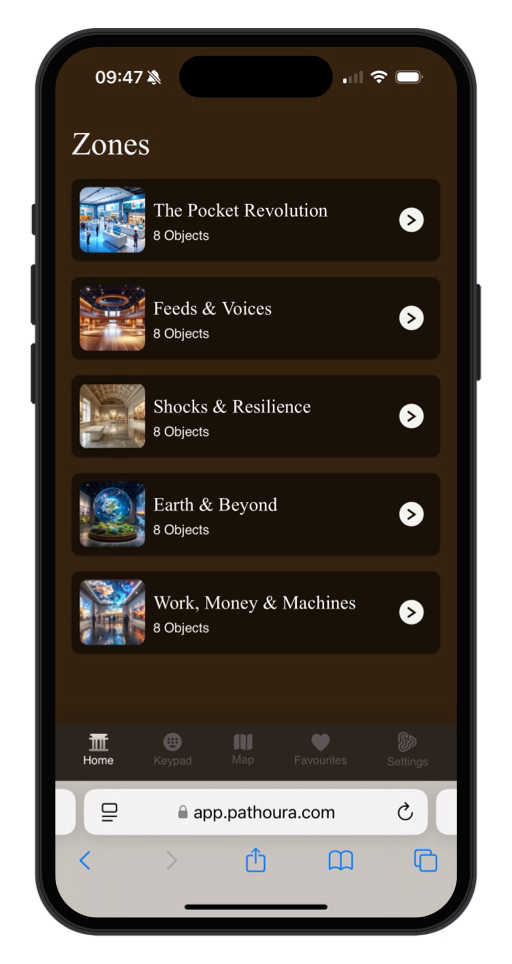
Pathoura
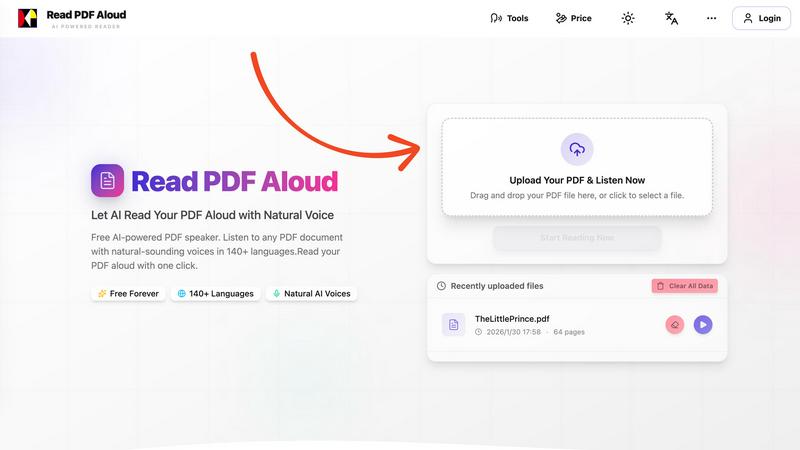
Read PDF Aloud
Feature Comparison
Pathoura
AI-Powered Translation & Narration
Pathoura's advanced AI instantly translates your exhibit text and scripts into over 20 languages. It then generates expressive, human-sounding audio narrations in seconds, eliminating the need for costly and time-consuming studio recordings. You maintain full control, with the ability to preview and fine-tune translations and voice outputs before publishing, ensuring accuracy and the right tone for your stories.
No-App, Smartphone-Based Access
Visitors access your audio guides instantly using their own devices. By simply scanning a QR code or typing an exhibit number into their mobile browser, they get immediate access to the full tour. This removes the friction of app downloads, device rentals, and long queues, providing a smooth start to the visitor experience while saving your institution significant hardware and maintenance costs.
Intuitive Content Management Dashboard
The platform provides a user-friendly dashboard where your team can easily create and manage entire tours. You can add exhibit titles, detailed descriptions, images, and even upload existing audio files. Content is automatically saved and can be organized into zones or themes, making it simple to build, update, and maintain your guides as exhibitions evolve.
Sustainable & Inclusive Operation
Pathoura is designed for sustainability and inclusivity. By eliminating physical devices, you reduce electronic waste and operational costs. More importantly, multilingual interpretation is built into the core workflow, allowing you to serve a global audience effortlessly. This makes your institution more accessible and welcoming to international visitors and non-native speakers by default.
Read PDF Aloud
Free to Use
Read PDF Aloud offers free daily credits to all registered users, making it easy for anyone to enjoy its features without any cost. Just log in, and you can start converting your PDFs into audio instantly.
PDF OCR
With advanced Optical Character Recognition (OCR) technology, Read PDF Aloud can read not just standard PDFs but also scanned documents. This means you can upload any PDF file, and the application will identify and extract the text for you to listen to.
Natural AI Voices
Enjoy a diverse selection of realistic AI voices with different accents and tones. Choose from hundreds of natural-sounding voice options to enhance your listening experience, ensuring that the narration suits your content perfectly.
Cross-Platform Compatibility
Read PDF Aloud works seamlessly across various devices and operating systems. Whether you are using Windows, Mac, iPhone, iPad, Android, or Linux, you can access the application from any modern browser without any installation required.
Use Cases
Pathoura
Small Museums with Limited Budgets
For small or community-run museums, Pathoura is a game-changer. It provides a professional audio guide solution without the prohibitive upfront investment in hardware or studio recording sessions. Staff can create and update engaging, multilingual tours in-house, dramatically enhancing the visitor experience and making their collections accessible to a wider audience on a modest budget.
Traveling or Temporary Exhibitions
Institutions hosting special or traveling exhibitions can use Pathoura to create tailored audio content quickly and efficiently. Instead of investing in temporary hardware, you can generate a specific tour for the exhibition, complete with translations. Once the exhibition ends, you can archive or repurpose the content, making it a flexible and cost-effective solution for short-term events.
Heritage Sites and Outdoor Locations
Pathoura is ideal for outdoor heritage sites, sculpture parks, or historical walking tours. Visitors can access the guide on their personal smartphones as they move through the site by scanning QR codes at different points of interest. This provides a rich, contextual narrative without the logistical challenges and potential damage or loss associated with loaning out physical audio devices in open environments.
Educational Programs and School Groups
Museums can create specialized audio tours for educational programs or school groups. Educators can develop age-appropriate content and even multiple language options for diverse classrooms. Students use their own devices (or provided tablets) to engage with the material interactively, fostering a more immersive and self-paced learning experience during their visit.
Read PDF Aloud
Studying for Exams
Students can use Read PDF Aloud to listen to their study materials, making it easier to absorb information. This auditory approach helps reinforce learning and can improve retention rates for complex subjects.
Proofreading Documents
Writers and editors can benefit from hearing their documents read aloud, allowing them to catch mistakes or awkward phrasing that they might miss during traditional reading. It's a perfect tool for enhancing the editing process.
Enjoying eBooks on the Go
For avid readers, Read PDF Aloud provides a convenient way to enjoy eBooks while commuting or during other activities. Simply upload your eBook PDF and listen to it as you go about your day.
Accessibility for Visual Impairments
Individuals with visual impairments can use Read PDF Aloud to access written content easily. The application empowers users by providing them with a way to engage with text that they might otherwise find challenging to read.
Overview
About Pathoura
Pathoura is a modern, AI-powered audio guide platform designed to transform how museums, galleries, and heritage sites engage with their visitors. It replaces the traditional, cumbersome model of physical audio devices and expensive studio recordings with a simple, web-based solution that runs directly on a visitor's own smartphone. The core mission is to empower cultural institutions of all sizes—from small local museums to large national galleries—to deliver rich, immersive storytelling effortlessly and affordably. With Pathoura, staff can use an intuitive online dashboard to create tours, upload exhibit information and images, and organize visitor routes. The platform's advanced AI then handles the heavy lifting, instantly translating content into 20+ languages and generating natural-sounding voice narrations. For visitors, the experience is seamless: they simply scan a QR code or enter an exhibit number on their phone to access the guide instantly, with no app download required. This eliminates hardware costs, maintenance, and e-waste while making multilingual content accessible by default. Pathoura also includes built-in tools for tour monetization or donations, helping institutions grow sustainably. Ultimately, Pathoura lets museums focus on what they do best—telling compelling stories—by removing the technical and financial barriers to high-quality, inclusive interpretation.
About Read PDF Aloud
Read PDF Aloud is an innovative browser-based application that revolutionizes how you interact with PDF documents by converting them into natural-sounding speech. With its cutting-edge AI technology, it supports over 142 languages and numerous voice options, making it an ideal tool for a diverse audience, including students, professionals, and casual readers. Whether you have a simple text PDF or a complex scanned document, Read PDF Aloud ensures you can listen to your content effortlessly. Its local-first processing philosophy means your data remains secure within your browser, providing a smooth experience across devices such as Windows, Mac, iPhone, iPad, and Android. The application is designed for seamless use, allowing you to pick up where you left off without any hassle. This accessibility is especially beneficial for those who prefer auditory learning or need assistance with reading due to visual impairments or language barriers. With Read PDF Aloud, you can easily proofread documents, study for exams, or simply enjoy your favorite eBooks while on the move.
Frequently Asked Questions
Pathoura FAQ
Do visitors need to download an app to use Pathoura?
No, visitors do not need to download any app. The audio guide is entirely web-based and works directly in a mobile phone's internet browser. Visitors simply scan the QR code placed next to an exhibit or enter the exhibit number on your dedicated Pathoura tour page to start listening instantly.
How accurate are the AI translations and voice narrations?
Pathoura uses advanced AI models designed for high-quality translation and voice synthesis. The translations are context-aware to handle specialized museum terminology effectively. The generated narrations feature natural-sounding, expressive voices. You always have the opportunity to review, edit, and approve all AI-generated content before it goes live to ensure it meets your institution's standards.
Can we use our own pre-recorded audio files?
Yes, absolutely. The Pathoura dashboard allows you to upload your own professionally recorded audio files for any exhibit. This gives you complete flexibility, enabling you to use AI-generated narration for most content while incorporating custom recordings, such as curator interviews or historical sound clips, where a personal touch is desired.
How does Pathoura help with sustainability?
Pathoura promotes sustainability in several key ways. It completely eliminates the need to manufacture, charge, repair, and eventually dispose of physical audio devices, reducing electronic waste. It also minimizes the need for printed multilingual handouts. By operating on visitors' existing smartphones, it offers a green alternative that aligns with modern environmental goals.
Read PDF Aloud FAQ
How do I upload a PDF to Read PDF Aloud?
To upload a PDF, simply drag and drop your file into the designated area on the website or click to select a file from your device. The application supports all modern browsers.
Can I choose different voices and languages?
Yes, Read PDF Aloud supports over 142 languages and provides various natural-sounding voice options for each language. You can select your preferred voice before starting the reading.
Is my data secure while using Read PDF Aloud?
Absolutely! Read PDF Aloud processes most data locally within your browser. This means that your documents and personal information remain secure and are not stored on external servers.
Can I export the audio to listen offline?
Yes, Read PDF Aloud allows you to export the audio as MP3 files. This feature enables you to download your documents and listen to them on any device or audio player, even when you are offline.
Alternatives
Pathoura Alternatives
Pathoura is an AI-powered audio guide platform designed for museums, galleries, and heritage sites. It falls into the category of digital interpretation tools, helping these institutions create and deliver multilingual audio tours that visitors access directly on their own smartphones. People often explore alternatives for various reasons. An institution's specific budget, the need for different feature sets like advanced analytics or custom branding, or a preference for a different technological approach (like a dedicated app) can all lead to a search for other options. It's a normal part of finding the perfect fit for an organization's unique needs. When evaluating other solutions, consider key factors like the total cost of ownership, the ease of content creation and management, the visitor experience you want to provide, and the depth of language support. The goal is to find a tool that removes technical barriers so your team can focus on sharing stories with every visitor, effectively and sustainably.
Read PDF Aloud Alternatives
Read PDF Aloud is an innovative browser-based application that allows users to listen to their PDF documents with natural-sounding speech, making it a part of the AI Assistants and Audio & Music categories. Users often seek alternatives to Read PDF Aloud for various reasons, including pricing concerns, specific feature sets, or compatibility with different platforms. When choosing an alternative, it's essential to consider factors such as voice quality, language support, ease of use, and whether the service maintains user privacy and security. --- [{"question": "What is Read PDF Aloud?", "answer": "Read PDF Aloud is a browser-based application that converts PDF documents into natural-sounding speech using AI technology."}, {"question": "Who is Read PDF Aloud for?", "answer": "Read PDF Aloud is designed for anyone who prefers listening to text, including students, professionals, and individuals with visual impairments."}, {"question": "Is Read PDF Aloud free?", "answer": "Yes, Read PDF Aloud offers a free AI-powered service to listen to PDF documents."}]