
Graph Maker vs Peekaboo
Side-by-side comparison to help you choose the right AI tool.

Graph Maker
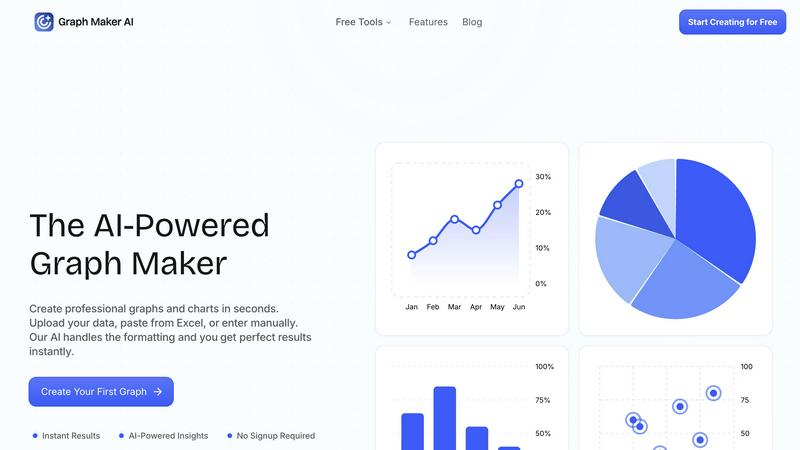
Effortlessly create and customize stunning graphs and charts from your data in seconds with our AI-powered Graph Maker.
Last updated: February 26, 2026
Peekaboo
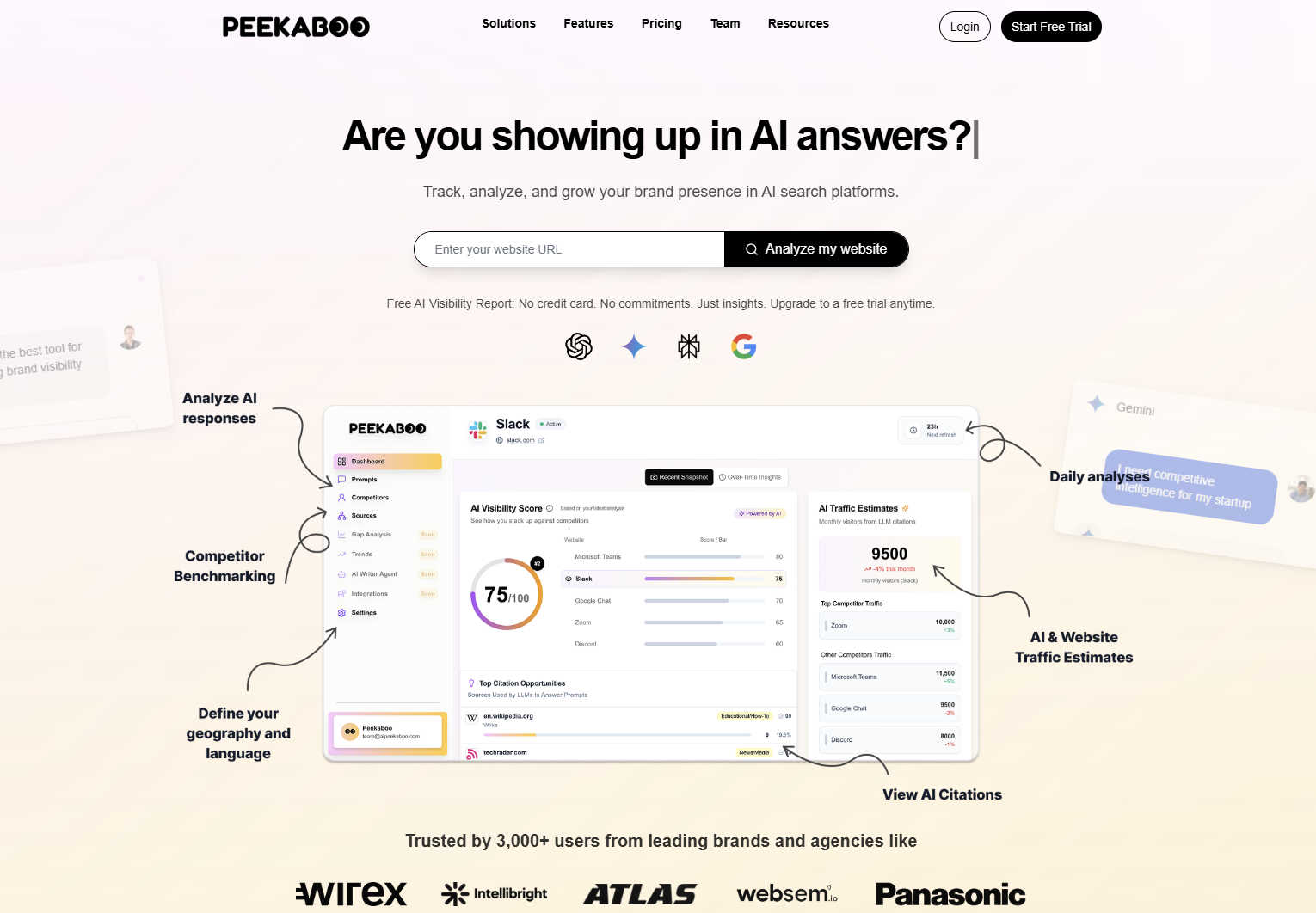
Peekaboo shows where your brand appears in AI answers and how to get seen more often.
Last updated: March 1, 2026
Visual Comparison
Graph Maker
Peekaboo
Feature Comparison
Graph Maker
Instant Graph Generation
With Graph Maker, simply paste your data and click "Generate." The AI-powered tool creates your graph in seconds, eliminating the need for time-consuming setup or configuration. This feature allows users to visualize data instantly without the hassle.
Fully Editable Graphs
Customize every aspect of your graphs, from themes and colors to labels and legends. This feature ensures that your visualizations can be tailored to meet specific presentation needs or personal preferences, making it easy to achieve the perfect look for your data.
Automatic AI Insights
Graph Maker doesn’t just create graphs; it also generates clear insights from your data. The AI analyzes trends, proportions, distributions, and correlations, helping you tell a meaningful story with your charts rather than just presenting numbers.
Multiple Graph Types
Choose from a variety of graph types, including line graphs, pie charts, bar graphs, and scatter plots. Each option is powered by AI, making it effortless to select the visualization that best fits your data and your goals.
Peekaboo
AI Prompt Tracking & Monitoring
Peekaboo allows you to select and monitor specific prompts and questions that potential customers are asking AI assistants. You can track queries like "Which team chat tool is best for a 10-person startup?" to see exactly when, where, and how different AI models mention your brand in their answers. This gives you a clear, real-time picture of your visibility for the topics that matter most to your business.
Competitor Visibility Analysis
Beyond tracking your own brand, Peekaboo provides insights into how your competitors are performing in the same AI search landscape. You can see which prompts they rank for, how often they are mentioned, and the context of those mentions. This competitive intelligence is crucial for understanding your market position and identifying opportunities to outmaneuver rivals in AI-generated responses.
Actionable Optimization Insights
Peekaboo doesn't just show you the data; it tells you what to do with it. The platform analyzes your performance and provides clear, actionable recommendations on how to improve your visibility. This could include suggestions on content creation, website optimization, or other strategies to make your brand more likely to be cited as a credible source by AI models.
Free AI Visibility Report
You can start understanding your AI search presence instantly with Peekaboo's free tool. Simply enter your website URL to receive a detailed report on where you appear in AI answers. This no-commitment, no-sign-up report offers a valuable snapshot of your current standing, helping you gauge the immediate need and potential value of ongoing monitoring.
Use Cases
Graph Maker
Students and Educators
Students can leverage Graph Maker for homework, science projects, and presentations, while educators can create engaging graphs for lessons and classroom materials. The tool's simplicity allows users to focus on learning rather than struggling with complex software.
Marketers and Content Creators
Marketing teams utilize Graph Maker to visualize campaign data, create social media graphics, and generate client reports. By turning spreadsheets into shareable visuals quickly, they enhance their storytelling and communication efforts.
Business Analysts and Data Professionals
Data professionals can streamline their workflow by using Graph Maker to replace tedious Excel tasks. The tool allows for quick visualizations, enabling analysts to focus on extracting insights rather than formatting data.
Researchers and Scientists
Researchers can use Graph Maker to visualize their findings in a professional manner. Whether presenting statistical analysis or displaying experimental data, the tool makes it easy to create compelling graphs that enhance the impact of their research.
Peekaboo
For SEO and Digital Marketing Agencies
Agencies can use Peekaboo to offer a cutting-edge new service to their clients: AI Search Visibility Audits and Optimization. By demonstrating how a client's brand appears (or doesn't appear) in AI answers, agencies can prove their value, justify retainer fees, and develop new strategies to secure top mentions in ChatGPT, Gemini, and Perplexity, future-proofing their SEO offerings.
For In-House Marketing Teams
Marketing managers and directors can leverage Peekaboo to protect and grow their brand's market share in the age of AI search. They can track brand mentions, measure the impact of their content strategies on AI visibility, and make data-driven decisions to ensure their product is recommended when AI assistants answer critical buyer questions in their industry.
For SaaS and Product Companies
SaaS companies can monitor how their software is being compared and recommended against competitors in AI conversations. By tracking prompts related to features, pricing, and use cases, they can identify content gaps, strengthen their messaging, and optimize their online presence to become the top-of-mind recommendation in AI-generated answer engines.
For E-commerce Brands
E-commerce businesses can track how AI platforms recommend products in their category. Whether it's "best running shoes for flat feet" or "most durable kitchen knives," Peekaboo helps these brands understand if they are being suggested. This insight allows them to adjust product descriptions, blog content, and technical SEO to align with how AI interprets and recommends products.
Overview
About Graph Maker
Graph Maker is an innovative AI-powered tool that revolutionizes the way you create professional graphs and charts. Designed for users of all backgrounds—from students and educators to marketers and business analysts—Graph Maker simplifies the data visualization process. You can easily upload your data, paste it from Excel, or input it manually, and the tool's advanced AI takes care of the formatting and design aspects, delivering perfect results in seconds. The primary value proposition of Graph Maker is its ability to save you time and effort; with no signup required, you can start creating visually appealing graphs immediately. Whether you need to illustrate trends, compare data, or present insights, Graph Maker provides an accessible solution that turns your raw data into clear, engaging visuals in no time.
About Peekaboo
In the new world of AI-powered search, being found is everything. Peekaboo is your essential guide and radar for this new landscape. It's the leading AI Search visibility platform designed to help brands, agencies, and marketers track, analyze, and optimize how they appear across major AI platforms like ChatGPT, Gemini, and Perplexity. When potential customers ask these AI assistants for product recommendations or advice, is your brand being mentioned? Peekaboo answers that critical question. It goes far beyond simple tracking, providing actionable insights to help you improve your visibility and turn those valuable AI mentions into tangible business growth. Whether you're a marketing manager, an SEO specialist, or a business owner, Peekaboo empowers you to understand your brand's presence in AI-generated answers. It gives you the practical tools to get seen more often, ensuring you don't get left behind as search behavior evolves from traditional engines to conversational AI. Think of it as your indispensable partner for navigating the future of discoverability.
Frequently Asked Questions
Graph Maker FAQ
How does Graph Maker handle data formatting?
Graph Maker's AI automatically cleans and formats your data upon input. This means you can spend less time on data preparation and more time on analyzing and understanding your results.
Do I need to create an account to use Graph Maker?
No, there is no signup required to use Graph Maker. You can start creating your graphs immediately, making it a hassle-free experience for all users.
Can I customize the graphs I create?
Absolutely! Graph Maker allows you to customize various elements of your graphs, including themes, labels, and legends, ensuring that your visualizations meet your specific needs.
What types of graphs can I create with Graph Maker?
Graph Maker offers a wide range of graph types, including line graphs, pie charts, bar graphs, and scatter plots. You can choose the type that best represents your data and insights.
Peekaboo FAQ
How does Peekaboo work?
Peekaboo works by continuously querying major AI platforms like ChatGPT, Gemini, and Perplexity using the specific prompts and questions you want to track. It then analyzes the generated answers to detect mentions of your brand, competitors, or relevant keywords. The platform aggregates this data into easy-to-understand dashboards and reports, showing you your visibility and providing insights for improvement.
What kind of prompts should I track?
You should track prompts that your potential customers are likely asking AI assistants. These are typically question-based queries related to product recommendations, feature comparisons, pricing advice, and "best for" scenarios in your industry. For example, a project management software company might track prompts like "What's the best tool for agile project management?" or "Compare Asana vs Trello vs ClickUp."
Do I need technical expertise to use Peekaboo?
No, Peekaboo is designed to be user-friendly and approachable for marketers, business owners, and SEO specialists alike. The interface is intuitive, guiding you through setting up prompts and interpreting the results. The actionable insights are presented in clear, non-technical language, so you can focus on strategy rather than complex data analysis.
How is AI search different from traditional SEO?
Traditional SEO focuses on optimizing your website to rank highly on search engine results pages (SERPs) like Google. AI search, however, involves conversational assistants providing a single, synthesized answer. Visibility means being cited within that answer as a source or recommendation. Peekaboo helps you optimize for this new paradigm, where the goal is to be the brand the AI "chooses" to mention.
Alternatives
Graph Maker Alternatives
Graph Maker is an innovative AI-powered tool that enables users to create professional graphs and charts in just seconds. It falls under the categories of AI Assistants, Analytics & Data, Business Intelligence, and Data Visualization. Users often seek alternatives to Graph Maker due to various reasons such as pricing, specific feature requirements, or compatibility with different platforms. Selecting the right alternative involves considering aspects like user-friendliness, customization options, data handling capabilities, and overall performance to ensure that it meets your unique graphing needs. When exploring alternatives, it's essential to evaluate how well the tool integrates with your existing workflows and whether it can handle the types of data you typically work with. Additionally, consider the level of support and resources available for users, as well as any trial periods that allow you to test the software before committing. This way, you can find a solution that best fits your requirements and enhances your data visualization experience.
Peekaboo Alternatives
Peekaboo is a specialized analytics platform focused on AI Search visibility. It helps brands track and understand how they appear in answers from AI assistants like ChatGPT and Gemini, providing insights to improve their presence in this new search landscape. People explore alternatives for various reasons. They might be looking for a different pricing structure, need monitoring for additional AI platforms not covered, or require more specific features like deeper competitive analysis or integration with their existing marketing tech stack. When evaluating other tools, consider what's most important for your goals. Key factors include the range of AI platforms monitored, the depth of insights provided, ease of use, and of course, the overall cost. The right tool should give you a clear picture of your AI visibility and actionable steps to improve it.