
Patrivox vs Playwriter
Side-by-side comparison to help you choose the right AI tool.

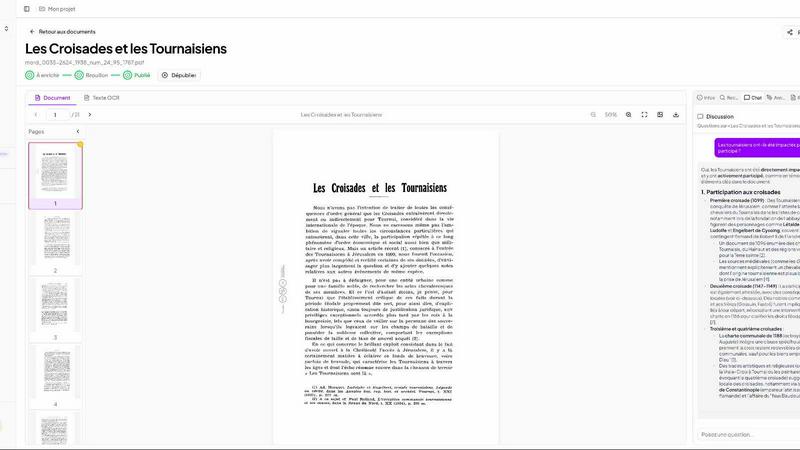
Patrivox
Patrivox uses AI to quickly digitize, classify, and make your documents fully searchable in just minutes.
Last updated: March 3, 2026

Playwriter
Playwriter lets your agents control Chrome directly with AI, using existing sessions and tools without extra memory or bot detection.
Last updated: March 18, 2026
Visual Comparison
Patrivox
Playwriter

Feature Comparison
Patrivox
Batch Import
With Patrivox, users can effortlessly upload hundreds of PDF documents at once. The platform's batch import feature saves invaluable time, allowing organizations to digitize and index large collections in just minutes, eliminating the need for manual entry.
Automatic Entity Extraction
Patrivox employs state-of-the-art Named Entity Recognition (NER) to automatically identify and classify entities such as names, locations, and organizations within documents. This feature enhances the searchability of archives, making it easier to locate relevant information.
Full-Text Search
The full-text search functionality allows users to quickly find any word or phrase within their entire collection of documents. With built-in typo tolerance, users can search with confidence, while advanced filtering options based on date, author, and type further refine results.
Interactive Knowledge Graph
Patrivox’s interactive knowledge graph visually represents the connections between identified entities within documents. Users can navigate through this graph to uncover relationships and insights that may have previously been hidden, enhancing their understanding of the material.
Playwriter
Seamless Browser Integration
Playwriter allows your AI agents to work within your existing Chrome session, retaining all logins, extensions, and cookies. This eliminates issues related to bot detection and ensures a more efficient browsing experience.
Full Automation API
With a single execute tool, Playwriter provides access to the complete Playwright API without the need for wrappers or complicated setups. This low-context usage ensures that agents can run any Playwright code in a streamlined manner.
Real-Time Collaboration
Playwriter promotes collaboration by allowing users to see exactly what the agent is doing in real time. Users can intervene when necessary, such as solving captchas or managing consent walls, enhancing the overall workflow.
Advanced Debugging Tools
The integrated debugger includes features like breakpoints and live code editing, enabling developers to troubleshoot and refine their scripts effectively. Coupled with network interception, users can analyze requests and responses seamlessly.
Use Cases
Patrivox
Municipal Archives
Municipal archives can utilize Patrivox to digitize and organize important records, such as deliberations and correspondence. This ensures that historical documents are preserved and made accessible for public research.
Historical Societies
Historical societies can leverage Patrivox to make their bulletins and documentary collections searchable. This functionality enhances the ability of researchers and enthusiasts to explore rich historical narratives within their collections.
Heritage Libraries
Heritage libraries can open their special collections to researchers and the public by using Patrivox to index and digitize rare documents. This accessibility fosters greater community engagement and promotes historical literacy.
Dioceses and Parishes
Dioceses and parishes can use Patrivox to preserve and index ecclesiastical records and parish registers. By making these documents searchable, they facilitate genealogical research and provide valuable resources for community members.
Playwriter
Automated Testing
Developers can leverage Playwriter to create automated tests for web applications, ensuring that all functionalities work correctly across different scenarios. The integration with existing browser sessions helps maintain consistency in testing.
Web Scraping
Playwriter is ideal for web scraping tasks where data needs to be extracted from various websites. The tool can navigate complex sites, bypass bot detection, and store scraped data efficiently, all while using your logged-in session.
Performance Monitoring
By using Playwriter, teams can monitor website performance in real time. The tool’s capabilities allow for detailed analysis of network requests, helping identify bottlenecks and improve overall site performance.
Collaborative Content Generation
Content teams can utilize Playwriter to generate and curate web content collaboratively. The agent can automate repetitive content tasks while team members step in for creative input, ensuring efficiency without sacrificing quality.
Overview
About Patrivox
Patrivox is a cutting-edge European SaaS platform designed to empower organizations such as heritage institutions, municipal services, associations, and enterprises to transform their vast collections of scanned documents into a fully searchable knowledge base. With Patrivox, users can simply drag and drop their PDFs, and within minutes, Mistral AI utilizes advanced optical character recognition (OCR) technology to extract every word. This platform not only identifies key entities like people, places, and organizations but also connects them in an interactive knowledge graph. Patrivox caters to those who need quick access to information, allowing users to search instantly with typo tolerance or ask questions in natural language, with the AI providing sourced answers. Its main value proposition lies in making previously inaccessible knowledge easily searchable and shareable, opening doors for research and public access.
About Playwriter
Playwriter is a powerful tool designed to enhance the capabilities of AI agents by allowing them to utilize your actual browser session. Unlike traditional AI solutions that either operate in a headless mode or provide limited browser access, Playwriter integrates seamlessly with your existing Chrome setup, including all your logins, cookies, and extensions. This means that your agents can perform web tasks without encountering bot detection issues or the limits imposed by fixed toolsets. Playwriter's architecture combines a Chrome extension and a command-line interface (CLI), enabling full automation and allowing for real-time collaboration. It is particularly beneficial for developers, testers, and professionals who rely on accurate and efficient web browsing for their tasks. With robust features like accessibility snapshots, a powerful debugger, and a network interceptor, Playwriter provides a comprehensive solution for automating and controlling web interactions effectively.
Frequently Asked Questions
Patrivox FAQ
What kind of documents can I upload to Patrivox?
Users can upload any PDF documents, including scanned images of paper documents, reports, and archives. The platform efficiently processes and indexes various types of content.
Is my data secure with Patrivox?
Absolutely! Patrivox is hosted entirely in Europe and adheres to GDPR regulations. This ensures that your data is handled securely and with respect for privacy, providing peace of mind.
Can I access Patrivox for free?
Yes, Patrivox offers a free tier that allows users to try the platform with 100 trial pages and limited AI queries. This enables organizations to experience the benefits of Patrivox without any upfront costs.
How does Patrivox support collaboration within my organization?
Patrivox allows for unlimited reader access and multiple administrators, making it easy for teams to collaborate on research projects. This feature encourages collective exploration of documents and shared insights.
Playwriter FAQ
How do I install Playwriter?
To install Playwriter, first add the Chrome extension and then install the CLI using the command npm i -g playwriter. Lastly, teach your agent to use Playwriter with npx -y skills add remorses/playwriter.
Is Playwriter secure to use?
Yes, Playwriter operates entirely on your local machine, meaning that no data is sent to remote servers. The Chrome extension connects to a local WebSocket relay, ensuring secure communication without exposing sensitive information.
Can multiple agents use Playwriter simultaneously?
Absolutely! Playwriter's relay multiplexes sessions, allowing multiple agents or CLI instances to control the same browser at the same time without interference.
What platforms does Playwriter support?
Playwriter is designed to work with any MCP client, including popular tools such as Cursor, Claude, and VS Code, providing flexibility for developers and teams to integrate it into their existing workflows.
Alternatives
Patrivox Alternatives
Patrivox is an innovative European SaaS platform designed to help organizations, including heritage institutions and enterprises, transform their vast collections of scanned documents into fully searchable databases. By leveraging advanced AI technology, Patrivox allows users to quickly digitize and navigate through large volumes of text, making document management more efficient and accessible. Users often seek alternatives to Patrivox for various reasons, such as differing pricing structures, unique feature sets, or specific platform requirements that better align with their needs. When evaluating alternatives, it’s essential to consider factors like ease of use, the robustness of search capabilities, integration options, and data security measures. Finding a solution that fits your organization’s specific workflow will ensure a seamless transition and improved productivity.
Playwriter Alternatives
Playwriter is an innovative tool designed to control Chrome using AI through a Command Line Interface (CLI) or a Machine Control Protocol (MCP). It falls under the category of automation, providing users with a seamless way to integrate AI agents into their browsing experience. With Playwriter, users can leverage their actual browser session, complete with logins and extensions, making it an attractive solution for those seeking advanced web automation. Users often search for alternatives to Playwriter for various reasons, including pricing, specific feature sets, and compatibility with different platforms. When considering an alternative, it's essential to evaluate factors such as ease of use, the level of automation offered, support for integrations with existing tools, and overall cost-effectiveness. A well-rounded alternative should not only meet your automation needs but also enhance your browsing experience without compromising security or functionality.