
ProcessBankStatement vs Tailride
Side-by-side comparison to help you choose the right AI tool.

ProcessBankStatement
Instantly convert your PDF bank statements into clean, ready-to-use CSV files with fast, secure, and accurate processing.
Last updated: March 11, 2026

Tailride
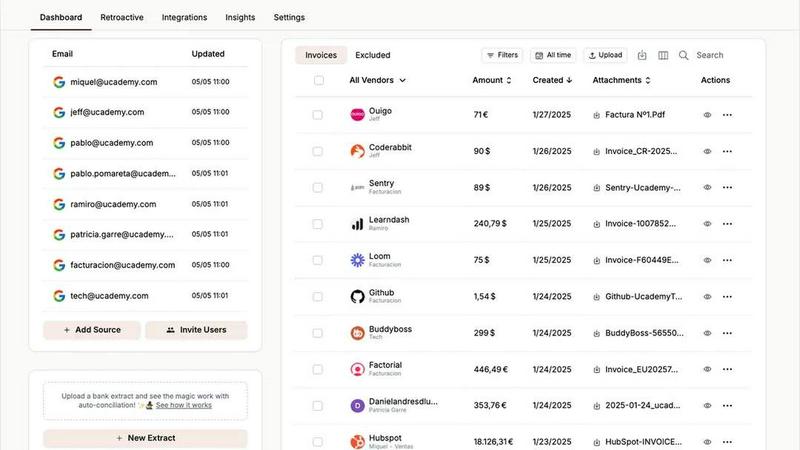
Tailride automates invoice and receipt management from email and web, saving accountants time and reducing chaos.
Last updated: February 26, 2026
Visual Comparison
ProcessBankStatement

Tailride
Feature Comparison
ProcessBankStatement
Lightning-Fast PDF to CSV Conversion
Say goodbye to waiting. Our optimized processing engine converts your uploaded PDF bank statements into a downloadable CSV file in a matter of seconds. There's no complicated setup or software to install. The process is as simple as upload, parse, and download, transforming what used to be an hour-long task into a quick, effortless step in your workflow.
Bank-Grade Security & Privacy
Your financial data's security is our top priority. All file transfers are protected with strong encryption to keep your information safe while it's in transit. You maintain complete control over your data on our platform; you can view your uploaded statements and delete them permanently at any time, giving you peace of mind and full ownership of your sensitive documents.
Intelligent & Accurate Data Parsing
Not all bank statements are formatted the same, but our smart parser handles them with ease. It's designed to accurately detect and extract transaction details like dates, descriptions, amounts, and balances from a wide variety of statement layouts. The result is clean, consistently structured data that's immediately usable without requiring tedious cleanup in your spreadsheet.
Broad Bank & File Type Support
We understand you work with statements from many sources. That's why our tool supports PDFs from all major U.S. banks and countless regional institutions. More importantly, we handle both digital/text-based PDFs and scanned/image-based statements or photos converted to PDF. This flexibility means you can process virtually any statement you receive.
Tailride
Inbox Scanning
Tailride's inbox scanning feature monitors your email inbox for incoming invoices, ensuring that you never miss an important document. It works with all major email clients, allowing you to find any invoice in seconds, whether it's in a PDF, an image, or embedded in the email body. This feature eliminates the hassle of manually searching for invoices, providing a streamlined approach to invoice management.
Online Portals
With Tailride, users can effortlessly extract invoices from various online portals without the need for manual intervention. This feature simplifies the process of gathering financial documents from multiple sources, making it easy for business owners to keep track of their expenses and invoices. By automating extraction from websites, Tailride saves time and minimizes the risk of errors.
AI Processing
Tailride employs cutting-edge AI processing to intelligently categorize and organize invoices based on customizable rules. This feature allows users to set specific criteria for how their invoices should be categorized, ensuring that financial documents are sorted according to the unique needs of their business. The result is a highly organized dashboard that makes tracking and managing invoices a breeze.
Reconciliation
The reconciliation feature in Tailride helps businesses match transactions with their corresponding invoices, automatically identifying any missing documents. This functionality streamlines the reconciliation process, allowing accountants and finance teams to maintain accurate financial records and ensuring compliance with tax regulations. By simplifying this crucial aspect of accounting, Tailride enhances overall financial management.
Use Cases
ProcessBankStatement
Streamlining Bookkeeping & Accounting
For accountants and bookkeepers, manually entering client transaction data is a major time sink. ProcessBankStatement automates this core task. You can quickly upload PDF statements received from clients and generate perfect CSVs for direct import into QuickBooks, Xero, or other accounting software, drastically reducing reconciliation time and minimizing human error.
Simplifying Small Business Finance Management
Small business owners wearing multiple hats need efficient financial tools. Instead of manually copying data from bank statements into spreadsheets for expense tracking, tax preparation, or cash flow analysis, they can upload their monthly statement and get an analysis-ready CSV instantly, making financial management faster and more accurate.
Accelerating Loan & Mortgage Processing
Loan processors and underwriters often need to analyze months of bank statements for applicants. Manually reviewing each PDF is slow. This tool allows processors to convert statements to CSV in batches, enabling quick filtering, sorting, and analysis of transaction history in Excel, significantly cutting down on application processing time and improving throughput.
Enhancing Financial Reporting & Analysis
Financial analysts and consultants who need to create reports or perform audits benefit from structured data. Converting PDF statements to CSV allows for easy manipulation in Excel or data visualization tools. This enables deeper analysis, trend spotting, and the creation of custom reports without the initial barrier of manual data transcription.
Tailride
For Accountants
Accountants managing multiple clients can leverage Tailride to automate the extraction and organization of invoices across different accounts. This tool significantly reduces the time spent on manual data entry, allowing accountants to focus on higher-value tasks such as financial analysis and client advisory services.
For Small Business Owners
Small business owners can benefit from Tailride's ability to automate invoice management, freeing them from the tedious process of tracking down receipts and invoices. By utilizing Tailride, they can ensure that their financial documents are organized and easily accessible, facilitating better financial planning and reporting.
For Finance Teams
Finance teams can streamline their workflows with Tailride by integrating it with their existing accounting software. This integration allows for seamless data transfer, reducing the risk of errors and improving the accuracy of financial reports. With automated invoice capture, finance teams can close their books faster and more efficiently.
For Expense Tracking
Tailride makes it simple for employees to keep track of their expenses by allowing them to send photos of paper receipts via Telegram or WhatsApp. This feature ensures that all expense-related documents are captured and organized, making expense reporting straightforward and hassle-free for employees and managers alike.
Overview
About ProcessBankStatement
ProcessBankStatement is your intelligent solution for turning messy, time-consuming bank statement PDFs into clean, structured data in seconds. It's a secure, web-based tool designed to eliminate the tedious chore of manual data entry. Simply upload any PDF bank statement—whether it's a text-based file from your online banking portal or a scanned image of a paper statement—and our smart parsing engine goes to work. In moments, you receive a downloadable CSV file with all your transactions neatly organized, ready for import into QuickBooks, Excel, or any other analysis platform. It's built for finance professionals, accountants, bookkeepers, small business owners, and anyone who regularly deals with financial data. The core value proposition is simple: reclaim hours of your week by automating a frustrating manual process with a tool that is fast, remarkably accurate, and puts you in full control of your data. We proudly support statements from all major U.S. banks like Chase, Bank of America, and Wells Fargo, ensuring broad compatibility for your needs.
About Tailride
Tailride is an innovative AI-powered accounting automation platform designed to streamline the way businesses handle their invoices and receipts. By integrating seamlessly with your email inbox, Tailride automatically detects, extracts, and processes invoices and receipts from both emails and attachments using advanced intelligent document recognition technology. Tailride is an ideal solution for business owners, accountants, and finance teams seeking to eliminate the tedious manual data entry associated with invoice management. Its core value proposition lies in saving users hundreds of hours each month by automating and organizing their financial documents. With features like a Chrome extension for quick invoice extraction from over 20 platforms, customizable AI rules for automatic categorization, and robust integrations with popular accounting software such as QuickBooks and Xero, Tailride transforms the way you manage your financial records, providing peace of mind and increased efficiency.
Frequently Asked Questions
ProcessBankStatement FAQ
What file types do you support?
We currently support PDF bank statements. This includes both text-based PDFs downloaded directly from your online banking portal and scanned PDFs (or images saved as PDFs) of physical paper statements. We do not support other file formats like JPEG or DOCX directly; they should be converted to PDF first.
Is there a free trial or free tier?
Yes! You can try ProcessBankStatement completely risk-free. Guest users can process up to 3 pages per day without even creating an account. For more capacity, signing up for a free account grants you 5 pages per day, which is perfect for testing the tool with your actual statements before committing to a paid plan.
How secure is my financial data?
Your data's security is paramount. All files are encrypted during upload and download (in transit). We are committed to privacy, and you have full control over your data on our platform. You can access your file history and permanently delete any uploaded statements and their extracted data from our servers at any time through your dashboard.
Do you support international bank statements?
Currently, our parser is optimized to support statements from banks in the United States. We are actively working to add support for more international formats and banks in the future. For now, we recommend the tool primarily for U.S. bank statement processing.
Tailride FAQ
How does Tailride extract invoices from my email?
Tailride connects directly to your email inbox, automatically scanning for incoming invoices and receipts. It uses intelligent document recognition to identify and extract relevant information, ensuring that you never miss an important financial document.
Can I customize how Tailride categorizes my invoices?
Yes, Tailride allows users to set customizable AI rules for automatic categorization of invoices. This feature enables you to tailor the organization of your invoices based on your specific business needs, ensuring that everything is categorized accurately.
What email clients are compatible with Tailride?
Tailride is compatible with all major email clients, including Gmail, Outlook, and IMAP. This flexibility ensures that users can seamlessly integrate Tailride into their existing email systems without any hassle.
Is there a limit to how many users I can invite to use Tailride?
No, Tailride allows you to link as many users as you need, making it easy for teams to collaborate and maintain visibility over incoming invoices. This feature is particularly beneficial for organizations with multiple employees involved in expense tracking and invoice management.
Alternatives
ProcessBankStatement Alternatives
ProcessBankStatement is a specialized tool in the business and finance category, designed to convert PDF bank statements into clean, structured CSV files. It automates a traditionally manual task, saving finance professionals and business owners significant time and reducing errors. Users often explore alternatives for various reasons. Some might need a different pricing model, such as a one-time purchase versus a subscription. Others may require specific features, like integration with particular accounting software or support for international bank formats. Platform preference, whether desktop software or a mobile app, can also drive the search for a different solution. When evaluating other options, consider a few key factors. Look for accuracy and reliability in data extraction, as this is the core function. Security and data privacy policies are paramount when handling sensitive financial documents. Finally, assess the tool's ease of use and the quality of customer support, as these greatly impact the overall experience.
Tailride Alternatives
Tailride is an innovative AI-powered accounting automation platform that streamlines the process of managing invoices and receipts. By connecting directly to your email inbox, it intelligently extracts financial documents from emails and attachments, making accounting tasks more efficient. Tailride is designed for businesses looking to simplify their financial processes, particularly in the realm of invoice management. Users often seek alternatives to Tailride for various reasons, including budget considerations, specific feature requirements, or compatibility with existing platforms. When choosing an alternative, it's essential to evaluate factors such as pricing, ease of use, the range of integrations available, and the flexibility of the platform to meet unique business needs. A thoughtful assessment of these aspects can help ensure that your chosen solution aligns well with your financial automation goals.