

Tailride
Tailride scans your inbox and web portals to automatically capture and organize invoices, saving you hundreds of hours on accounting.
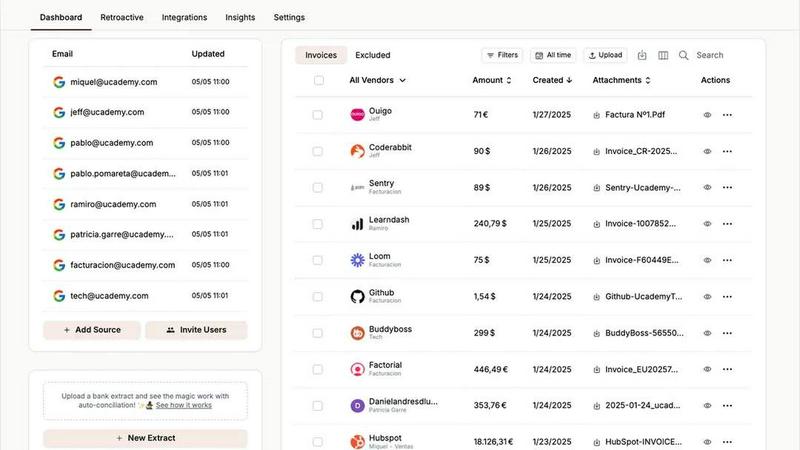
About Tailride
Tailride is an AI-powered accounting automation platform designed to eliminate the tedious, time-consuming task of managing invoices and receipts. Instead of manually digging through your email inbox, downloading attachments, and categorizing expenses, Tailride connects directly to your email (Gmail, Outlook, or any IMAP account) and automatically detects, extracts, and processes invoices and receipts from emails and their attachments. It handles PDFs, images, text within the email body, and even links behind URLs. The platform is built for business owners, finance teams, and accountants who want to completely forget about invoice management. Its main value proposition is saving hundreds of hours every month by automating the entire invoice workflow. Tailride goes beyond simple receipt scanning apps by offering native inbox integration, retroactive scanning of past emails, a Chrome extension for one-click extraction from over 20 online platforms (like Amazon, Meta Ads, Notion, and ChatGPT), and powerful AI rules for automatic categorization. It also includes bank reconciliation features to match transactions with invoices and identify missing documents, and integrates seamlessly with QuickBooks, Xero, Google Drive, and more. Whether you are a solo entrepreneur or an accountant with dozens of clients, Tailride promises to organize your financial documents with minimal effort, turning a chaotic end-of-quarter scramble into a calm, automated process.
Features of Tailride
Inbox Scanning and Monitoring
Tailride connects natively to your email inbox (Gmail, Outlook, or any IMAP service) and continuously monitors it for incoming invoices and receipts. This means you never have to forward invoices to a random email address again. The system automatically detects invoices whether they are attached as PDFs, embedded as images, written in the email body, or hidden behind a URL. You can also connect your colleagues' inboxes, giving you full visibility into all company expenses. Your emails never leave your inbox, ensuring security and privacy while keeping a clear audit trail of where each invoice came from.
Retroactive Scanning
When you first connect to Tailride, you are not limited to processing only new invoices. The platform allows you to retroactively search your entire inbox for past invoices. You can choose a specific time range, such as this month, this quarter, this year, or all time, and Tailride will scan through your historical emails to find and extract every invoice it can. This is incredibly useful for catching up on missed documents, preparing for tax filings, or simply getting organized after a busy period. It turns a daunting manual search into a one-click automated process.
Online Portals and Chrome Extension
Tailride includes a powerful Chrome extension that allows you to extract invoices from over 20 popular online platforms with a single click. This includes major services like Amazon, Meta Ads, Adobe, Notion, Microsoft, and ChatGPT. Instead of logging into each platform, downloading the invoice, and then uploading it to your accounting system, you simply click the Tailride extension while on the invoice page, and the data is automatically captured and sent to your dashboard. This feature replaces tools like GetMyInvoices and saves significant time for businesses that regularly purchase services or advertising from multiple online vendors.
AI Processing and Custom Rules
Tailride uses intelligent document recognition to automatically extract key data from every invoice, including vendor name, date, total amount, and line items. But what sets it apart is its customizable AI rules. You can set up rules that automatically categorize invoices based on criteria like vendor, amount, or project. For example, you can create a rule that automatically tags all invoices from Meta Ads as "Marketing Expenses" and forwards them to a specific folder in Google Drive. This level of automation ensures that your invoices are organized exactly how your business needs them, without any manual sorting.
Use Cases of Tailride
Streamlining End-of-Quarter Tax Preparation
For a growing company, end-of-quarter tax filings often involve a frantic search for hundreds of missing invoices. With Tailride, you can retroactively scan your entire inbox for the past quarter and instantly gather all invoices. The AI processes and categorizes them, and you can forward the organized set directly to your accountant or to a Google Drive folder. This turns a multi-day, stressful task into a 40-second operation, ensuring you never miss a deductible expense again.
Automating Expense Reporting for Remote Teams
A company with multiple remote employees using personal email addresses for business purchases can connect each team member's inbox to Tailride. The platform monitors all inboxes simultaneously, capturing invoices from software subscriptions, office supplies, and travel bookings. Employees no longer need to manually forward receipts or fill out expense reports. Tailride automatically organizes everything, and the finance team gets a centralized, up-to-date view of all company spending without any manual data entry.
Managing Invoices from Multiple Online Platforms
A business that runs ads on Meta, uses Notion for project management, and subscribes to Adobe Creative Cloud can use Tailride's Chrome extension. Instead of logging into each platform to download invoices, the finance team simply clicks the extension while viewing each invoice online. Tailride captures the data and sends it to the same dashboard. This eliminates the hassle of managing dozens of different vendor portals and ensures all recurring subscription invoices are captured and categorized consistently.
Handling Physical Receipts for On-the-Go Employees
Not all expenses come through email. Tailride provides a Telegram and WhatsApp bot for handling paper receipts. Employees can simply take a picture of a physical receipt, send it to the bot, and Tailride will process the image and add the expense to the dashboard. This is perfect for field workers, sales representatives, or anyone who makes in-person purchases. It extends the automation to cover all types of expenses, not just digital invoices, creating a complete and unified expense management system.
Frequently Asked Questions
How does Tailride connect to my email inbox?
Tailride connects natively to your email inbox using secure protocols. It supports Gmail, Outlook, and any email account that uses IMAP. When you connect, you grant Tailride permission to read your emails, but your messages never leave your inbox. The system only scans for invoice-related content and extracts the relevant data. You are in full control, and you can revoke access at any time. You can also connect multiple inboxes, including those of your colleagues, to get a complete view of all incoming invoices.
Can Tailride find invoices that are already in my inbox?
Yes, absolutely. When you first connect to Tailride, you have the option to perform a retroactive scan of your inbox. You can choose to scan for invoices from this month, this quarter, this year, all time, or a custom date range. This feature is designed to help you catch up on past invoices that you may have missed or not processed. It is a one-time setup that can instantly organize months or even years of financial documents.
What types of files and formats does Tailride support?
Tailride is built to handle a wide variety of invoice formats. It can extract data from PDF attachments, images (like photos of receipts), text written directly in the email body, and even invoices that are behind a URL link in the email. For physical paper receipts, you can use the Telegram or WhatsApp bot to take a picture and send it to Tailride for processing. The platform is designed to be a universal solution, so you do not have to worry about the format of the invoice.
Is Tailride suitable for accountants with multiple clients?
Yes, Tailride is specifically designed for accountants who manage multiple clients. The platform includes features that allow accountants to connect to each client's inbox (with permission), organize invoices by client, and automatically forward the processed data to the appropriate accounting software like QuickBooks or Xero. This eliminates the manual work of collecting and sorting invoices for each client, making tax filings and financial reviews much more efficient. Accountants with more than 10 clients can also access dedicated support and features.
Similar to Tailride

RunMyWealth
Smart, private financial calculators for mortgage, FIRE, and debt. 100% free, runs locally in your browser, no signup required.


sakuttoAI
A free suite of online tools for everyday tasks like PDF compression, image conversion, text diff and CSV to Excel.


Tapetide
AI-first stock research platform and MCP server for every NSE & BSE listed stock.

ColdCrow
AI cold email writer: turn one line about a prospect into personalized outreach with a deliverability score in seconds. Free trials, no credit card.

invoala
Invoala is an AI-powered invoicing platform that helps businesses create, manage, send, and track professional invoices with less time and effort.

FalcoScan
A market map of 7,000+ AI products across 30 markets, with each product's closest rivals.