
Skipclips vs Veo 4 AI
Side-by-side comparison to help you choose the right AI tool.

Skipclips
Skipclips instantly finds the key highlights and insights from your favorite podcasts and shows.
Last updated: March 1, 2026

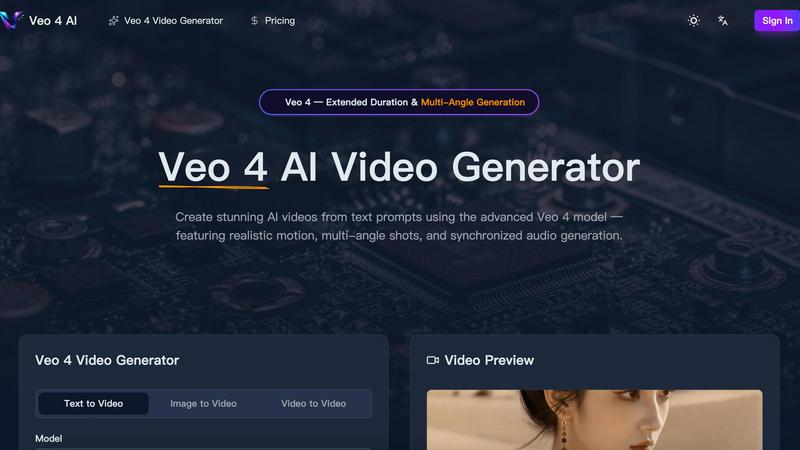
Veo 4 AI instantly creates stunning, realistic videos from your text prompts with synchronized audio and multi-angle shots.
Last updated: March 11, 2026
Visual Comparison
Skipclips

Veo 4 AI
Feature Comparison
Skipclips
AI-Powered Summaries & Outlines
Skipclips uses advanced AI to listen to and analyze entire podcast episodes, automatically generating detailed summaries and chapter-like outlines. This means you get a clear, structured breakdown of the entire conversation, highlighting the main arguments, stories, and takeaways without having to scrub through the audio yourself. It's perfect for grasping the essence of a 3-hour interview in just a few minutes of reading.
Comprehensive Topic Tagging & Discovery
Every summarized episode is enriched with a comprehensive set of tags that identify key discussion points, themes, and subjects. This powerful feature allows you to browse content not just by show, but by specific interests like "Geopolitics," "Personal Development," or "Technology." You can discover new episodes and creators based on the topics you care about most, creating a personalized learning and discovery feed.
Guest & Theme Tracking
Go beyond single episodes. Skipclips intelligently identifies and tracks guests across different podcasts and shows. Want to hear everything a particular expert has said recently? Skipclips makes it easy. Furthermore, it helps you identify recurring themes and discussions happening across the content landscape, so you can spot trends and understand broader conversations at a glance.
Curated "New Episodes" Feed
Stay on top of the latest content with a dynamically updated feed of newly processed episodes from a wide array of popular shows. From "The Joe Rogan Experience" to "Huberman Lab" and "Veritasium," you can quickly see what's fresh, check the summary, and decide if it's worth a deeper dive, ensuring you never miss a key discussion from your favorite creators.
Veo 4 AI
Photorealistic Text-to-Video Generation
Describe any scene in plain English, and watch as Veo 4 AI generates a high-fidelity video that matches your vision. It excels at creating realistic lighting, accurate physics for elements like water and fabric, and natural human movement, turning your prompts into believable, cinematic footage.
Multi-Angle Camera Generation
This powerful feature allows you to generate the same scene from multiple perspectives—like front, side, overhead, and behind—all in a single request. It provides complete creative coverage, making it perfect for creating dynamic sequences without having to generate each shot separately.
Synchronized Audio & Lip-Sync
Veo 4 AI doesn't just create silent movies. It generates dialogue, sound effects, and ambient audio that are perfectly synchronized with the on-screen action. This includes accurate lip-sync for characters across multiple languages, creating a cohesive and professional audiovisual experience from one prompt.
Extended Duration & Cinematic Control
Generate longer video clips with consistent quality, giving you more usable footage for storytelling. Furthermore, you have precise control over the cinematography, allowing you to specify lens types, camera motion, and tracking shots for a truly directorial level of creative input.
Use Cases
Skipclips
The Busy Professional & Lifelong Learner
For professionals who want to stay informed on industry trends, leadership strategies, or new scientific discoveries but lack hours in the day, Skipclips is a game-changer. Quickly scan summaries of relevant podcasts during a coffee break to extract actionable insights and stay knowledgeable without sacrificing productivity.
The Content Researcher & Writer
Journalists, students, and content creators can use Skipclips as a powerful research tool. Need to gather quotes or understand various perspectives on a topic like "free speech" or "mental health"? Search the tag library to instantly find relevant episodes across multiple shows, get precise topic breakdowns, and locate timestamped discussions, drastically speeding up the research process.
The Curious Podcast Fan
With so many great podcasts available, choosing what to listen to can be overwhelming. Skipclips helps you preview episodes through detailed outlines and summaries before you commit to listening. You can efficiently decide if an episode matches your interest level and avoid spending time on content that doesn't resonate with you.
The Topic-Based Explorer
Maybe you're not loyal to a specific show, but you're deeply interested in specific subjects like history, philosophy, or geopolitics. Skipclips allows you to follow your passions, not just podcasts. Explore the "Tags" section to dive into a curated collection of clips and summaries from across the podcast universe centered on your chosen topic.
Veo 4 AI
Content Creation for Social Media & Marketing
Quickly produce eye-catching promotional videos, product demos, or branded content for platforms like TikTok, Instagram, and YouTube. Generate diverse scenes and angles to keep your audience engaged without the need for live-action shoots.
Pre-Visualization and Storyboarding for Filmmakers
Directors and screenwriters can use Veo 4 AI to visualize complex scenes before filming. Generate different camera angles and character actions to plan shots, test concepts, and create dynamic animatics or storyboards efficiently.
Educational and Explainer Video Production
Educators and trainers can bring complex concepts to life. Generate videos showing scientific processes, historical reenactments, or animated diagrams from a simple text description, making learning materials more engaging and accessible.
Prototyping for Game and Animation Studios
Game developers and animators can rapidly prototype character movements, environmental effects, or short narrative sequences. This accelerates the creative process, allowing teams to experiment with styles and motions before committing to final, resource-intensive production.
Overview
About Skipclips
Skipclips is your intelligent shortcut to the world of long-form audio and video content. In a world overflowing with fascinating podcasts, in-depth interviews, and lengthy shows, finding the time to consume it all is nearly impossible. That's where Skipclips comes in. It's an AI-powered discovery platform that meticulously analyzes episodes from top creators and delivers concise, structured summaries. Think of it as having a super-efficient research assistant who listens to every episode for you, breaking down complex discussions into clear outlines, key topics, and searchable tags. Whether you're a curious learner, a busy professional, a content researcher, or just someone who wants to stay informed without the multi-hour commitment, Skipclips transforms overwhelming content into easily digestible insights. Its core value is simple: it gives you back your time while deepening your knowledge, allowing you to explore subjects you love or need to know about with unprecedented efficiency and clarity.
About Veo 4 AI
Veo 4 AI is a groundbreaking text-to-video generator that transforms your imagination into stunning, photorealistic video content. Built on Google's most advanced model, it's designed for filmmakers, content creators, marketers, and anyone who wants to produce high-quality video without a film crew or expensive equipment. Simply describe your scene in natural language, and Veo 4 AI brings it to life with incredible detail, realistic motion, and cinematic flair. Its core value lies in democratizing professional video production, offering features like multi-angle shots and synchronized audio generation that were once exclusive to big studios. Whether you're crafting a short film, a social media ad, or an educational clip, Veo 4 AI provides the creative control and quality you need to tell compelling visual stories effortlessly.
Frequently Asked Questions
Skipclips FAQ
What kind of content does Skipclips summarize?
Skipclips focuses primarily on long-form audio and video content, especially podcasts, talk shows, and interview-based series from a wide variety of creators. The website shows examples from popular shows like The Prof G Pod, Huberman Lab, The Joe Rogan Experience, Veritasium, and many more, covering topics from politics and science to health and comedy.
How does the AI create the summaries and tags?
While the exact technical details are proprietary, Skipclips uses advanced artificial intelligence and natural language processing models to analyze the full transcript of an episode. The AI identifies key discussion points, main themes, and structural segments to build a coherent outline and summary. It then generates relevant tags based on the content's core subjects and mentioned entities for easy search and discovery.
Is Skipclips a free service?
Based on the available website content, Skipclips appears to offer its core discovery and summarization features for free browsing. Users can visit the site, explore new episodes, browse by shows and tags, and read summaries without indicating a paid subscription. For the most current information on any premium tiers or features, please check the official Skipclips website.
Can I request a specific podcast or episode to be summarized?
The provided content doesn't specify a request feature. The platform seems to have a curated but extensive library of shows that it processes regularly, as seen in the "New Episodes" and "All Shows" sections. It's best to check if your favorite show is already listed in their "All Shows" directory to see if it is currently covered by their service.
Veo 4 AI FAQ
What makes Veo 4 better than previous versions?
Veo 4 represents a significant leap forward with stronger character consistency across shots, more realistic and synchronized audio generation, enhanced understanding of complex prompts, and greater control over cinematic elements like camera motion. It produces higher quality, more coherent, and professional-looking videos.
Can I use an image to create a video with Veo 4 AI?
Absolutely! The Image-to-Video feature allows you to upload any still picture. Veo 4 AI will then animate it, adding natural motion, depth, and cinematic camera movement to bring your static image to life in a dynamic video format.
How long can the videos generated by Veo 4 be?
Veo 4 supports extended duration video generation, allowing for longer clips than previous models while maintaining consistent quality. The exact maximum length may vary, but it is designed to provide more footage per generation for better storytelling.
Do I need video editing skills to use Veo 4 AI?
Not at all! Veo 4 AI is built to be user-friendly. You can create stunning videos directly from text prompts. However, for creators who want more control, it offers advanced settings for aspect ratio, resolution, and audio to fine-tune your results without complex software.
Alternatives
Skipclips Alternatives
Skipclips is a fantastic tool in the lifestyle and entertainment space, designed to help you quickly uncover the best parts of podcasts and long-form shows. It uses AI to summarize episodes and break down topics, saving you hours of listening time. People often look for alternatives for various reasons, like needing a different price point, specific features not offered, or compatibility with their preferred platforms. When you're exploring other options, it's smart to consider what matters most to you. Think about the accuracy of summaries, how easy the platform is to use, and whether it covers the specific shows or creators you love. Also, look at the depth of features, like guest tracking or how content is tagged, to ensure a new tool fits seamlessly into your routine. The goal is to find a service that makes discovering and enjoying content effortless. Whether you're a busy professional, a curious learner, or a podcast superfan, the right tool should feel intuitive and deliver real value, helping you get to the insights you want without the time commitment.
Veo 4 AI Alternatives
Veo 4 AI is a powerful tool in the AI video generation category, designed to transform simple text prompts into dynamic videos with realistic motion and sound. It's a fantastic option for creators looking to produce high-quality visual content quickly. However, you might be exploring other options for a variety of reasons. Perhaps you need a different pricing model, specific features like a particular video style or longer generation limits, or you simply want to see what else is available on the market. It's always smart to compare tools to find the perfect fit for your unique projects and workflow. When evaluating alternatives, consider what matters most to you. Key factors often include the quality and style of the generated video, the ease of use of the platform, the cost and any usage limits, and how well the tool integrates with other software you use. By focusing on your core needs, you can find a solution that empowers your creativity.