
Sprite Flow vs ThumbnailMaker
Side-by-side comparison to help you choose the right AI tool.

Sprite Flow
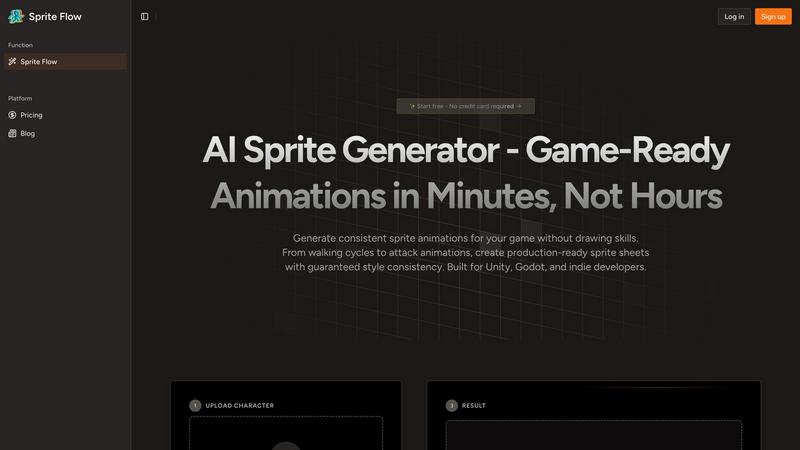
Sprite Flow creates game-ready sprite animations for Unity and Godot in minutes, not hours.
Last updated: March 3, 2026

ThumbnailMaker
Easily create eye-catching thumbnails with AI for your videos, boosting clicks and engagement in just seconds, no design skills required.
Last updated: April 4, 2026
Visual Comparison
Sprite Flow
ThumbnailMaker

Feature Comparison
Sprite Flow
Style Consistency Guarantee
This is the cornerstone of Sprite Flow. You can train the AI on your specific art style—whether it's a particular pixel art aesthetic, a cartoon look, or an anime style—by providing reference images. Once trained, the AI locks in your color palette, line thickness, and character proportions. This means every sprite and every frame of every animation it generates will maintain perfect visual consistency, solving the common nightmare of mismatched details and colors that can happen when drawing frames manually over many hours.
Complete Animation Sets & 8-Directional Support
Sprite Flow doesn't just create static sprites; it generates full, game-ready animation cycles. You can create walking, idling, running, and attacking animations with ease. Crucially, it offers robust 8-directional sprite support, which is essential for top-down or isometric games where characters need to move in all cardinal and intercardinal directions. This feature automates one of the most tedious parts of sprite creation, providing you with a complete set of animations for fluid in-game movement without manual duplication or adjustment.
Game-Ready Sprite Sheet Export
The tool is built with direct game engine integration in mind. With one click, you can export your generated animations as perfectly formatted sprite sheets. These exports are tailored for engines like Unity and Godot, and often include helpful metadata like JSON animation data, timeline configurations, and even collision box suggestions. This eliminates the tedious manual setup and slicing typically required to get a sprite sheet working in your project, getting your assets from Sprite Flow into your game in record time.
Accessible AI-Powered Generation
Sprite Flow is designed for developers, not just artists. You don't need any drawing skills to create compelling sprites. The process is incredibly straightforward: upload a base character image or describe your character, select the type of animation you need, choose your trained art style, and let the AI work. It democratizes high-quality sprite creation, allowing anyone with a game idea to bring visually consistent and animated characters to life in minutes, not weeks.
ThumbnailMaker
AI-Powered Thumbnail Generator
Our AI thumbnail generator is the heart of ThumbnailMaker. By simply entering your video title, the AI analyzes your content and proposes engaging thumbnail designs within seconds. This feature eliminates the need for design expertise, making it accessible for everyone.
Style Clone & Transfer
With the style clone and transfer feature, you can import thumbnails from successful YouTube videos by pasting their URLs. The tool then extracts the design style, allowing you to either replicate it closely or remix it for a fresh take, ensuring your thumbnails resonate with proven visual strategies.
Fix & Refine Options
ThumbnailMaker allows you to tweak and refine your thumbnails after generating them. If something doesn't look right, simply specify the changes you want, and the AI will regenerate the thumbnail in seconds. This iterative process means you can achieve the perfect look without starting from scratch.
Face Consistency & Brand Identity
When you upload your photo, ThumbnailMaker ensures that your face remains consistent across all generated thumbnails. This feature helps build a recognizable brand identity, making your content instantly identifiable to your audience.
Use Cases
Sprite Flow
Rapid Prototyping for Game Jams
During time-crunched game jams, every minute counts. Sprite Flow is a lifesaver, allowing solo developers or small teams to generate a cast of unique, consistently styled characters and their core animations in under an hour. This lets you focus on gameplay, mechanics, and coding instead of getting bogged down for days creating art assets, turning a prototype idea into a presentable game much faster.
Cost-Effective Production for Indie Developers
Hiring a pixel artist for custom sprites can cost hundreds to thousands of dollars per character, which is often prohibitive for indie studios. Sprite Flow provides a powerful and affordable alternative. For a fraction of the cost, developers can generate entire rosters of heroes, enemies, and NPCs, all matching the game's established art style, allowing for a richer, more visually cohesive game without blowing the budget.
Creating Variants and Enemy Types
Once you have a hero character designed, Sprite Flow excels at creating visual variants. Need five different colored slime enemies, three types of guards, or a palette-swapped player character? Simply use your trained style and generate new sprites based on your original designs. This makes populating your game world with diverse yet consistent enemies and NPCs incredibly efficient, adding depth and variety to your levels.
Streamlining Animation for Non-Artists
Many talented programmers and game designers lack formal art training. Sprite Flow empowers these creators by removing the art skill barrier. If you can describe or sketch a simple concept, the AI can interpret it within your chosen style and produce professional-grade animated sprites. This enables solo developers to handle all aspects of game creation, maintaining full creative control and a consistent vision from code to visuals.
ThumbnailMaker
YouTuber Launching a New Series
If you're a YouTuber starting a new series, you can use ThumbnailMaker to create distinctive thumbnails that reflect your brand and the content's theme. The AI helps generate multiple options, making it easier to choose one that stands out.
Social Media Content Creator
As a social media influencer, having visually appealing thumbnails for your videos is crucial. ThumbnailMaker allows you to create thumbnails quickly, enhancing your content's visibility across platforms like Instagram and TikTok.
Educator or Online Course Creator
If you are creating educational content or online courses, thumbnails that clearly communicate the subject matter are essential. ThumbnailMaker helps you design informative and appealing thumbnails that attract potential students to your videos.
Brand Promoter or Affiliate Marketer
For brand promoters or affiliate marketers, effective thumbnails can significantly increase click-through rates. With ThumbnailMaker, you can create enticing thumbnails that highlight products or services, driving more traffic to your promotional content.
Overview
About Sprite Flow
Sprite Flow is an AI-powered production line that revolutionizes the creation of 2D game sprites. It's designed for game developers who want professional-quality character animations without the immense time, cost, or artistic skill traditionally required. The core problem it solves is the grueling process of manually drawing each frame of an animation—a task that can take an artist over 20 hours for a single character with multiple actions. Sprite Flow slashes this down to about 20 minutes. The magic lies in its ability to learn your unique art style. You train the AI once on your preferred aesthetic, and it then generates all your characters, enemies, and NPCs with guaranteed visual consistency, ensuring every animation frame is perfectly on-model. It supports multiple art styles, generates complex 8-directional sprites, and exports seamlessly to popular engines like Unity and Godot. For indie developers, solo creators, and game jam participants, Sprite Flow is the practical, cost-effective bridge between a creative vision and a fully animated game, eliminating the need for expensive custom art commissions or the limitations of pre-made asset packs.
About ThumbnailMaker
ThumbnailMaker is an innovative AI-powered tool designed to help content creators generate stunning thumbnails in mere seconds. Whether you're a YouTuber, Twitch streamer, or any digital content creator, eye-catching thumbnails are essential for capturing viewers' attention and boosting click-through rates. This tool simplifies the process, enabling users with no design skills to create professional-looking thumbnails effortlessly. By inputting a video title, ThumbnailMaker's AI quickly analyzes the content and generates multiple thumbnail options tailored to maximize viewer engagement. With features that allow for customization, style transfer, and real-time adjustments, ThumbnailMaker empowers creators to enhance their visual branding and grow their audience effectively.
Frequently Asked Questions
Sprite Flow FAQ
Do I need to know how to draw to use Sprite Flow?
Not at all! Sprite Flow is specifically designed for game developers of all skill levels, including those with no drawing experience. The AI handles the complex task of creating consistent, frame-by-frame animations. You provide the creative direction through descriptions, base images, and style training, and the tool does the detailed artistic work for you.
How does the "Style Training" work?
Style training involves providing Sprite Flow's AI with a set of reference images that exemplify the visual aesthetic you want for your game. This could be your own artwork, sprites from a specific genre, or even concept art. The AI analyzes these images to learn the key characteristics like color palette, shading technique, line work, and proportions. Once trained, it applies this learned style to every new sprite it generates for you.
What game engines does Sprite Flow support?
Sprite Flow is built for seamless integration with popular 2D game development engines. It specifically offers one-click export options optimized for Unity (for use with Sprite Renderer) and Godot (for use with AnimatedSprite). The exported sprite sheets come with necessary metadata to simplify setup in these environments.
Can I create sprites for commercial games?
Yes, absolutely. The sprites you generate using Sprite Flow are intended for use in your commercial game projects. It's always a good idea to review the specific Terms of Service for the latest details on licensing and usage rights, but the tool is designed to be a production asset for developers building games to publish and sell.
ThumbnailMaker FAQ
How does ThumbnailMaker generate thumbnails?
ThumbnailMaker uses advanced AI algorithms to analyze the video title and content, generating multiple thumbnail designs that are optimized for visual impact and engagement.
Can I upload my own images for thumbnails?
Yes, ThumbnailMaker allows you to upload your own photos to personalize your thumbnails. This helps in maintaining a consistent brand identity by incorporating your likeness into the designs.
Is there a limit to how many thumbnails I can create?
Initially, users receive 10 free credits upon signing up. Each thumbnail generation consumes a credit, but you can purchase additional credits if needed to create more thumbnails.
What if I'm not satisfied with the generated thumbnails?
ThumbnailMaker offers a fix and refine feature that lets you make adjustments to generated thumbnails. You can specify what you want changed, and the AI will regenerate the thumbnail based on your feedback, ensuring you get the desired look.
Alternatives
Sprite Flow Alternatives
Sprite Flow is an AI-powered tool in the image and photo category, designed to automate the creation of 2D game sprites and animations. It helps indie developers and game jam participants generate consistent character sheets and full animation sets in minutes instead of days. People often look for alternatives for various reasons. This could be due to budget constraints, needing a tool that works on a different platform, or requiring a specific feature that might not be available. Some developers might prefer a more hands-on, manual approach to sprite creation. When evaluating other options, consider what matters most for your project. Key factors include the quality and consistency of the output, the range of animations supported, how easy it is to export to your game engine, and of course, the overall cost. The right tool should fit seamlessly into your workflow.
ThumbnailMaker Alternatives
ThumbnailMaker is a free thumbnail creator and generator designed to help users create eye-catching thumbnails in seconds. Falling under the categories of Image & Photo and Image Generation, it harnesses the power of AI to assist users, regardless of their design skills, in boosting click-through rates (CTR) and growing their channels effectively. Many users seek alternatives to ThumbnailMaker for various reasons, including pricing concerns, the need for additional features, or compatibility with different platforms. When choosing an alternative, it's essential to consider factors like ease of use, available design templates, customization options, and overall effectiveness in enhancing visual appeal. Finding an alternative that meets your specific needs can significantly impact your content's performance and engagement.