
ScopeSnap vs TrackMailBox
Side-by-side comparison to help you choose the right AI tool.

ScopeSnap
ScopeSnap transforms your discovery notes into structured project scopes and polished proposals in minutes, simplifying freelance development.
Last updated: March 18, 2026

TrackMailBox
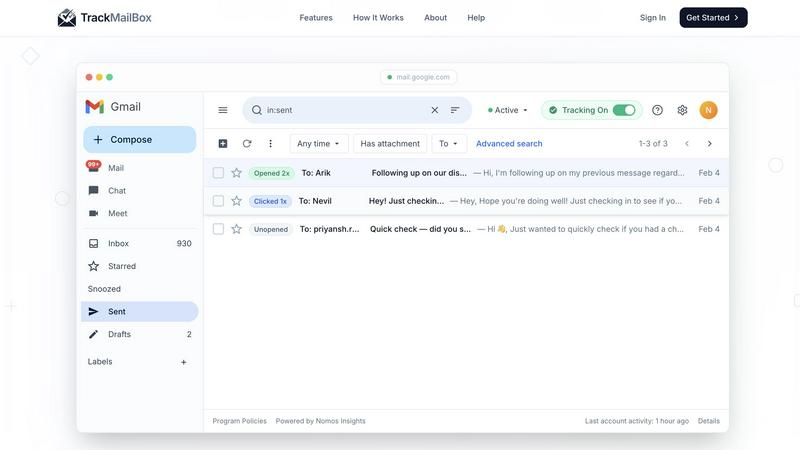
TrackMailBox is a free Chrome extension that provides real-time tracking of email opens and link clicks in Gmail.
Last updated: February 26, 2026
Visual Comparison
ScopeSnap

TrackMailBox
Feature Comparison
ScopeSnap
Smart Note Transformation
ScopeSnap allows users to paste in transcripts, emails, and notes from discovery conversations. The AI then processes this information to create a structured scope, making it easy to visualize and manage project requirements.
Backlog Generation
The platform automatically generates epics and scope items from your discovery notes. It also surfaces open questions and flags assumptions, ensuring that nothing critical is overlooked during project planning.
Interactive Refinement and Estimation
With ScopeSnap, users can refine their structured backlog collaboratively. Assign roles, set accurate estimates, and resolve any open questions to create a comprehensive project scope that all stakeholders understand.
Automatic Proposal Creation
Once the project scope is finalized, ScopeSnap generates a polished proposal or Statement of Work (SOW) ready for client presentation. This feature saves countless hours of manual writing, allowing users to focus on delivering value to their clients.
TrackMailBox
Unlimited Email Tracking
TrackMailBox offers unlimited email tracking, allowing you to monitor as many emails as you want without any costs. There are no hidden fees or premium tiers, making it an ideal solution for those who frequently send important emails.
Real-time Open Notifications
Receive instant notifications the moment your emails are opened. TrackMailBox ensures you know exactly when your recipients engage with your messages, helping you follow up effectively and strategically.
Link Click Tracking
With TrackMailBox, you can track which links in your emails are clicked and how often. This feature provides valuable insights into what content resonates with your recipients and can help you tailor your future communications for better engagement.
Detailed Engagement History
Access a comprehensive engagement history for each email directly within your Gmail interface. You'll see opens, clicks, and timestamps, allowing you to analyze the effectiveness of your email campaigns at a glance.
Use Cases
ScopeSnap
Streamlining Discovery Calls
Freelancers and agencies can use ScopeSnap immediately after a client discovery call. By inputting their notes, they can quickly create a structured scope that captures all necessary details, reducing the risk of missing vital requirements.
Efficient Project Estimation
ScopeSnap empowers developers to estimate projects more accurately. By breaking down tasks into clear, manageable items, users can avoid common pitfalls and ensure they provide reliable estimates to clients.
Creating Client Proposals
When it's time to send a proposal, ScopeSnap generates a polished document directly from the structured scope. This use case is perfect for agencies looking to impress clients with professional documentation without the tedious writing process.
Collaborative Team Planning
For software agencies with multiple team members, ScopeSnap facilitates collaborative planning. Team members can review and refine the project scope together, ensuring that everyone is aligned and that all perspectives are considered.
TrackMailBox
Freelancers Pitching Clients
Freelancers can use TrackMailBox to track their proposals and pitches, ensuring they know when potential clients have read their messages. This insight allows them to time their follow-ups effectively.
Sales Teams Closing Deals
Sales teams can benefit greatly from TrackMailBox by monitoring when leads open their emails and click on links to product demos or sales materials. This real-time data helps them prioritize their outreach efforts.
Recruiters Following Up with Candidates
Recruiters can streamline their communication with candidates by using TrackMailBox to see if their emails, such as interview invites or feedback, have been opened, ensuring a smoother hiring process.
Job Seekers Networking
Job seekers can utilize TrackMailBox to track their networking emails, ensuring they follow up with contacts who have engaged with their outreach. This feature can enhance their chances of securing job opportunities.
Overview
About ScopeSnap
ScopeSnap is an innovative AI-powered tool designed specifically for freelance developers and software agencies to transform chaotic discovery notes into organized project scopes, detailed estimates, and professional client-ready proposals. As anyone in the custom software development industry knows, estimating projects can be a daunting task, often fraught with risks such as overlooked requirements and vague scopes. ScopeSnap alleviates these challenges by streamlining the entire process. By allowing users to input raw notes from discovery calls, the platform intelligently breaks down project ideas into manageable tasks, ensuring clarity and confidence in each estimation. This means freelancers and agencies can spend less time on administrative work and more time focusing on what they do best: building exceptional software. With ScopeSnap, turning messy notes into polished documents becomes a quick and straightforward workflow, making project management more efficient and effective.
About TrackMailBox
TrackMailBox is a free and unlimited email tracking extension designed specifically for Gmail users. It addresses a common question among email senders: "Did they read it?" Unlike Gmail's default settings, which lack built-in read receipts, TrackMailBox provides a seamless solution for those who send important emails like proposals, pitches, or follow-ups. The tool eliminates the frustrations associated with other email tracking solutions that often impose restrictions, include unwanted signatures, or charge monthly fees. With TrackMailBox, you can track an unlimited number of emails without any branding, ensuring that your communications remain professional and clean. This extension is perfect for freelancers, sales teams, recruiters, job seekers, and founders—essentially anyone who relies on email for communication and wants to gain insights into their email engagement.
Frequently Asked Questions
ScopeSnap FAQ
How does ScopeSnap improve project estimation?
ScopeSnap improves project estimation by breaking down complex project ideas into clear, structured tasks that are easier to understand and estimate accurately, minimizing risks of oversight.
Can I use ScopeSnap for multiple projects?
Yes, ScopeSnap is designed to handle multiple projects simultaneously. You can create separate scopes and proposals for each project, making it a versatile tool for freelance developers and agencies.
Is my data secure with ScopeSnap?
Absolutely. ScopeSnap takes data security seriously and implements strong measures to ensure that your project details and client information are kept safe and confidential.
How can I get started with ScopeSnap?
Getting started with ScopeSnap is easy. Simply visit the website, sign up for an account, and begin transforming your discovery notes into structured scopes and proposals in minutes.
TrackMailBox FAQ
Is TrackMailBox really free?
Yes! TrackMailBox is completely free and unlimited. You can track as many emails as you want without any cost. There are no credit card requirements, hidden fees, or premium tiers involved.
How do I install TrackMailBox?
Installing TrackMailBox is easy. Simply add the extension from the Chrome Web Store. The installation process takes less than 30 seconds, and you can start tracking right away without any technical setup.
Will my recipients know I'm tracking my emails?
No, your recipients will not be aware that you are tracking your emails. TrackMailBox operates invisibly, meaning no signatures, logos, or labels are added to your outgoing messages.
Can I monitor engagement history for all my emails?
Absolutely! TrackMailBox provides a detailed engagement history for each email you send. You can view opens, clicks, and timestamps directly in your Gmail account, making it easy to analyze your email performance.
Alternatives
ScopeSnap Alternatives
ScopeSnap is an innovative tool that leverages AI to streamline project scoping and proposal generation for freelance developers and software agencies. By transforming chaotic discovery notes into well-structured project scopes, it simplifies the often cumbersome process of estimating custom software projects. Users appreciate how it helps them clarify requirements, ensuring nothing gets overlooked, while also saving valuable time in proposal preparation. Despite its strengths, users may seek alternatives for various reasons, including pricing, feature sets, or specific platform needs. When exploring alternatives, it's essential to consider factors such as user-friendliness, integration capabilities, and the ability to support your unique project management workflows. Finding the right fit can enhance your productivity and ensure a seamless scoping experience.
TrackMailBox Alternatives
TrackMailBox is a free email tracking extension designed specifically for Gmail users, enabling real-time open and click tracking without any limitations or branding. Users often seek alternatives to TrackMailBox for various reasons, including pricing, feature sets, and compatibility with other platforms. As you explore options, it's essential to consider factors such as ease of use, the comprehensiveness of tracking features, privacy policies, and whether the tool integrates seamlessly with your existing email workflows. When selecting an alternative, look for tools that offer unlimited tracking without hidden fees, ensure a clean email presentation, and provide detailed engagement insights. Prioritizing user privacy and data security is also crucial, as you want a solution that protects your information while delivering the insights you need.