
MakeAIVideo vs Video Background Remover
Side-by-side comparison to help you choose the right AI tool.

MakeAIVideo
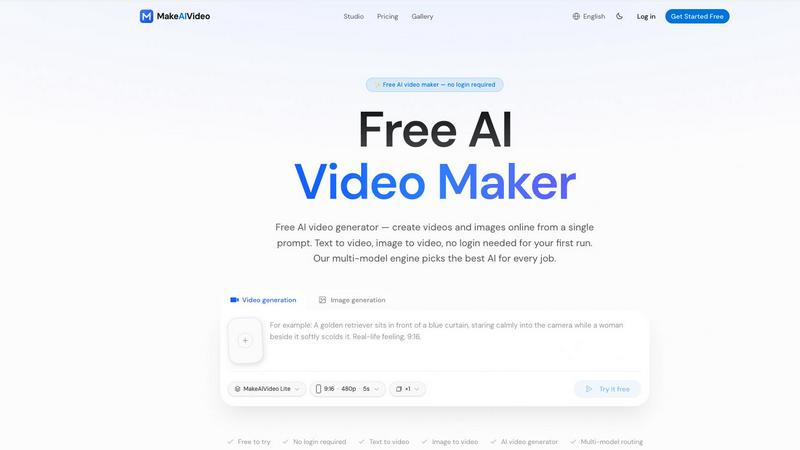
MakeAIVideo is an innovative AI video generator that creates stunning videos from text or images using advanced multi-model routing technology.
Last updated: March 18, 2026

Video Background Remover
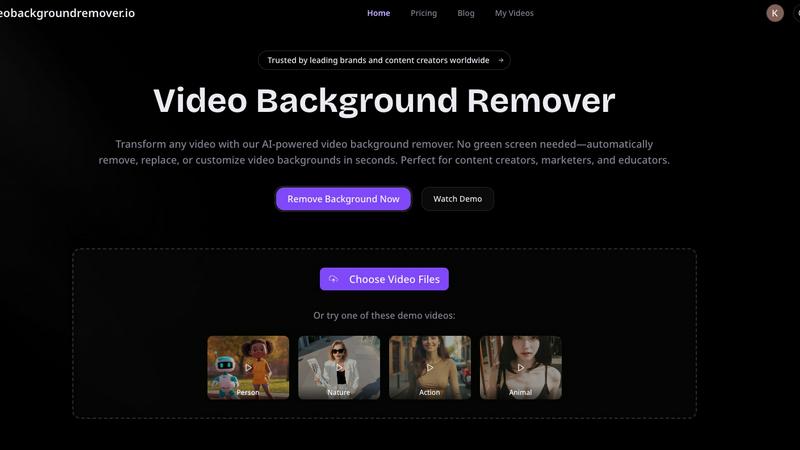
Easily remove and customize video backgrounds in seconds with our AI tool, no green screen required.
Last updated: March 3, 2026
Visual Comparison
MakeAIVideo
Video Background Remover
Feature Comparison
MakeAIVideo
Multi-Model Routing
MakeAIVideo employs a sophisticated multi-model routing engine that automatically selects the best AI model suited to your prompt. This means that depending on the task, you benefit from the most effective capabilities of models like Seedance, Veo, and more, ensuring high-quality video output tailored to your needs.
Zero Login Required
One of the standout features of MakeAIVideo is that you can begin creating videos without needing to create an account. This hassle-free access allows you to dive directly into video generation, making it perfect for those who want to quickly test the platform or generate content on the fly.
High-Quality Output
The platform generates cinematic-quality videos in under a minute, with options for up to 4K resolution. This ensures that whether you are creating content for social media, advertisements, or presentations, the visuals will be sharp and professional, meeting industry standards.
Dual-Channel Sound Design
Enhance your videos with dual-channel sound design, where audio is generated in sync with the visuals. This feature removes the need for post-production editing, allowing for a seamless audio-visual experience that elevates the overall quality of your videos.
Video Background Remover
AI-Powered Background Detection
This feature uses advanced artificial intelligence and machine learning algorithms to automatically detect and remove backgrounds from videos, eliminating the need for any physical green screen setup. This capability allows users to focus on their content without worrying about complex equipment or setups.
Instant Background Removal
With the Video Background Remover, users can enjoy instant background removal, which means they can upload their videos and have the backgrounds eliminated in seconds. This quick processing time enhances productivity and allows for faster turnaround on projects.
Multiple Export Options
Users can export their edited videos in various formats, including transparent backgrounds for WebM or MOV files, or replace backgrounds with custom colors, images, and video clips. This flexibility ensures that the final video aligns perfectly with branding requirements or personal preferences.
Batch Video Processing
For those working on multiple projects, the batch video processing feature allows users to upload and process several videos simultaneously. This saves time and effort, especially for marketers and content creators who need to produce large volumes of video content quickly.
Use Cases
MakeAIVideo
Social Media Content Creation
MakeAIVideo is ideal for social media managers looking to create engaging videos for platforms like Instagram and TikTok. The ease of use and rapid generation enables them to keep their content fresh and relevant without extensive resources or time.
Product Showcases
Businesses can utilize MakeAIVideo to create stunning product showcase videos quickly. By entering details about the product, users can generate high-quality promotional videos that highlight features and benefits, perfect for e-commerce and online marketing.
Educational Videos
Educators and content creators can leverage MakeAIVideo to produce informative videos that explain concepts clearly and creatively. The platform's ability to generate custom visuals based on text prompts allows for interactive and engaging learning materials.
Brand Storytelling
MakeAIVideo can help brands tell their stories through compelling narratives. By inputting key messages and themes, businesses can create videos that resonate with their audience, enhancing brand identity and customer engagement.
Video Background Remover
E-commerce Product Videos
E-commerce businesses utilize the Video Background Remover to create polished product videos that enhance the shopping experience. By removing distracting backgrounds, they can showcase products in a clean, professional manner, leading to increased conversion rates and improved customer engagement.
Social Media Content Creation
Over 500,000 creators leverage this tool to produce eye-catching social media content. By removing backgrounds, users can create engaging memes, reaction videos, and unique visual effects that resonate with audiences on platforms like TikTok and Instagram, ultimately boosting engagement and virality.
Online Education and Training
Educators benefit from the Video Background Remover by producing distraction-free educational videos. By replacing home backgrounds with professional virtual settings, they can enhance the learning experience, improve student focus, and increase retention rates in online courses and tutorials.
Professional Presentations and Meetings
Professional services use the Video Background Remover to deliver polished client presentations and virtual meetings. By eliminating office clutter and customizing backgrounds, they can maintain a professional image that reinforces their brand during webinars and online events.
Overview
About MakeAIVideo
MakeAIVideo is an innovative AI video generator that stands out as the first to utilize multi-model routing. This unique feature allows the platform to analyze your prompt dynamically and select the most suitable AI model for the task at hand, whether it be Seedance, Kling, Veo, Sora, Hailuo, or others. This flexibility ensures that users get the best possible results tailored to their specific needs. Designed for creators, marketers, and businesses alike, MakeAIVideo eliminates the typical barriers associated with video creation. You can generate videos effortlessly with no account required for your first video. Just visit the site, enter your prompt, and watch as your video comes to life. With its combination of automatic model selection and zero-friction access, MakeAIVideo offers an unparalleled experience for producing high-quality video content quickly and easily.
About Video Background Remover
Video Background Remover is an innovative AI-powered online tool designed to simplify the video editing process by allowing users to effortlessly remove or replace video backgrounds. It caters to a diverse audience, including content creators, marketers, educators, and business professionals, offering a user-friendly solution that eliminates the need for cumbersome green screens and complex setups. This tool automatically detects and removes backgrounds, enabling users to concentrate on delivering their message effectively. Supporting MP4 and MOV file formats, Video Background Remover can process videos of up to 120 minutes in HD quality. Its intuitive interface ensures that anyone, regardless of technical expertise, can achieve professional-quality results in just a few clicks. By streamlining the video production workflow, it saves time and resources while enhancing project quality and audience engagement, making it an essential tool for modern video creators.
Frequently Asked Questions
MakeAIVideo FAQ
How does MakeAIVideo choose the AI model for my video?
MakeAIVideo's multi-model routing engine analyzes your prompt and automatically selects the AI model best suited for your specific needs. This ensures optimal results without requiring manual selection on your part.
Can I use MakeAIVideo for commercial purposes?
Yes, all plans offered by MakeAIVideo allow for commercial use of the generated videos. This makes it an excellent tool for businesses looking to produce marketing materials without worrying about licensing issues.
Is there a limit to how long my videos can be?
Free users can generate videos with a length of 5 to 10 seconds, while paid plans offer more flexibility with longer videos. The platform supports video lengths suitable for various formats and needs.
Do I need any video editing skills to use MakeAIVideo?
No, MakeAIVideo is designed to be user-friendly, allowing anyone to create videos without prior video editing experience. The intuitive interface and automated features simplify the entire process, making video creation accessible to everyone.
Video Background Remover FAQ
How does the Video Background Remover work?
The Video Background Remover uses advanced AI technology to analyze each frame of the uploaded video. It automatically detects the subject and removes the background without the need for a green screen, streamlining the editing process.
What video formats are supported?
This tool supports popular video formats such as MP4, MOV, and WebM. Users can upload videos of up to 120 minutes in HD quality, ensuring versatility in handling various types of video content.
Can I replace the background with custom images or videos?
Yes, users can not only remove backgrounds but also replace them with custom colors, images, or video clips. This allows for creative flexibility and ensures that the final product aligns with branding and personal preferences.
Is there a limit to the number of videos I can process?
The Video Background Remover supports batch video processing, allowing users to upload and process multiple videos simultaneously. This feature is particularly useful for those who need to create large volumes of content efficiently.
Alternatives
MakeAIVideo Alternatives
MakeAIVideo is an innovative AI video generator that falls into the category of video creation tools. It stands out by offering multi-model routing, which means it intelligently selects the best AI model for your specific needs without requiring you to commit to just one option. This unique feature, along with the effortless access to video creation without the need for an account, makes it an attractive tool for users seeking to create videos quickly and efficiently. However, users often seek alternatives for various reasons, such as pricing structures, specific feature sets, or compatibility with different platforms. When choosing an alternative, consider factors like ease of use, the range of features offered, and whether the tool can cater to your specific video creation needs. It's essential to weigh these aspects to find a solution that aligns with your goals and budget.
Video Background Remover Alternatives
Video Background Remover is an advanced AI-powered tool that allows users to effortlessly remove and customize video backgrounds without the need for green screens. It caters to a wide range of users, including content creators, marketers, educators, and business professionals, making video production more accessible and efficient. Users often seek alternatives due to various reasons, such as pricing, specific feature sets, or platform compatibility. When considering an alternative, it's important to evaluate factors like processing speed, ease of use, and the quality of output. A good alternative should also support a variety of video formats and provide customizable background options to meet diverse creative needs.