
Seedance vs Video Background Remover
Side-by-side comparison to help you choose the right AI tool.

Seedance is your all-in-one AI studio to easily create stunning videos, images, and music using top models like Sora 2 and Suno.
Last updated: March 18, 2026

Video Background Remover
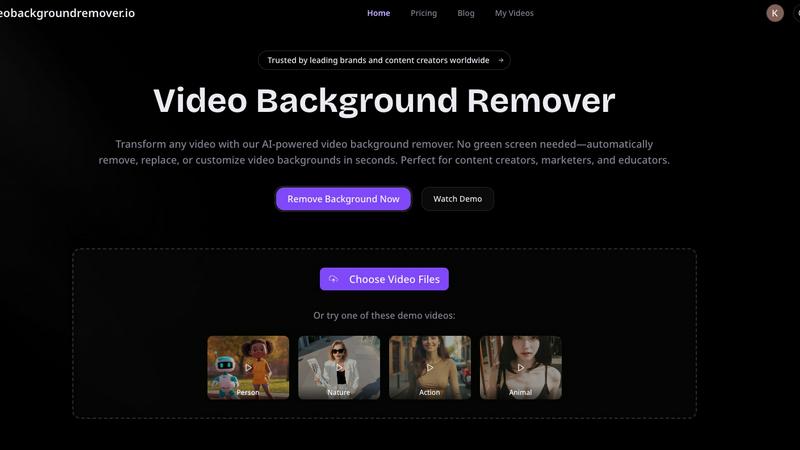
Easily remove and customize video backgrounds in seconds with our AI tool, no green screen required.
Last updated: March 3, 2026
Visual Comparison
Seedance

Video Background Remover
Feature Comparison
Seedance
Unified Model Hub
This is the core of Seedance. Instead of managing accounts across a dozen different AI websites, you get instant access to a curated selection of the most powerful models in one dashboard. You can generate a video using Sora 2, an image with Gemini 3 Pro, and a music track with Suno V5 all within the same session. This centralized access saves immense time and simplifies your creative toolkit.
Side-by-Side Model Comparison
Seedance empowers you to make informed creative decisions. You can run the same prompt through multiple AI models (like Veo 3.1 and Kling AI for video) simultaneously and view the results in a single workspace. This allows you to easily compare styles, quality, and adherence to your prompt, ensuring you select the best output for your needs without guesswork.
Multi-Format Generation Studio
The platform is a true multi-modal studio supporting all key creative formats. Generate high-resolution images with crisp detail for illustrations or concept art. Create video clips with coherent motion and cinematic quality for shorts or scenes. Produce original music, soundscapes, and vocals to score your projects. Everything integrates into one smooth workflow.
Fast, Responsive Interface
Seedance is built for iteration. The interface is designed to be quick and lag-free, allowing you to preview generations, make tweaks to your prompts, and download your final assets without frustrating delays. This responsive environment keeps you in a state of creative flow, making the process of refining and perfecting your AI-generated content efficient and enjoyable.
Video Background Remover
AI-Powered Background Detection
This feature uses advanced artificial intelligence and machine learning algorithms to automatically detect and remove backgrounds from videos, eliminating the need for any physical green screen setup. This capability allows users to focus on their content without worrying about complex equipment or setups.
Instant Background Removal
With the Video Background Remover, users can enjoy instant background removal, which means they can upload their videos and have the backgrounds eliminated in seconds. This quick processing time enhances productivity and allows for faster turnaround on projects.
Multiple Export Options
Users can export their edited videos in various formats, including transparent backgrounds for WebM or MOV files, or replace backgrounds with custom colors, images, and video clips. This flexibility ensures that the final video aligns perfectly with branding requirements or personal preferences.
Batch Video Processing
For those working on multiple projects, the batch video processing feature allows users to upload and process several videos simultaneously. This saves time and effort, especially for marketers and content creators who need to produce large volumes of video content quickly.
Use Cases
Seedance
Social Media Content Creation
Quickly produce eye-catching, platform-specific content. Generate trending video hooks with Kling AI, create branded visuals with GPT Image, and score them with a custom Suno track—all in one sitting. Perfect for creators who need to maintain a consistent and high-quality posting schedule across Instagram, TikTok, and YouTube.
Marketing and Advertising Prototyping
Rapidly visualize campaign concepts and create compelling ad assets. Use the image models to mock up product scenes or character designs, and generate short, cinematic video teasers to present ideas to clients or stakeholders before committing to expensive production, accelerating the brainstorming and approval process.
Independent Filmmaking and Storyboarding
Bring narrative ideas to life without a massive budget. Use Seedance to generate atmospheric video clips for scene pre-visualization, create consistent character portraits for casting, and produce original soundtrack demos. It's an invaluable tool for developing mood, tone, and visual language for short films or pilots.
Concept Art and Digital Illustration
Explore visual ideas and iterate on artistic concepts at lightning speed. Whether you're designing characters, environments, or album art, you can use the powerful image models to generate multiple variations, refine details, and achieve a specific artistic style, serving as both inspiration and a foundational starting point for further refinement.
Video Background Remover
E-commerce Product Videos
E-commerce businesses utilize the Video Background Remover to create polished product videos that enhance the shopping experience. By removing distracting backgrounds, they can showcase products in a clean, professional manner, leading to increased conversion rates and improved customer engagement.
Social Media Content Creation
Over 500,000 creators leverage this tool to produce eye-catching social media content. By removing backgrounds, users can create engaging memes, reaction videos, and unique visual effects that resonate with audiences on platforms like TikTok and Instagram, ultimately boosting engagement and virality.
Online Education and Training
Educators benefit from the Video Background Remover by producing distraction-free educational videos. By replacing home backgrounds with professional virtual settings, they can enhance the learning experience, improve student focus, and increase retention rates in online courses and tutorials.
Professional Presentations and Meetings
Professional services use the Video Background Remover to deliver polished client presentations and virtual meetings. By eliminating office clutter and customizing backgrounds, they can maintain a professional image that reinforces their brand during webinars and online events.
Overview
About Seedance
Seedance is your all-in-one AI creation studio, designed to supercharge the workflow of modern creators. It solves a common frustration: the need to juggle multiple separate tools and subscriptions for video, image, and music generation. Seedance brings industry-leading models like OpenAI's Sora 2, Google's Veo 3.1, Kling AI, GPT Image, and Suno V5 into a single, unified workspace. This means you can generate stunning visuals, cinematic video clips, and original music tracks without ever switching tabs. The platform is built for speed and efficiency, allowing you to compare outputs from different top-tier models side-by-side to find the perfect result for your project, then export it seamlessly. Whether you're a social media content creator, a marketer, a filmmaker, or a hobbyist exploring AI art, Seedance provides a powerful, predictable, and fast environment to move from your initial idea to a polished final output.
About Video Background Remover
Video Background Remover is an innovative AI-powered online tool designed to simplify the video editing process by allowing users to effortlessly remove or replace video backgrounds. It caters to a diverse audience, including content creators, marketers, educators, and business professionals, offering a user-friendly solution that eliminates the need for cumbersome green screens and complex setups. This tool automatically detects and removes backgrounds, enabling users to concentrate on delivering their message effectively. Supporting MP4 and MOV file formats, Video Background Remover can process videos of up to 120 minutes in HD quality. Its intuitive interface ensures that anyone, regardless of technical expertise, can achieve professional-quality results in just a few clicks. By streamlining the video production workflow, it saves time and resources while enhancing project quality and audience engagement, making it an essential tool for modern video creators.
Frequently Asked Questions
Seedance FAQ
What AI models are available on Seedance?
Seedance integrates a constantly updated selection of top-tier models. For video, you can access models like OpenAI's Sora 2, Google's Veo 3.1, and Kling AI. For images, options include Google's Gemini-powered Nano Banana models, GPT Image, and Z-Image. For music, Suno V5 is available. The unified hub lets you use them all from one account.
Do I need separate subscriptions for each AI model?
No, that's the primary benefit of Seedance. You do not need individual subscriptions to OpenAI, Google, Suno, etc. You subscribe to a Seedance plan, which provides you with credits or access to use the various integrated models within the platform, offering predictable costs and centralized billing.
Can I use my own images or videos as a starting point?
Yes, many of the integrated video models support image-to-video generation. As shown in the examples, you can upload a reference image (like the surreal sink scene) and use it with a prompt in models like Veo 3.1 to guide the style and composition of your generated video, creating more controlled and personalized outputs.
Is there a free trial available?
Yes, Seedance offers a Free Trial to let new users explore the platform's capabilities. This allows you to test the interface, experiment with different models, and generate sample content before committing to a paid plan. You can start the free trial directly from their website to begin creating.
Video Background Remover FAQ
How does the Video Background Remover work?
The Video Background Remover uses advanced AI technology to analyze each frame of the uploaded video. It automatically detects the subject and removes the background without the need for a green screen, streamlining the editing process.
What video formats are supported?
This tool supports popular video formats such as MP4, MOV, and WebM. Users can upload videos of up to 120 minutes in HD quality, ensuring versatility in handling various types of video content.
Can I replace the background with custom images or videos?
Yes, users can not only remove backgrounds but also replace them with custom colors, images, or video clips. This allows for creative flexibility and ensures that the final product aligns with branding and personal preferences.
Is there a limit to the number of videos I can process?
The Video Background Remover supports batch video processing, allowing users to upload and process multiple videos simultaneously. This feature is particularly useful for those who need to create large volumes of content efficiently.
Alternatives
Seedance Alternatives
Seedance is an all-in-one AI studio that specializes in generating video, images, and music. It falls into the categories of content creation, video, and image generation, acting as a central hub where creators can access multiple top-tier AI models from a single workspace. Users often explore alternatives for various reasons. Some might be looking for a different pricing structure or a free tier to start with. Others may need specific features that cater to a niche workflow or prefer a platform dedicated solely to one type of media, like only video or only music generation. When choosing an alternative, it's wise to consider your primary creative needs. Think about which type of content you create most often and evaluate tools based on the quality of their core models, ease of use, and how well they integrate into your existing process. The goal is to find a tool that feels like a natural extension of your creativity.
Video Background Remover Alternatives
Video Background Remover is an advanced AI-powered tool that allows users to effortlessly remove and customize video backgrounds without the need for green screens. It caters to a wide range of users, including content creators, marketers, educators, and business professionals, making video production more accessible and efficient. Users often seek alternatives due to various reasons, such as pricing, specific feature sets, or platform compatibility. When considering an alternative, it's important to evaluate factors like processing speed, ease of use, and the quality of output. A good alternative should also support a variety of video formats and provide customizable background options to meet diverse creative needs.