

xyOps
xyOps automates and monitors your infrastructure, streamlining job scheduling and alerting for seamless workflow management.
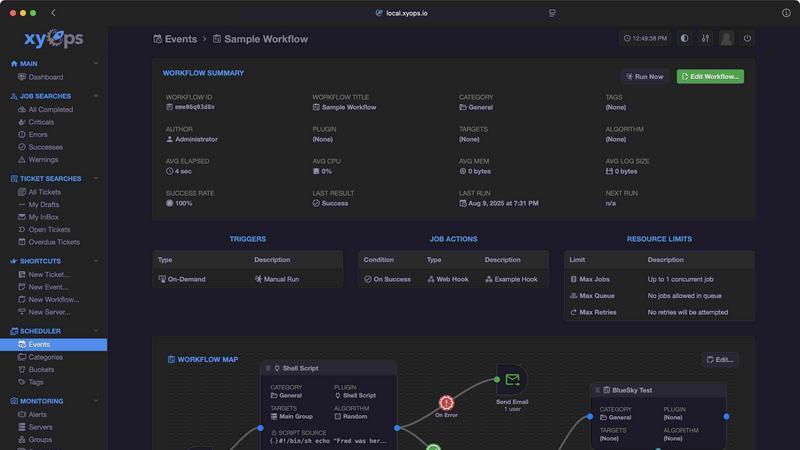
About xyOps
xyOps™ is a cutting-edge platform designed to revolutionize the way teams approach job scheduling, workflow automation, server monitoring, alerting, and incident response. Tailored specifically for developers and operations teams, xyOps empowers users to manage their automation stack without compromising on data privacy, freedom, or visibility. Unlike many contemporary solutions, xyOps stands out by offering transparency without hidden features or telemetry requirements. Built to be open and extensible, it can be deployed across various environments, ensuring that teams have full control over their operations. With xyOps, users can orchestrate their entire infrastructure from a single interface, enabling seamless collaboration and enhanced productivity. Its robust features and user-friendly design make it an indispensable tool for organizations looking to optimize their workflows and monitor their systems effectively.
Features of xyOps
Job Scheduling Reimagined
xyOps elevates job scheduling beyond conventional tools like cron by providing a flexible and intuitive scheduling system. Users can target specific servers or groups, set multiple schedules for events, and even import crontab entries. This feature ensures precise job execution while accommodating various operational needs, such as blackout periods for maintenance or holidays.
Visual Workflow Builder
The graphical workflow editor in xyOps allows users to visually construct workflows by connecting events, triggers, actions, and monitors. This feature enables teams to create intricate pipelines with ease, pass data between workflow steps, and assign actions to specific events, enhancing overall efficiency. It's a great way to simplify complex processes and visualize automation.
Smart Alerts
With xyOps, users can set up rich alerting mechanisms tailored to their needs. This feature includes customizable triggers and notifications, ensuring that users are promptly informed about critical events. Alerts can also create tickets or execute jobs, making incident response swift and effective. The snapshot feature provides a quick overview of the server status at the time of the alert.
Integrated Ticketing System
xyOps features a built-in ticketing system that streamlines incident response. Alerts and failed jobs can automatically generate tickets, which can include attachments and be integrated with CI/CD systems. This functionality ensures that teams can address issues promptly and maintain a clear record of incidents, enhancing collaboration and accountability.
Use Cases of xyOps
Automated Deployment Pipelines
xyOps is ideal for managing automated deployment processes. By scheduling jobs and monitoring server performance, teams can ensure that their applications are deployed smoothly and efficiently, with alerts to catch any issues before they escalate.
Real-time Server Monitoring
Organizations can leverage xyOps to monitor server performance actively. By defining custom metrics and receiving instant notifications on critical issues, teams can maintain system health and prevent downtime, significantly improving reliability.
Workflow Optimization
xyOps enables teams to visualize and streamline their workflows. By using the visual workflow builder, teams can identify bottlenecks, optimize processes, and ensure that all tasks are completed efficiently, ultimately leading to increased productivity.
Incident Management
With its integrated ticketing system, xyOps is an excellent tool for incident management. When a job fails or an alert is triggered, tickets are created automatically, allowing teams to respond quickly and effectively, reducing response times and improving service levels.
Frequently Asked Questions
What makes xyOps different from other automation tools?
xyOps is unique due to its open-source nature, lack of hidden features, and a focus on user control and flexibility. It allows teams to manage their automation stack without compromising data privacy or visibility.
Is xyOps suitable for large-scale operations?
Yes, xyOps is designed to scale up seamlessly, accommodating organizations with five servers or thousands. Its architecture supports extensive workflows and monitoring capabilities, making it ideal for any size of operation.
How easy is it to set up xyOps?
Setting up xyOps is straightforward, with deployment possible in just minutes. The user-friendly interface and detailed documentation make it easy for teams to get started quickly.
Can I customize alerts in xyOps?
Absolutely! xyOps offers robust alert customization options, allowing users to define complex triggers and notification methods. This ensures that teams are informed in a way that suits their operational needs.
Similar to xyOps

TestNeo
TestNeo.ai is an AI-native engineering and release assurance platform that helps teams automate web and API testing using natural language.


Chatmizer
Chatmizer is an AI-powered SaaS platform for chatbots, WhatsApp automation, social messaging, CRM, lead generation, and sales workflows.

TryThatTool
Discover AI tools worth trying. Compare options, explore practical reviews, and build your own AI stack based on your goals and budget.


Novastart
Novastart brings apps and files onto an infinite canvas where people and AI agents can work together.

Foxello
Messy documents to clean data. Minutes, not hours of typing.

AI Email Filter
AI Email Filter sorts incoming mail into folders using plain-language prompts you write. Works with any IMAP mailbox; bring your own LLM if you want.