
FrogLead vs Graph Maker
Side-by-side comparison to help you choose the right AI tool.

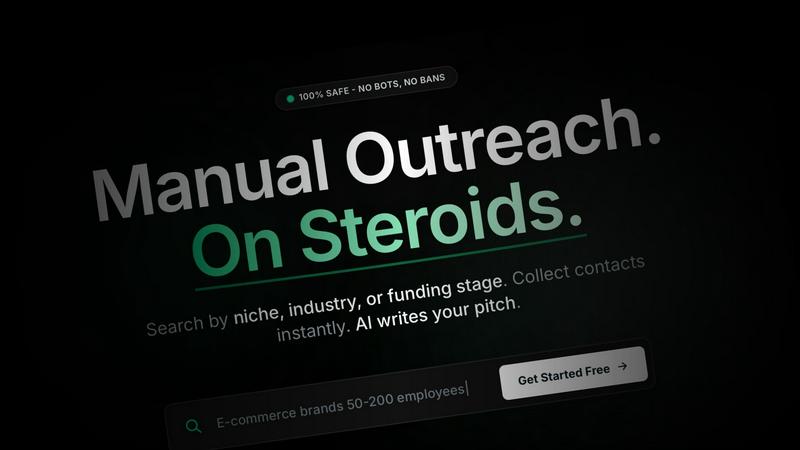
FrogLead is a manual LinkedIn CRM that helps founders find leads and write AI-powered pitches for warm conversations.
Last updated: March 18, 2026

Graph Maker
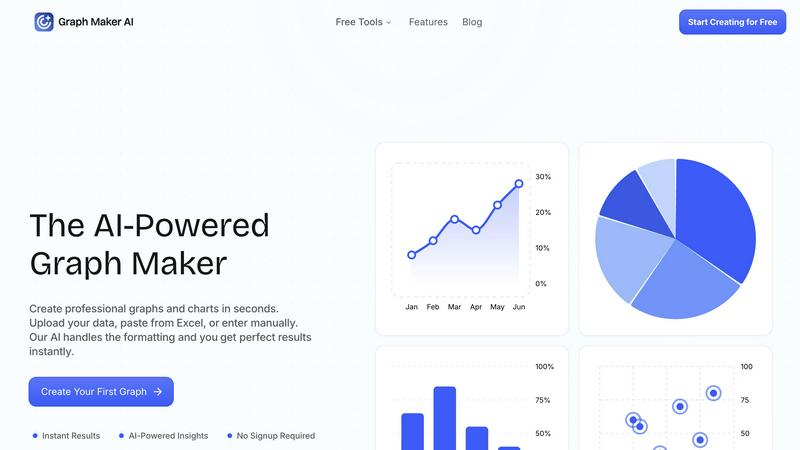
Effortlessly create and customize stunning graphs and charts from your data in seconds with our AI-powered Graph Maker.
Last updated: February 26, 2026
Visual Comparison
FrogLead
Graph Maker
Feature Comparison
FrogLead
Intelligent Company & Contact Discovery
Go beyond basic searches. FrogLead provides access to millions of companies, which you can filter using smart criteria like industry, funding stage, location, and size. Once you find a target company, the platform instantly surfaces key decision-makers such as CEOs, CTOs, and VPs. This means you spend your time researching the right people who have the authority to say "yes" to your offer, rather than wasting effort on generic contact lists.
Visual Kanban Pipeline Board
Manage your outreach like a pro with a clear, visual pipeline. This drag-and-drop board allows you to track each lead through stages like "New," "Connected," "Replied," and "Closed." Moving a card is as simple as dragging it, making it easy to see your entire funnel at a glance. You can add notes, log interactions, and never lose track of where you stand with any prospect, turning lead management into an intuitive and almost gamified experience.
AI-Powered Message Generation
Say goodbye to writer's block and generic templates. FrogLead uses GPT-4 to generate personalized opening messages for you. The AI incorporates the contact's name, role, and company context to create a relevant and engaging pitch. You can regenerate the message until it's perfect, then simply copy and paste it into LinkedIn to send manually. This ensures high personalization with zero risk of automation-related bans.
Smart Alerts & Pipeline Rules
Never miss a critical follow-up again. You can set custom rules for each stage of your pipeline. For example, you can trigger an alert if a contact has been in "Connected" status for 3 days without a reply. Alerts come via email, in-app, or push notifications. You can even set rules to auto-hide stale leads from your board after a certain period, keeping your focus sharp on the hottest opportunities.
Graph Maker
Instant Graph Generation
With Graph Maker, simply paste your data and click "Generate." The AI-powered tool creates your graph in seconds, eliminating the need for time-consuming setup or configuration. This feature allows users to visualize data instantly without the hassle.
Fully Editable Graphs
Customize every aspect of your graphs, from themes and colors to labels and legends. This feature ensures that your visualizations can be tailored to meet specific presentation needs or personal preferences, making it easy to achieve the perfect look for your data.
Automatic AI Insights
Graph Maker doesn’t just create graphs; it also generates clear insights from your data. The AI analyzes trends, proportions, distributions, and correlations, helping you tell a meaningful story with your charts rather than just presenting numbers.
Multiple Graph Types
Choose from a variety of graph types, including line graphs, pie charts, bar graphs, and scatter plots. Each option is powered by AI, making it effortless to select the visualization that best fits your data and your goals.
Use Cases
FrogLead
B2B Sales Prospecting
Sales representatives and account executives can use FrogLead to systematically identify and reach out to potential clients. By searching for companies in a specific niche (e.g., "AI startups in San Francisco with Series B funding"), finding the relevant VP of Sales or Head of Product, and sending AI-crafted personalized messages, they can build a consistent pipeline of qualified leads and accelerate their sales cycle efficiently.
Startup Founder Outreach
Founders looking for investors, partners, or early customers need to make every connection count. FrogLead allows them to search for companies by funding stage and size to find potential partners or identify venture capital firms. They can then pinpoint key decision-makers and craft tailored messages that speak directly to mutual interests, helping to secure crucial meetings without risking their personal LinkedIn accounts.
Recruitment and Talent Sourcing
Recruiters and hiring managers can leverage FrogLead to source passive candidates. They can search for professionals by industry, company, and likely role (like "CTO at a DevTools startup"). The AI helps draft respectful and compelling InMails, and the Kanban board is perfect for tracking candidates through stages from "Initial Contact" to "Interview Scheduled," making the talent pipeline highly organized.
Agency Lead Generation
Marketing and SEO agencies constantly need to attract new clients. With FrogLead, they can build targeted lists of businesses that fit their ideal customer profile, such as "SaaS companies with 50-500 employees." The platform helps them identify the marketing director or CEO, and the unified inbox allows them to manage both LinkedIn and email follow-ups in one place, streamlining their outbound client acquisition efforts.
Graph Maker
Students and Educators
Students can leverage Graph Maker for homework, science projects, and presentations, while educators can create engaging graphs for lessons and classroom materials. The tool's simplicity allows users to focus on learning rather than struggling with complex software.
Marketers and Content Creators
Marketing teams utilize Graph Maker to visualize campaign data, create social media graphics, and generate client reports. By turning spreadsheets into shareable visuals quickly, they enhance their storytelling and communication efforts.
Business Analysts and Data Professionals
Data professionals can streamline their workflow by using Graph Maker to replace tedious Excel tasks. The tool allows for quick visualizations, enabling analysts to focus on extracting insights rather than formatting data.
Researchers and Scientists
Researchers can use Graph Maker to visualize their findings in a professional manner. Whether presenting statistical analysis or displaying experimental data, the tool makes it easy to create compelling graphs that enhance the impact of their research.
Overview
About FrogLead
FrogLead is your intelligent sidekick for LinkedIn outreach, designed to supercharge your manual efforts without the risk of bans associated with automation bots. It's built on a simple, powerful idea: you handle the authentic human connection, and FrogLead handles everything else. The platform empowers sales professionals, founders, recruiters, and marketers to find the right companies and decision-makers with incredible precision. You can search by niche, industry, funding stage, or company size to build a targeted list. Then, FrogLead's AI helps you craft personalized opening messages using GPT-4, which you copy and send manually, keeping your account 100% safe. All your leads are then managed in a visual, drag-and-drop Kanban board, with smart alerts to ensure no follow-up falls through the cracks. By combining a massive company database, contact discovery, and a unified inbox for Email and LinkedIn, FrogLead turns the tedious process of cold outreach into an efficient, effective, and safe system for generating warm conversations and closing more deals.
About Graph Maker
Graph Maker is an innovative AI-powered tool that revolutionizes the way you create professional graphs and charts. Designed for users of all backgrounds—from students and educators to marketers and business analysts—Graph Maker simplifies the data visualization process. You can easily upload your data, paste it from Excel, or input it manually, and the tool's advanced AI takes care of the formatting and design aspects, delivering perfect results in seconds. The primary value proposition of Graph Maker is its ability to save you time and effort; with no signup required, you can start creating visually appealing graphs immediately. Whether you need to illustrate trends, compare data, or present insights, Graph Maker provides an accessible solution that turns your raw data into clear, engaging visuals in no time.
Frequently Asked Questions
FrogLead FAQ
Is FrogLead safe for my LinkedIn account?
Absolutely. FrogLead is designed with safety as the top priority. It does not use any automation bots to send messages or perform actions on LinkedIn. All outreach is 100% manual—you copy the AI-generated message and paste it into LinkedIn yourself. The platform also includes safety features that track your activity and warn you before you approach LinkedIn's limits, ensuring your account remains in good standing.
What kind of AI writes the messages?
FrogLead utilizes GPT-4, one of the most advanced language models available, to generate your outreach messages. This allows the AI to create highly personalized and context-aware pitches based on the prospect's name, role, and company information. You maintain full control and can regenerate the message as many times as you like until it sounds perfectly natural and effective.
Can my team use FrogLead together?
Yes, FrogLead supports team collaboration. The platform includes features for team assignment, allowing you to assign contacts to specific team members. You can also filter the pipeline board to see only the leads assigned to you, ensuring everyone can manage their own outreach funnel while leadership maintains visibility into the overall team pipeline.
How does the Kanban board help with follow-ups?
The visual Kanban board is central to never missing a follow-up. As you move contacts through stages, you get a clear picture of who needs attention. More importantly, you can set up Smart Alert rules. For instance, if a contact has been in "Replied" status for 5 days, FrogLead can automatically notify you to follow up. This systemized approach replaces memory and spreadsheets with reliable, automated reminders.
Graph Maker FAQ
How does Graph Maker handle data formatting?
Graph Maker's AI automatically cleans and formats your data upon input. This means you can spend less time on data preparation and more time on analyzing and understanding your results.
Do I need to create an account to use Graph Maker?
No, there is no signup required to use Graph Maker. You can start creating your graphs immediately, making it a hassle-free experience for all users.
Can I customize the graphs I create?
Absolutely! Graph Maker allows you to customize various elements of your graphs, including themes, labels, and legends, ensuring that your visualizations meet your specific needs.
What types of graphs can I create with Graph Maker?
Graph Maker offers a wide range of graph types, including line graphs, pie charts, bar graphs, and scatter plots. You can choose the type that best represents your data and insights.
Alternatives
FrogLead Alternatives
FrogLead is a specialized LinkedIn CRM and sales intelligence platform designed for founders and professionals who prioritize genuine, manual outreach. It falls into categories like AI-assisted sales tools and marketing intelligence, focusing on turning cold LinkedIn connections into warm conversations without automation risks. People explore alternatives to FrogLead for various reasons. Budget constraints, the need for different feature sets like deeper CRM integration or multi-platform support, or simply a preference for a different user interface can drive the search. Some users might require tools that cater to larger teams or offer more advanced automation, even if it carries higher risk. When evaluating other options, consider your core needs. Key factors include the tool's approach to LinkedIn safety and ban risk, the quality of its contact database, the personalization capabilities of its AI, and how it manages your outreach pipeline. The best fit aligns with your outreach philosophy, whether that's strictly manual or allows for some scheduled touches, and scales with your business.
Graph Maker Alternatives
Graph Maker is an innovative AI-powered tool that enables users to create professional graphs and charts in just seconds. It falls under the categories of AI Assistants, Analytics & Data, Business Intelligence, and Data Visualization. Users often seek alternatives to Graph Maker due to various reasons such as pricing, specific feature requirements, or compatibility with different platforms. Selecting the right alternative involves considering aspects like user-friendliness, customization options, data handling capabilities, and overall performance to ensure that it meets your unique graphing needs. When exploring alternatives, it's essential to evaluate how well the tool integrates with your existing workflows and whether it can handle the types of data you typically work with. Additionally, consider the level of support and resources available for users, as well as any trial periods that allow you to test the software before committing. This way, you can find a solution that best fits your requirements and enhances your data visualization experience.