

Cosy
Cosy automates Slack onboarding and member introductions, transforming your community while saving you valuable time.
About Cosy
Cosy is an innovative Slack integration designed to enhance your workspace by transforming it into a vibrant and engaging community hub. It's tailored for community managers, team leaders, and anyone passionate about fostering connections among members. With Cosy, you can automate tasks that typically consume valuable time, such as onboarding new members and facilitating introductions. This allows you to concentrate on building meaningful relationships within your community. Cosy features a user-friendly interface that includes a searchable member directory and highlights of popular content, making it easy for members to find relevant information and engage with one another. By leveraging these tools, you can create a thriving environment where every member feels welcomed, valued, and connected, ultimately leading to increased engagement and community satisfaction.
Features of Cosy
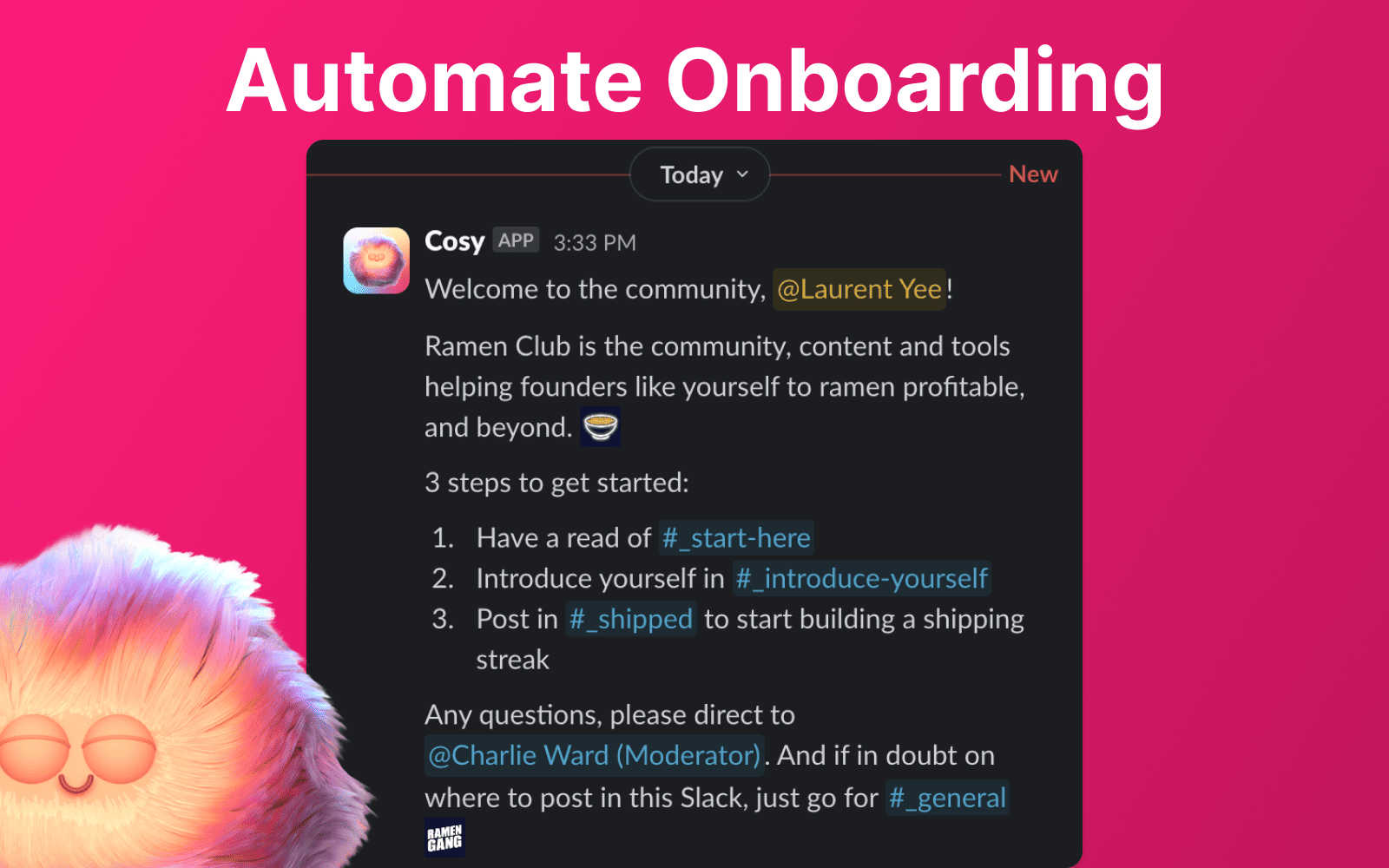
Automate Onboarding
Cosy allows you to create and automate personalized onboarding welcome DMs for new members. You can configure up to 10 distinct sequences that can be sent from you, your team, or the Cosy bot. This feature ensures that new members receive a warm welcome as soon as they join, saving you hours of manual effort and ensuring no one is overlooked, regardless of when they join.
Connect Your Members
This feature enhances community engagement by automatically introducing members to each other via direct messages. You can customize the frequency and timing of these introductions, fostering connections among members without manual intervention. This creates a more vibrant community atmosphere where members can easily engage with one another.
Member Directory
Cosy provides a searchable member directory that can be accessed directly from Slack. Members can create their profiles with customizable fields, making it easier to find and connect with others based on shared interests and expertise. This feature enhances member interactions and helps everyone feel more integrated into the community.
Content Highlights
With the Content Highlights feature, you can surface the top 10 most engaging posts within your community or identify messages that have gone unanswered. This allows members to stay informed about key discussions and encourages participation by highlighting relevant content. Using simple slash commands, you can quickly access these insights, making it easier to foster engagement.
Use Cases of Cosy
Streamlining Onboarding Processes
Cosy is ideal for community managers looking to streamline the onboarding process for new members. By automating welcome messages, you ensure that newcomers feel valued and informed right from the start, freeing you to focus on other important tasks.
Enhancing Member Connections
For teams aiming to boost engagement, Cosy’s automated introductions help members to connect organically. This feature can lead to increased collaboration and networking opportunities, making the community more interactive and supportive.
Building a Comprehensive Member Directory
Community leaders can use the member directory feature to create a comprehensive resource for members to find each other easily. This can be particularly useful in larger communities where individuals may not know everyone personally, promoting a sense of belonging and collaboration.
Highlighting Important Content
Cosy enables community leaders to keep members engaged by highlighting popular content and unanswered messages. This ensures that valuable discussions are not overlooked and encourages members to participate more actively in ongoing conversations.
Frequently Asked Questions
How does Cosy automate the onboarding process?
Cosy automates onboarding by allowing you to set up personalized DM sequences that are triggered when new members join. This means they receive a warm welcome automatically, without the need for manual follow-up.
Can I customize the introduction messages sent to members?
Yes, you can customize the introduction messages that are sent to members. This allows you to personalize how members are connected to each other, fostering a more engaging community experience.
What options do I have for the member directory fields?
You can create a member directory with up to 10 customizable fields, which can include text entry, single-select, or multi-select options. This flexibility allows members to share relevant information that helps others connect with them more easily.
How can I highlight engaging content in my community?
Cosy allows you to highlight engaging content through slash commands that pull up the top 10 most engaged messages in a channel or across all public channels. This feature helps ensure that important discussions are not missed by community members.
Explore more in this category:
Similar to Cosy


TestNeo
TestNeo.ai is an AI-native engineering and release assurance platform that helps teams automate web and API testing using natural language.


Chatmizer
Chatmizer is an AI-powered SaaS platform for chatbots, WhatsApp automation, social messaging, CRM, lead generation, and sales workflows.

TryThatTool
Discover AI tools worth trying. Compare options, explore practical reviews, and build your own AI stack based on your goals and budget.


Novastart
Novastart brings apps and files onto an infinite canvas where people and AI agents can work together.

WidgIq
Provide an AI-powered customer support widget for your website