
Seedance 2.0 AI Video
Seedance 2.0 turns your text, images, and audio into cinematic videos with lifelike lip-sync and native sound, all for free online.
Visit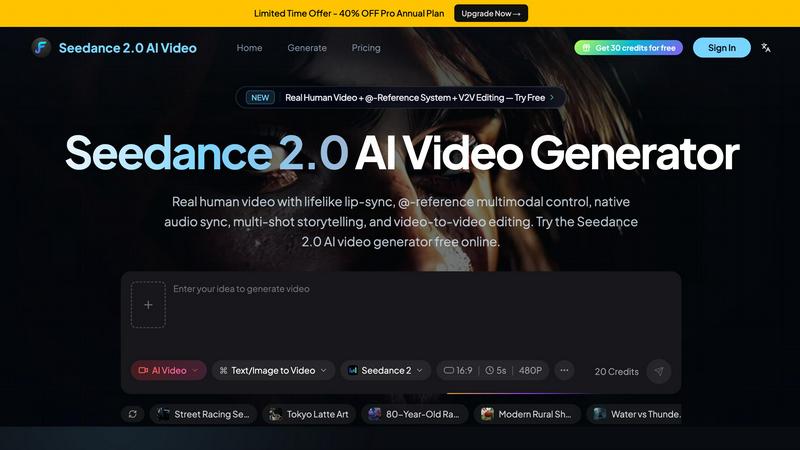
About Seedance 2.0 AI Video
Seedance 2.0 AI Video is a free online AI video generator that transforms your text prompts and reference images into stunning, cinematic videos. Think of it as your personal video production studio, accessible right from your browser. Whether you are a social media creator looking to produce engaging short-form content, a marketer crafting compelling product demos, or a storyteller bringing imaginative worlds to life, Seedance 2.0 makes the process incredibly simple and fast. Its main value proposition is combining several advanced features into one easy-to-use tool. You get lifelike human characters with accurate lip-sync in over 8 languages, the ability to control your video using multiple images, videos, and audio files, and even the power to edit existing video clips. All of this is wrapped in a friendly interface that guides you from idea to finished video in minutes. The platform is designed to remove the technical barriers of video creation, letting your creativity take the lead. With a generous free plan that gives you 30 credits just for signing up, you can start experimenting and generating professional-quality videos immediately, with no credit card required.
Features of Seedance 2.0 AI Video
Real Human Video with Lifelike Lip-Sync
This feature allows you to create videos with realistic human characters that speak naturally. Seedance 2.0 generates full-body motion and, most impressively, accurate lip-sync in over 8 languages. This means you can have a character deliver a monologue in English, give a presentation in Spanish, or tell a story in Japanese, and their mouth movements will match the audio perfectly. It is ideal for creating talking head videos, educational content, or character-driven narratives without needing to film a single frame.
@-Reference Multimodal Control
This is a powerful way to direct the AI by providing up to 9 images, 3 videos, and 3 audio files in a single request. You simply use the @ symbol to reference each file in your text prompt. For example, you could upload a photo of a specific actor, a video of a city street, and an audio clip of rain, then write a prompt like "The actor @actor_image walks down the street @street_video while it rains @rain_audio." This gives you incredible control over the look, motion, and sound of your final video.
Native Audio-Video Generation
Seedance 2.0 creates both the video and its accompanying audio at the same time. You do not need to find or add sound effects, background music, or ambient noise later. When you describe a scene, the AI understands the context and generates appropriate audio. A video of a jungle will have bird calls and rustling leaves, while a car chase will have roaring engines and screeching tires. This saves you hours of post-production work and ensures the audio perfectly matches the visual action.
Multi-Shot Storytelling with Character Consistency
This feature allows you to create short films or multi-scene stories where the main characters look the same from shot to shot. You can describe a character in one scene, and then place them in a completely different setting for the next scene, and the AI will maintain their appearance. This is a game-changer for narrative content, as it enables you to build coherent stories with recurring characters, something that is very difficult to achieve with other AI video tools.
Use Cases of Seedance 2.0 AI Video
Social Media Content Creation
Create eye-catching short-form videos for platforms like TikTok, Instagram Reels, and YouTube Shorts. You can quickly generate a 5-second product teaser, a funny character skit, or a visually stunning transition video. The ability to add lip-sync in multiple languages also lets you repurpose a single piece of content for a global audience, saving you time and effort in localization.
Marketing and Product Demos
Generate professional-looking product demonstration videos without needing a physical product or a film crew. Upload an image of your product and write a prompt describing how it works, including camera movements and lighting. Seedance 2.0 will create a video with realistic motion and synchronized sound effects, perfect for your website, social media ads, or email marketing campaigns.
Creative Storytelling and Filmmaking
Use Seedance 2.0 to visualize scenes from a script, create concept art in motion, or produce entire short films. The multi-shot storytelling feature lets you maintain character consistency across different locations and actions. This is an excellent tool for filmmakers, writers, and game designers to explore ideas, create pitch decks, or produce independent projects on a limited budget.
Video-to-Video Editing and Enhancement
Take an existing video clip and transform its style or content. You can upload a video of a person dancing and have the AI change their outfit, the background, or even the dance style. This is perfect for remixing old content, creating visual effects, or simply giving your footage a fresh, cinematic look without complex editing software.
Frequently Asked Questions
How does the credit system work?
Each video generation costs a certain number of credits based on its length, resolution, and complexity. For example, generating a standard 5-second, 480p video costs 20 credits. You start with 30 free credits upon signup, with no credit card required. When you run out, you can either wait for a daily top-up or purchase a subscription plan that provides a monthly credit allowance.
What does the @-reference multimodal control mean?
It is a simple way to tell the AI to use your uploaded files. When writing your prompt, you type the @ symbol followed by the name of the file you uploaded. For instance, if you upload a picture of a car and name it "my_car", you can write a prompt like "A cinematic video of @my_car driving down a rainy street." This lets you combine up to 9 images, 3 videos, and 3 audio files in one video request for precise control.
Can I use Seedance 2.0 for commercial projects?
Yes, the videos you generate can be used for commercial purposes such as marketing, advertising, and social media content. However, you should always review the specific terms of service for the plan you are on to understand any limitations. The Pro plan, for example, is designed with commercial use in mind and offers a high number of credits for active content creators.
What languages are supported for the lip-sync feature?
Seedance 2.0 supports lifelike lip-sync for over 8 languages. While the exact list is always expanding, it includes major languages such as English, Spanish, French, German, Japanese, Korean, and Chinese. This makes the tool incredibly versatile for creating localized content for international audiences without needing to hire voice actors or animators.
Pricing of Seedance 2.0 AI Video
Seedance 2.0 offers flexible pricing to suit different needs, from casual creators to power users. You can start for free and upgrade as your video creation demands grow.
Free Plan: $0 per month. You get 30 credits after signing up, with no credit card required. This is perfect for testing the platform and creating a few short videos.
Lite Plan: $19.9 per month. This plan gives you 200 credits each month, which is ideal for regular social media content creators who need a steady stream of videos.
Pro Plan: $25 per month. For serious creators and marketers, this plan provides 600 credits per month. There is also a limited-time offer of 40% off the Pro Annual Plan, making it an excellent value for high-volume video production.
Explore more in this category:
Top Alternatives to Seedance 2.0 AI Video
Gemini Omni
Gemini Omni gives you structured prompts and demos to easily generate, edit, and remix professional AI videos directly in your chat.

SeedanceGen
SeedanceGen lets you create cinematic AI videos from text or images using Seedance 2.0 for multi-shot stories, consistent characters, and native.
Sulphur 2
Sulphur 2 is a powerful local AI video generator that creates stunning, uncensored cinematic videos from text or images.

BulkDL
BulkDL lets you quickly download multiple TikTok videos without watermarks in HD, all for free, with no login required.
Cuto
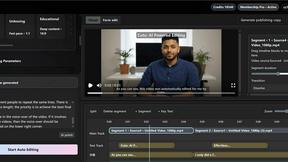
Cuto is an AI video editing assistant that transforms raw clips into polished, share-ready videos in just minutes.

WanAI
WanAI lets you effortlessly create stunning 1080p AI videos from text or images with advanced lip-sync and cinematic storytelling.
Meigen AI
Meigen AI helps you turn text or images into short videos, find viral prompts, and manage reusable creative workflows in one simple workspace.

AI Motion Control
AI Motion Control enables you to transfer human motion to any character with stunning precision using just one reference video.